
HondaBook.ru
Auto companies Volkswagen Auto companies Ford Auto companies Lada Auto companies Skoda Auto companies BMW Auto companies Mazda Auto companies Peugeot
English Русский
Български
Беларускі
Український
Српски
Hrvatski
Română
Polski
Slovenský
Magyar
Bookmark Contacts Sitemap   


Accord Civic Fit / Jazz CR-V HR-V Others Articles
Civic 3 and 4 (1983-1991) Civic 5 and 6 (1991-2000) Civic 6 (1995-2000) Civic 7 (2000-2005) Civic 8 (2005-2011)

Drive belt and camshaft sprocket — removal, inspection and installation (Honda Civic 3)

  • Main
  • Honda Civic
  • 3 (1983-1991)
  • Power unit
  • Engine in a car
  • Drive belt and camshaft sprocket — removal, inspection and installation
0
Contents: Removal ⇊ Inspection ⇊ Installation ⇊

Removal


1. Disconnect the negative cable from the battery.

2. Place chocks under the rear wheels and set the car's parking brake.

3. Loosen the left front wheel nuts and raise the front of the vehicle. Place the vehicle on safety stands.

4. Remove the left front wheel to gain easier access to the front crankshaft housing.

5. Use a jack to provide additional support for the engine. Place a piece of wood between the oil pan and the jack to avoid damaging the pan.

6. Remove the left engine support (section 17 of this Chapter).

7. Remove the spark plugs and drive belt (see Chapter 1).

8. Set the piston of the first cylinder to TDC (see Section 3).

9. Remove the upper drive belt cover so that the cover gasket remains on the block: it cannot be removed or replaced without damage.
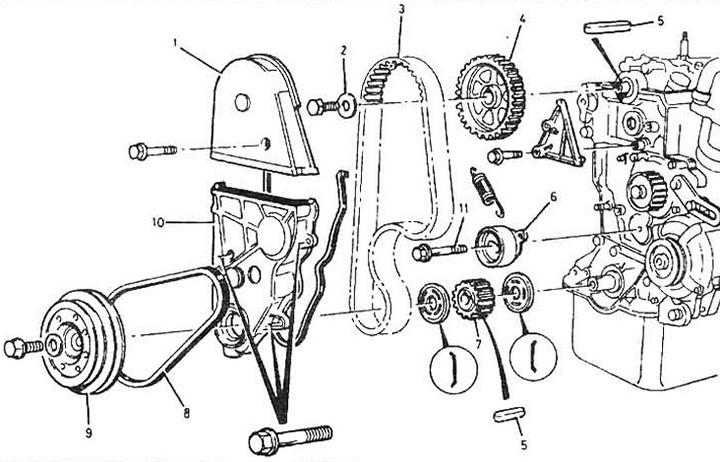
Fig. 7.9 Camshaft drive belt

Fig. 7.9 Camshaft drive belt
1 - top cover; 2 - washer; 3 - belt; 4 - camshaft gear; 5 - key; 6 - belt tensioner; 7 - crankshaft gear; 8 - generator drive belt; 9 - crankshaft pulley; 10 - bottom cover; 11 - tensioner adjusting bolt.


10. Remove the generator and its bracket (see Chapter 5).


11. Disconnect the power steering pump (GUR) without removing the oil hose and move it to the side (see Chapter 10).

12. If there is an air conditioner: disconnect the wires and remove the air conditioner compressor without dismantling the refrigerant hoses (see Chapter 3).

13. Using a large screwdriver inserted into the flywheel teeth, block the rotation of the crankshaft.

Loosen the bolt securing the pulley to the crankshaft. Remove the pulley from the shaft

14. Remove the water pump drive pulley.

15. Remove the lower part of the drive belt protective cover.
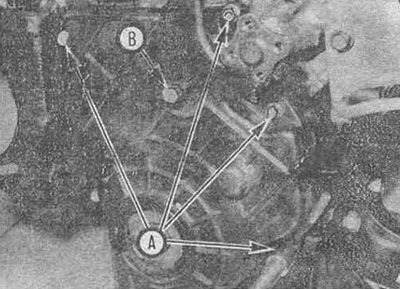
Fig. 7.15 To remove the lower drive belt cover,…

Fig. 7.15 To remove the lower drive belt cover, unscrew bolts A. Bolt B is used only for adjusting the belt tension


16. If you intend to use the belt again, mark the relative positions of the belt and the drive sprocket, indicating the direction of rotation.

17. Loosen the belt tensioner bolt, remove the outer belt guide from the crankshaft toothed pulley and remove the belt. Note the installation position of the outer belt guide. If you want to replace the front crankshaft oil seal, remove the crankshaft toothed pulley and the inner belt guide.
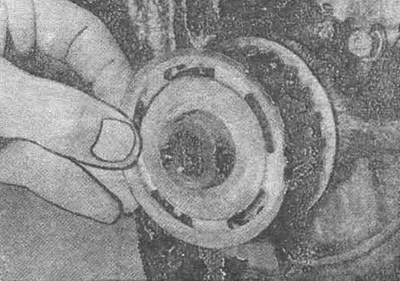


Fig. 7.17 Remove the outer belt guide: note that…

Fig. 7.17 Remove the outer belt guide: note that the bent part of the guide is directed away from the belt (the belt is removed)


18. If you want to replace the camshaft or its seal, secure the camshaft from turning with a large screwdriver by inserting it through the toothed pulley of the drive. Loosen the bolt and lubricate the toothed pulley. Do not forget to pull out the toothed pulley key.

Inspection


19. Manually rotate the belt tension roller and swing it from side to side. Replace the tension roller if axial play or uneven rotation is detected.

20. Check the belt for wear (especially the bearing side of the teeth), cracks, cuts, abrasions or oiling. If any of these defects are present, replace the belt.

Note: Replace the belt every time after removing it, regardless of the low mileage of the car after the previous replacement and the good appearance of the belt. Never install the old belt if there is the slightest doubt about its suitability.


Installation


21. If you removed the timing pulleys, install them. Don't forget to install the camshaft timing pulleys and the inner belt guide of the crankshaft timing pulley. Tighten the timing pulley mounting bolts to specification.


22. Before installing the belt, make sure that the small hole or "UP" mark on the camshaft timing pulley is at the top and the two marks on the outside of the timing pulley are in line with the cylinder head surface.
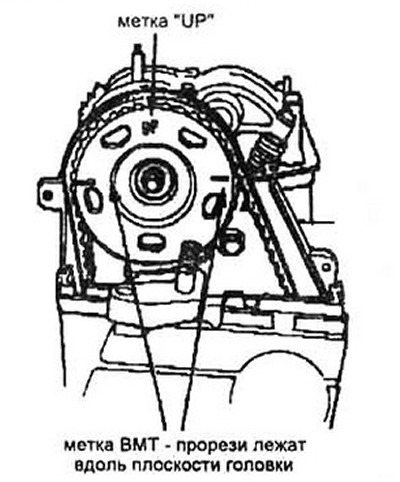
Fig. 7.22 When installing the gear, make sure…

Fig. 7.22 When installing the gear, make sure that the small hole (top arrow) or the "UP" marking was at the top


Note: On early engine models, these marks are located on the inside of the timing pulley.


23. Temporarily install the crankshaft pulley and turn it (if necessary) until the marks on the pulley and cover coincide (see Section 3).

24. Install a belt with low tension between the toothed pulleys (from the radiator side).
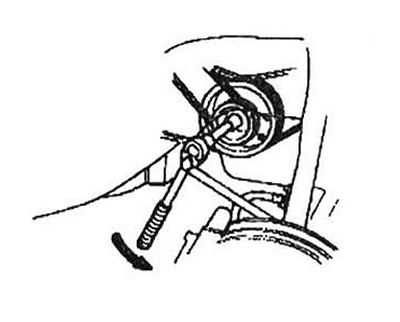
Fig. 7.24 Direction of rotation

Fig. 7.24 Direction of rotation


With the tensioner bolt loosened, slowly rotate the crankshaft counterclockwise at an angle approximately equal to three teeth on the camshaft sprocket. This will ensure belt tension.


25. Tighten the tensioner bolt.

26. Carefully rotate the crankshaft two turns clockwise and check that all marks match. If the crankshaft suddenly stops rotating, do not force it to turn, as one of the valves and the piston has met due to incorrect angular installation of the camshaft. In this case, remove the belt and repeat the entire procedure from step 22.

27. Remove the crankshaft pulley mounting bolt.

28. On 1984 through 1990 models, install the removed components in the reverse order of disassembly. Tighten the pulley mounting bolt to specification.

29. On models manufactured since 1991, install the removed components and parts in the reverse order of disassembly. If a new crankshaft pulley bolt is being installed, tighten it with a force of 200 Nm. then release completely and tighten again with force, according to the specification.

When using an old bolt: tighten it immediately to the torque specified in the specification.

30. Start the engine and check that it is working properly.
This article is available at: russian, bulgarian, belarusian, ukrainian, serbian, croatian, romanian, polish, slovak, hungarian
This information has been verified: Yaroslav Shiryaev
Share with friends:
◀ Previous
Civic 3 and 4: Engine in a car
Next ▶

Exhaust manifold — removal and installation
Intake manifold — removal and installation
Cylinder Head Cover — Removal and Installation
Top dead center (TDC) of the first cylinder
Repair work on the engine without removing it from the car
Crankshaft oil seal — replacement
Camshaft Seal — Replacement
Camshaft and rocker arms — removal, inspection and installation
Valve springs, plates and seals — replacement
Cylinder head — removal and installation
See also other articles from Honda manuals:
Removal, condition check and installation of gear wheels and balance… Honda Accord 6 (1997-2002)
Attachment drive belts Honda Fit 1 (2001-2008)
Replacing VTC drive, exhaust camshaft sprocket Honda CR-V 2 (2002-2006, petrol)
Checking and adjusting the alternator drive belt Honda HR-V 1 (1998-2006, petrol)
Seat belt pretensioners Honda Avancier 1 (1999-2003, petrol)
Link in different formats to this article
Comments and feedback from visitors
No comments yet


How much will 17 + 39 ?


Civic 8 (2005-2011) 
  • General information
  • Technical data
  • Governing bodies
  • Driving and maintenance
  • Power unit
  • Gasoline engines (L13A)
  • Gasoline engines (R18A)
  • Diesel engines (N22A)
  • Cooling and lubrication (L13A)
  • Cooling and lubrication (R18A)
  • Cooling and lubrication (N22A)
  • Injection system (gasoline)
  • Injection system (diesel)
  • Toxicity reduction system
  • Troubleshooting
  • Transmission
  • Clutch and drive shafts
  • Mechanical gearbox
  • Chassis and running gear
  • Suspension and wheels
  • Steering
  • Brake system
  • Body and interior
  • Exterior (external elements)
  • Doors, locks and windows
  • Electrical equipment
  • Equipment and devices
  • Headlights and lighting
  • Power devices
  • Electrical circuits
Civic 7 (2000-2005) 
  • General information
  • User manual
  • Maintenance
  • Power unit
  • Engines D15B and D17A
  • K20A Engines
  • Overhaul engine
  • Cooling system
  • Lubrication system
  • Fuel injection system
  • Toxicity reduction system
  • Engine electrical equipment
  • Transmission
  • Clutch
  • Manual gearbox
  • Automatic gearbox
  • Variator (CVT)
  • Drive shafts
  • Chassis and running gear
  • Car suspension
  • Steering
  • Brake system
  • Body and interior
  • Exterior (external elements)
  • Interior (internal elements)
  • Doors, locks and windows
  • Heater and air conditioner
  • Manual air conditioner
  • Automatic air conditioner
  • Security system
  • Electrical equipment
  • Equipment and devices
  • Headlights and lighting
  • Windscreen wipers
  • Audio system
  • Electrical diagrams
Civic 6 (1995-2000) 
  • General information
  • Introduction to guide
  • User manual
  • Maintenance
  • Power unit
  • Engine in car (Civic)
  • Engine in car (Integra)
  • Engine overhaul
  • Cooling and heating
  • Power and exhaust systems
  • Engine electrical equipment
  • Engine management systems
  • Transmission
  • Manual gearbox
  • Automatic transmission (AT/CVT)
  • Clutch and drive shafts
  • Chassis and running gear
  • Brake system
  • Car suspension
  • Steering
  • Body and interior
  • Exterior (external elements)
  • Interior (internal elements)
  • Doors, locks and windows
  • Electrical equipment
  • Equipment and devices
  • Electrical circuits
Civic 5 and 6 (1991-2000) 
  • Power unit
  • SOHC engines
  • DOHC engines
  • Engine overhaul
  • Cooling and lubrication system
  • Intake and exhaust system
  • Fuel injection system (SOHC)
  • Fuel injection system (DOHC)
  • Carburetor
  • Transmission
  • Clutch
  • Manual gearbox S4C
  • Manual gearbox S40
  • Automatic gearbox
  • Drive shafts
  • Chassis and running gear
  • Car suspension
  • Steering
  • Brake system
  • Body and interior
  • Body elements
  • Heater and air conditioner
  • Electrical equipment
  • Power devices
  • Equipment and instruments
  • Electrical circuits
Civic 3 and 4 (1983-1991) 
  • General information
  • Maintenance
  • Power unit
  • Engine in a car
  • Engine overhaul
  • Cooling system
  • Power and exhaust system
  • Engine electrical equipment
  • Emission control system
  • Transmission
  • Mechanical gearbox
  • Automatic gearbox
  • Clutch and drive shafts
  • Four-wheel drive
  • Chassis and running gear
  • Brake system
  • Car suspension
  • Steering
  • Body and interior
  • Body elements
  • Electrical equipment
  • Equipment and devices
  • Electrical circuits
HondaBook.ru © 2018–2026 • Mobile version • Sitemap: EN BG BY UA RS HR RO PL SK HU • Feedback • Driver Information • Search system • Bookmark
Accord 3 (1985-1989) • Accord 6 (1997-2002) • Civic 3 and 4 (1983-1991) • Civic 5 and 6 (1991-2000) • Civic 6 (1995-2000) • Civic 7 (2000-2005) • Civic 8 (2005-2011) • Fit 1 (2001-2008) • CR-V 1 (1995-2001) • CR-V 2 (2002-2006) • HR-V 1 (1998-2006) • Avancier 1 (1999-2003) •
 
This website uses cookies to ensure proper functioning. By clicking "OK," you agree.