HondaBook.ru
Auto companies Volkswagen Auto companies Ford Auto companies Lada Auto companies Skoda Auto companies BMW Auto companies Mazda Auto companies Peugeot
English Русский
Български
Беларускі
Український
Српски
Hrvatski
Română
Polski
Slovenský
Magyar
Bookmark Contacts Sitemap   


Accord Civic Fit / Jazz CR-V HR-V Others Articles
Civic 3 and 4 (1983-1991) Civic 5 and 6 (1991-2000) Civic 6 (1995-2000) Civic 7 (2000-2005) Civic 8 (2005-2011)

Clutch Replacement (L13A) (Honda Civic 8)

  • Main
  • Honda Civic
  • 8 (2005-2011)
  • Transmission
  • Clutch and drive shafts
  • Clutch Replacement (L13A)
0
Contents: Inspection of the guide bearing ⇊ Replacing the guide bearing ⇊ Checking the flywheel ⇊ Flywheel replacement ⇊ Installing the pressure and friction…⇊
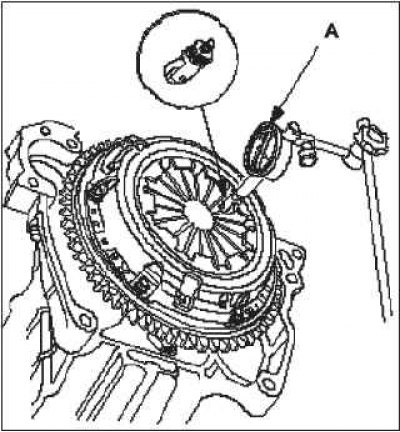
1. Check the position of the diaphragm spring petals using the dial indicator A. If the dial indicator readings go beyond the operating value, replace the pressure spring.

2. Install the special tool.

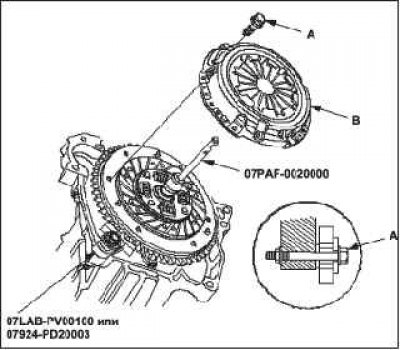
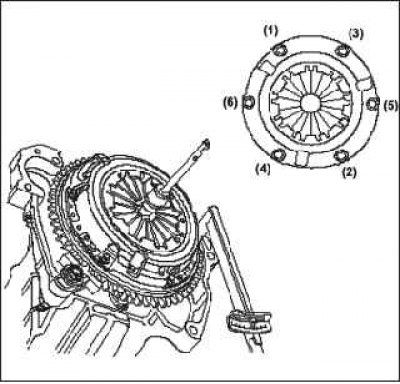
3. To prevent deformation, unscrew the bolts securing the pressure plate A crosswise in several steps. Then remove the pressure plate.

4. Check the surface of pressure plate A for wear, cracks and signs of overheating.
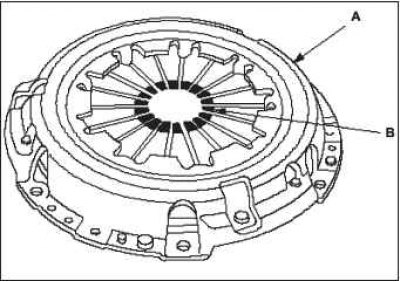
5. Check the petals of diaphragm spring B for…


5. Check the petals of diaphragm spring B for wear in the area of contact with the release bearing.
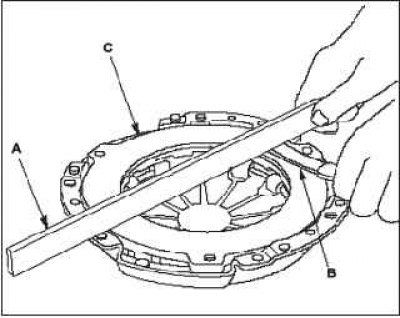
6. Check that the control ruler A and the…

6. Check that the control ruler A and the calibrated feeler gauge B are not deformed. Take measurements along the diagonal of the pressure plate C. If the measurement results are outside the working value, replace the pressure plate.


  • Standard (new): 0.03 mm.
  • Working range: max 0.15mm.

7. Remove the pressure plate and special tool.

8. Check the clutch friction disc for traces of oil. If the friction disc is blackened from overheating or is oily, replace it.

9. Measure the thickness of the friction disc. If the measurement results are outside the working value, replace the friction disc.
  • Standard (new): 7.15-7.85 mm.
  • Working range: maximum 5.0mm.

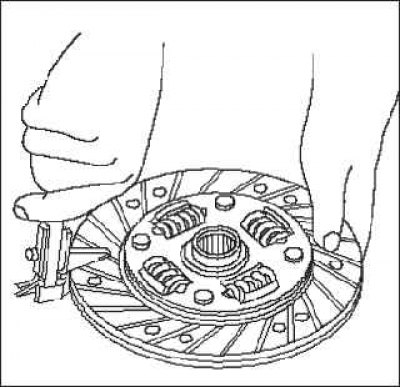
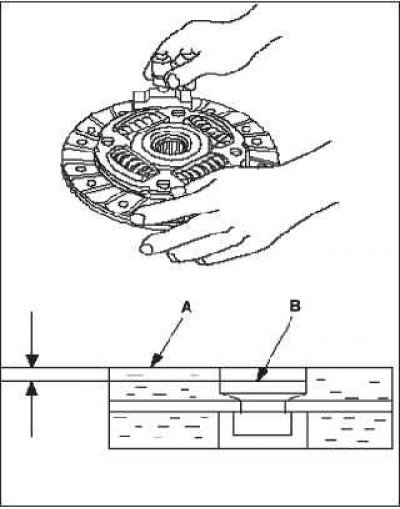
10. Measure the distance from the surface of the friction linings A to the heads of the rivets B on both sides of the disc. If the measurement results are outside the working value, replace the friction disc.
  • Standard (new): 0.9-1.4 mm.
  • Working range: maximum 0.2mm.

6. Check that the control ruler A and the…

Inspection of the guide bearing


Inspection of the guide bearing


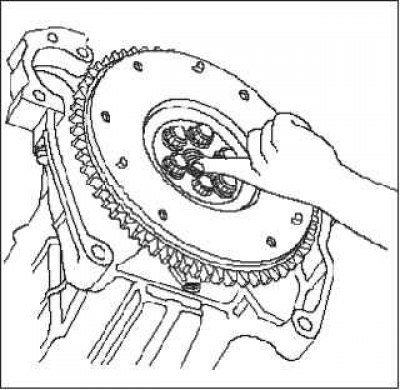
1. Turn the inner race of the pilot bearing with your finger. Turn the pilot bearing smoothly and quietly. Make sure that the outer race of the pilot bearing fits tightly to the flywheel. If the race does not turn smoothly, quietly, or does not fit tightly to the crankshaft, replace the pilot bearing.

Replacing the guide bearing


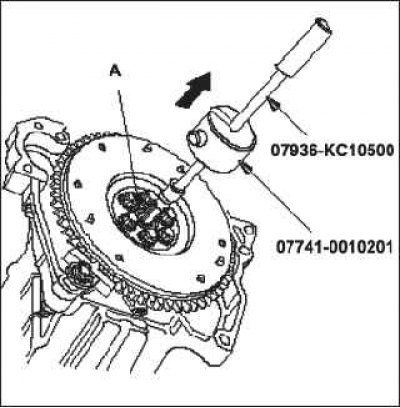
1. Remove the guide bearing A using a special tool.

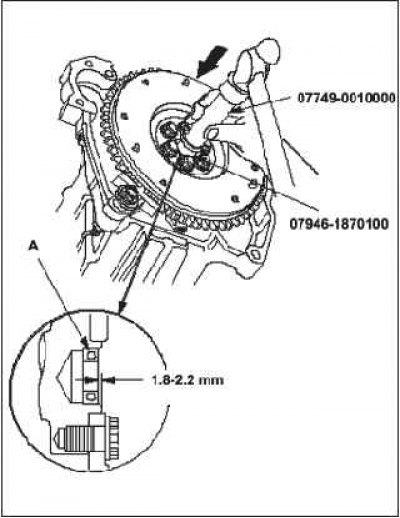
2. Install the new pilot bearing A into the crankshaft using the special tool. Lightly lubricate the bearing surface.
Checking the flywheel

Checking the flywheel


1. Check the flywheel ring gear for wear and damage.

2. Check the contact surface of the flywheel with the clutch friction disc for wear, cracks and signs of overheating.


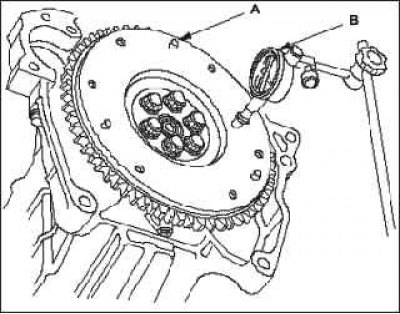
3. Measure the wear of the flywheel friction surface A using a dial indicator by rotating the flywheel installed on the engine at least two revolutions. Press on the flywheel as it rotates to eliminate the influence of the clearance in the crankshaft bearings on the measurement results. If the wear exceeds the operating values, replace the flywheel and check again. Regrinding the flywheel surface is not recommended.
  • Standard (new): 0.1 mm.
  • Working range: max 0.2mm.

Checking the flywheel

Flywheel replacement


Flywheel replacement


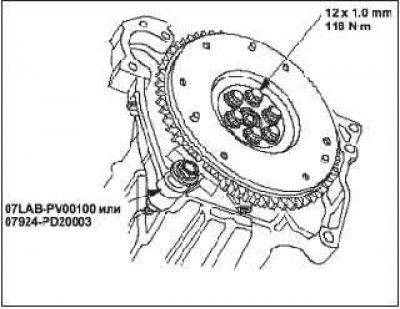
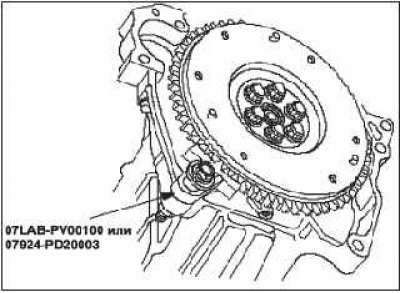
1. Install the special tool.

2. Unscrew the flywheel mounting bolts crosswise in several steps. Then remove the flywheel.

3. Install the flywheel on the crankshaft and tighten the mounting bolts.

4. Install the fixture and tighten the flywheel mounting bolts crosswise in several steps.
Installing the pressure and friction discs

Installing the pressure and friction discs


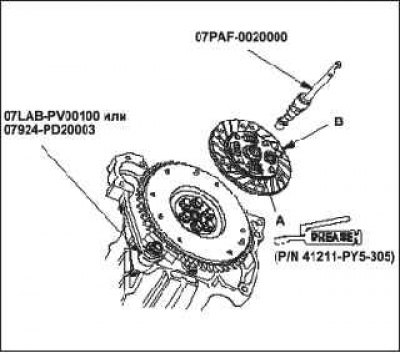
1. Install the ring gear holder.

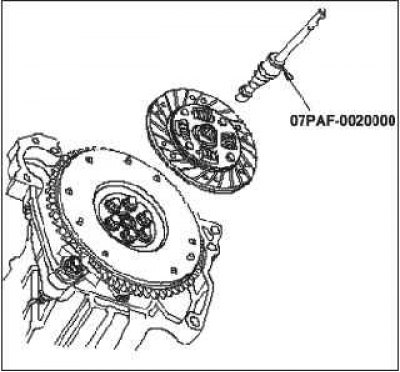
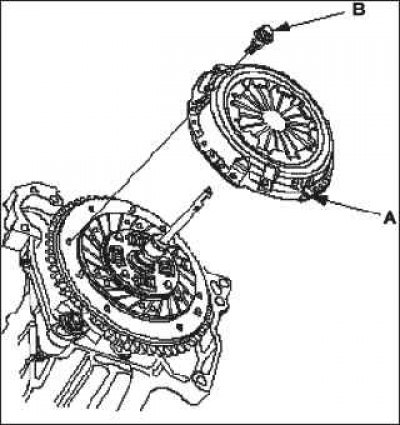
2. Apply UM 264 grease (P/N 41211-PY5—305) to splines A on clutch disc B, then install the clutch disc using special tools.

3. Install pressure plate A and tighten mounting bolts B.

4. Tighten the mounting bolts crosswise. Tightening should be done in several stages to prevent deformation of the diaphragm spring.

5. Remove the special tool.


Installing the pressure and friction discs

6. Make sure that the diaphragm spring petals are…


6. Make sure that the diaphragm spring petals are at the same height.

The text can be found on the website hondabook.ru
This article is available at: russian, bulgarian, belarusian, ukrainian, serbian, croatian, romanian, polish, slovak, hungarian
This information has been verified: Yaroslav Shiryaev
Share with friends:
◀ Previous
Civic 8: Clutch and drive shafts
Next ▶

Checking the clutch pedal position sensor (R18A)
Clutch pedal, position sensor, and clutch interlock switch adjustment
Adjusting the clutch pedal and clutch pedal position sensor
Replacing the clutch release bearing
Removal the drive shaft
Checking the drive shaft
Installing the drive shaft
See also other articles from Honda manuals:
Checking the functionality of the clutch switch signal Honda Accord 3 (1985-1989)
Checking the clutch fluid level Honda Fit 1 (2001-2008)
Clutch master cylinder Honda CR-V 1 (1995-2001, petrol)
Checking the starter overrunning clutch Honda HR-V 1 (1998-2006, petrol)
Automatic transmission clutch pressure solenoid valves A and B —… Honda Avancier 1 (1999-2003, petrol)
Link in different formats to this article
Comments and feedback from visitors
No comments yet


How much will 36 + 42 ?


Civic 8 (2005-2011) 
  • General information
  • Technical data
  • Governing bodies
  • Driving and maintenance
  • Power unit
  • Gasoline engines (L13A)
  • Gasoline engines (R18A)
  • Diesel engines (N22A)
  • Cooling and lubrication (L13A)
  • Cooling and lubrication (R18A)
  • Cooling and lubrication (N22A)
  • Injection system (gasoline)
  • Injection system (diesel)
  • Toxicity reduction system
  • Troubleshooting
  • Transmission
  • Clutch and drive shafts
  • Mechanical gearbox
  • Chassis and running gear
  • Suspension and wheels
  • Steering
  • Brake system
  • Body and interior
  • Exterior (external elements)
  • Doors, locks and windows
  • Electrical equipment
  • Equipment and devices
  • Headlights and lighting
  • Power devices
  • Electrical circuits
Civic 7 (2000-2005) 
  • General information
  • User manual
  • Maintenance
  • Power unit
  • Engines D15B and D17A
  • K20A Engines
  • Overhaul engine
  • Cooling system
  • Lubrication system
  • Fuel injection system
  • Toxicity reduction system
  • Engine electrical equipment
  • Transmission
  • Clutch
  • Manual gearbox
  • Automatic gearbox
  • Variator (CVT)
  • Drive shafts
  • Chassis and running gear
  • Car suspension
  • Steering
  • Brake system
  • Body and interior
  • Exterior (external elements)
  • Interior (internal elements)
  • Doors, locks and windows
  • Heater and air conditioner
  • Manual air conditioner
  • Automatic air conditioner
  • Security system
  • Electrical equipment
  • Equipment and devices
  • Headlights and lighting
  • Windscreen wipers
  • Audio system
  • Electrical diagrams
Civic 6 (1995-2000) 
  • General information
  • Introduction to guide
  • User manual
  • Maintenance
  • Power unit
  • Engine in car (Civic)
  • Engine in car (Integra)
  • Engine overhaul
  • Cooling and heating
  • Power and exhaust systems
  • Engine electrical equipment
  • Engine management systems
  • Transmission
  • Manual gearbox
  • Automatic transmission (AT/CVT)
  • Clutch and drive shafts
  • Chassis and running gear
  • Brake system
  • Car suspension
  • Steering
  • Body and interior
  • Exterior (external elements)
  • Interior (internal elements)
  • Doors, locks and windows
  • Electrical equipment
  • Equipment and devices
  • Electrical circuits
Civic 5 and 6 (1991-2000) 
  • Power unit
  • SOHC engines
  • DOHC engines
  • Engine overhaul
  • Cooling and lubrication system
  • Intake and exhaust system
  • Fuel injection system (SOHC)
  • Fuel injection system (DOHC)
  • Carburetor
  • Transmission
  • Clutch
  • Manual gearbox S4C
  • Manual gearbox S40
  • Automatic gearbox
  • Drive shafts
  • Chassis and running gear
  • Car suspension
  • Steering
  • Brake system
  • Body and interior
  • Body elements
  • Heater and air conditioner
  • Electrical equipment
  • Power devices
  • Equipment and instruments
  • Electrical circuits
Civic 3 and 4 (1983-1991) 
  • General information
  • Maintenance
  • Power unit
  • Engine in a car
  • Engine overhaul
  • Cooling system
  • Power and exhaust system
  • Engine electrical equipment
  • Emission control system
  • Transmission
  • Mechanical gearbox
  • Automatic gearbox
  • Clutch and drive shafts
  • Four-wheel drive
  • Chassis and running gear
  • Brake system
  • Car suspension
  • Steering
  • Body and interior
  • Body elements
  • Electrical equipment
  • Equipment and devices
  • Electrical circuits
HondaBook.ru © 2018–2026 • Mobile version • Sitemap: EN BG BY UA RS HR RO PL SK HU • Feedback • Driver Information • Search system • Bookmark
Accord 3 (1985-1989) • Accord 6 (1997-2002) • Civic 3 and 4 (1983-1991) • Civic 5 and 6 (1991-2000) • Civic 6 (1995-2000) • Civic 7 (2000-2005) • Civic 8 (2005-2011) • Fit 1 (2001-2008) • CR-V 1 (1995-2001) • CR-V 2 (2002-2006) • HR-V 1 (1998-2006) • Avancier 1 (1999-2003) •
 
This website uses cookies to ensure proper functioning. By clicking "OK," you agree.