
Note: Make sure the HDS and DLC cables of the HDS system are in good condition.
1. Turn the ignition key to the "OFF" position.
2. Connect the HDS to the Data Link Connector (DLC).
Note: Make sure the HDS is securely connected to the data link connector (DLC).
3. Turn on the ignition (position II) and look at the HDS indicator. Does the HDS identify the vehicle?
- YES - go to step 4.
- NO - go to step 23.
4. Check for Temporary DTCs or PGM-FI DTCs using the HDS. Are any Temporary DTCs or DTCs indicated?
- YES - Perform diagnostics for DTCs.
- NO - go to step 5.
5. Turn the ignition key to the "OFF" position.
6. Turn the ignition switch to the "ON" (II) position and observe the SRS indicator. Does the SRS indicator remain on?
- YES - Proceed to SRS General Troubleshooting Information.
- NO - with ABS system: go to step 7; with VSA system: go to step 9.
7. Turn the ignition key to the "OFF" position.
8. Turn the ignition switch to the "ON" (II) position and observe the ABS indicator. Does the ABS indicator remain on?
- YES - Proceed to the general ABS troubleshooting information.
- NO - go to step 11.
9. Turn the ignition key to the "OFF" position.
10. Turn the ignition switch to the "ON" (II) position and observe the VSA indicator.
Does the VSA indicator stay on?
- YES - Proceed to VSA System General Troubleshooting Information.
- NO - go to step 11.
11. Turn the ignition key to the "OFF" position.
12. Turn the ignition switch to the "ON" (II) position and observe the EPS indicator. Does the EPS indicator remain on?
- YES - Proceed to EPS General Troubleshooting Information.
- NO - go to step 13.
13. Turn the ignition key to the "OFF" position.
14. Turn the ignition switch to the "ON" (II) position and observe the immobilizer indicator.
Does the immobilizer indicator light up or flash?
- YES - proceed to troubleshooting the immobilizer system.
- NO - go to step 15.
15. Perform the self-diagnosis procedure of the measuring device.
16. Check B-CAN system fault codes without HDS. Are any B-CAN fault codes displayed?
- YES - Perform diagnostics for DTCs.
- NO - go to step 17.
17. Turn the ignition key to the "OFF" position.
18. Disconnect the HDS from the data link connector (DLC)
19. Check for continuity between terminal #7 of the DLC connector and the body ground.
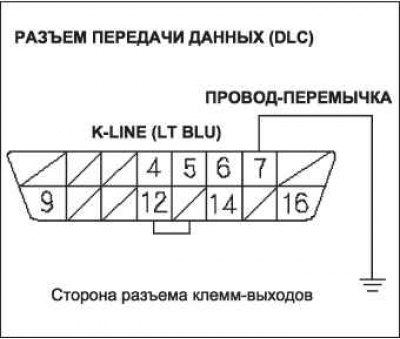
Is the resistance value 5 ohms or less?
- YES - go to step 20.
- NO - go to step 21.
20. Continue checking for continuity between DLC terminal #7 and body ground by disconnecting these components one by one:
- 28P connector A of the SRS unit;
- 26P ABS Modulator Control Unit Connector (with ABS system);
- 46P VSA modulator control unit connector (with VSA system);
- 28P EPS Control Unit D Connector;
- 7P connector of the remote control unit-immobilizer;
- 17P audio system connector;
- connector Q (16P) of the relay/fuse box under the instrument panel.
Is the circuit between the above mentioned components broken when they are disconnected?
- YES - Replace the part that caused the circuit to break when it was disconnected.
- NO - Repair short in wire between DLC (K-line) and ABS modulator-control unit (with ABS system), vSA modulator control unit (with VSA system), sRS unit, EPS control unit, remote control immobilizer control unit, audio unit or under-dash fuse/relay box.
21. Connect terminal No.7 of the DLC connector to the body ground using an adapter wire.
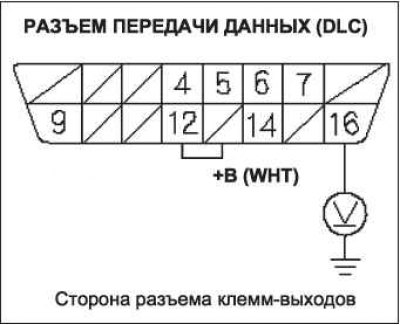
22. Check the continuity between the body ground and these connector terminals.
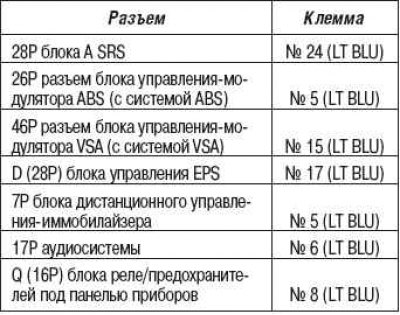
Is there continuity between the DLC connector terminal and each of the electrical circuit terminals?
- YES - Replace the unit that cannot communicate with HDS.
- NO - Repair the open in the circuit between the DLC (K-line) connector and the corresponding connector.
23. Perform the self-diagnosis procedure of the measuring device.
24. Check B-CAN system fault codes without HDS.
Are there any messages on the display with codes B1168, B1169 and/or B1178?
- YES - go to step 37.
- NO - go to step 25.
25. Turn the ignition key to the "OFF" position.
26. Disconnect the HDS from the data link connector (DLC)
27. Measure the voltage between terminal No.16 of the DLC connector and the body ground.
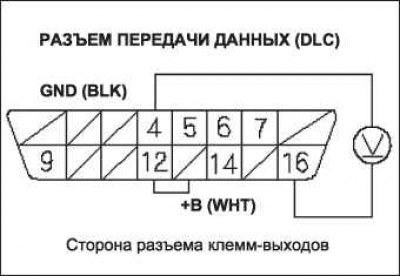
Is there voltage in the battery?
- YES - go to step 28.
- NO - Repair open in the circuit between DLC terminal #16 and the #16 +B BACK UP (15A) fuse in the under-hood fuse/relay box.
28. Measure the voltage between terminals No.4 and No.16 of the DLC connector.
Is there battery voltage?
- YES - go to step 29.
- NO - Repair open in wire between DLC terminal #4 and body ground (LRK: G502, for right-hand drive: G503).
29. Connect the HDS to the Data Link Connector (DLC).
30. Remove the battery.
31. Disconnect the 44P connector A of the ECM unit.
32. Disconnect the HDS from the data link connector (DLC)
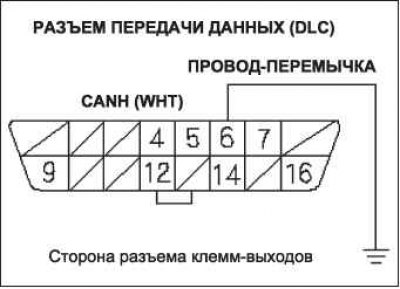
33. Connect terminal No.6 of the DLC connector to the body ground using an adapter wire.
34. Check for continuity between ECM connector terminal A36 and body ground.
Is the connection continuous?
- YES - go to step 35.
- NO - Repair open in the wire between the ECM(A36) and DLC terminal #6.
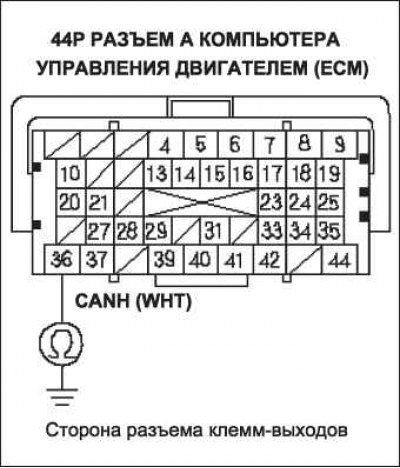
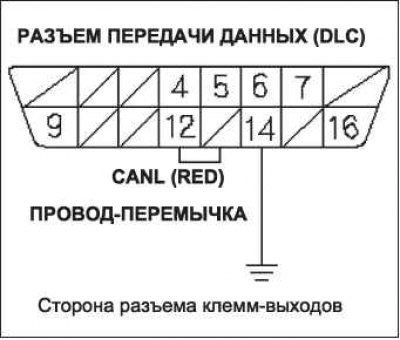
35. Connect terminal No.14 of the DLC connector to the body ground using an adapter wire.
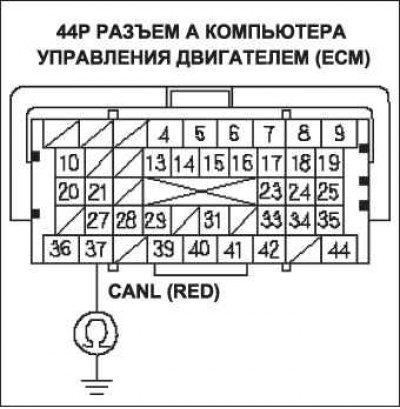
36. Check for continuity between ECM connector terminal A37 and body ground.
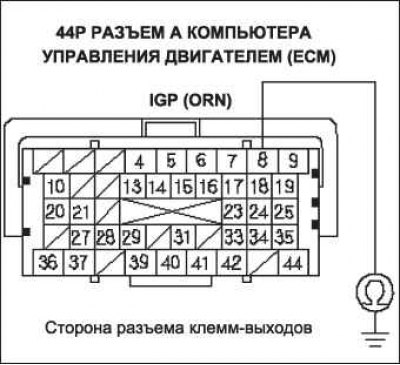
Is the connection continuous?
- YES - Update the ECM if it does not have the latest software, or temporarily replace it with a known-good ECM, then retest. If the fault does not occur with the known-good ECM, replace the removed ECM.
- NO - Repair open in the wire between the ECM(A37) and DLC terminal #14.
37. Try to start the engine.
Does the engine start and idle smoothly?
- YES - go to F-CAN circuit troubleshooting.
- NO - go to step 38.
38. Turn the ignition key to the "OFF" position.
39. Check fuse #2 IG MAIN (50 A) in the relay and fuse box located in the engine compartment.
Is the fuse good?
- YES - Repair the open in the wire between the #2 "IG MAIN" (50 A) fuse and the ignition switch. If the wire is OK, go to step 40.
- NO - Repair short circuit between fuse #2 IG MAIN (50A) and the underhood fuse/relay box. Also replace fuse #2IG MAIN (50A).
40. Check fuse #9 (15A) in the engine compartment fuse/relay box. Is the fuse good?
- YES - go to step 45.
- NO - go to step 41.
41. Remove the battery.
42. Disconnect the 44P connector A of the ECM unit.
43. Check the continuity of the wire between terminal B6 of the ECM connector and the body ground.
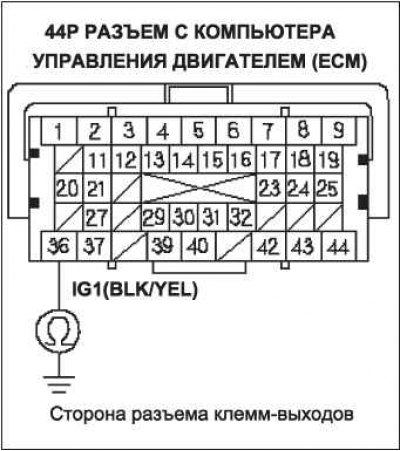
Is the connection continuous?
- YES - go to step 44.
- NO - Update the ECM if it does not have the latest software, or temporarily substitute a known-good ECM, then retest. If the fault does not occur with a known-good ECM, replace the removed ECM. Replace IGP fuse #9 (15A).
44. Continue checking for continuity between ECM connector terminal A8 and body ground by disconnecting these components one by one:
- main relay 2 module PGM-FI ("FUEL PUMP");
- 2-pin connector for each injector;
- 3P CKP sensor connector;
- 3P CMP sensor connector;
- 20P connector (white) engine compartment fuse/relay box.
Is the circuit between the above components broken when they are separated?
- YES - Replace the component that caused the open circuit when disconnected. Replace fuse #9 IGP (15A).
- NO - Repair open in the wire between the ECM (A8) and PGM-FI (FUEL PUMP) main relay 2, injector, CKP sensor, CMP sensor, or under-hood fuse/relay box. Replace IGP fuse #9 (15A).
45. Check fuse #2 for the fuel pump (FUEL PUMP) (15 A) in the under-dash fuse/relay box.
Is the fuse good?
- YES - go to step 56.
- NO - go to step 46.
46. Remove the battery.
47. Disconnect the 44P connector C of the ECM.
48. Check for continuity between ECM connector terminal C36 and body ground.
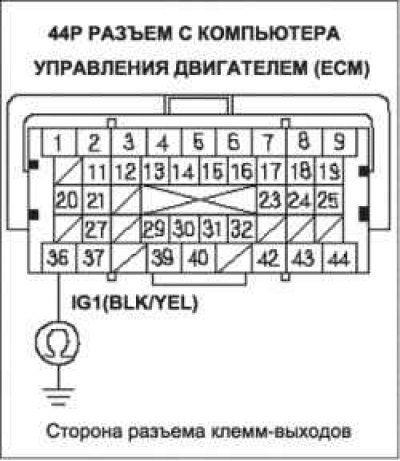
Is the connection continuous?
- YES - go to step 49.
- NO - Update the ECM if it does not have the latest software, or temporarily substitute a known-good ECM, then retest. If the fault does not occur with a known-good ECM, replace the removed ECM. Also replace fuse #2 "FUEL PUMP" (15A).
49. Remove the PGM-Fl Fuel Pump A Main Relay 2 from the under-dash fuse/relay box.
50. Check for continuity between ECM connector terminal C36 and body ground.
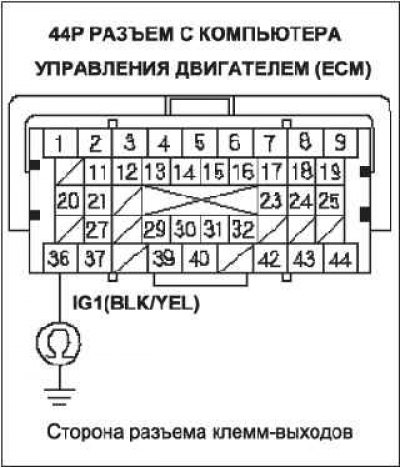
Is the connection continuous?
- YES - Repair open in the wire between the ECM (C9) and the No.2 (15A) fuel pump fuse, between the No.2 (15A) fuel pump fuse and the PGM-FI main relay 2 ("FUEL PUMP"), or between the immobilizer control unit. Also replace the No.2 FUEL PUMP (15A) fuse.
- NO - go to step 51.
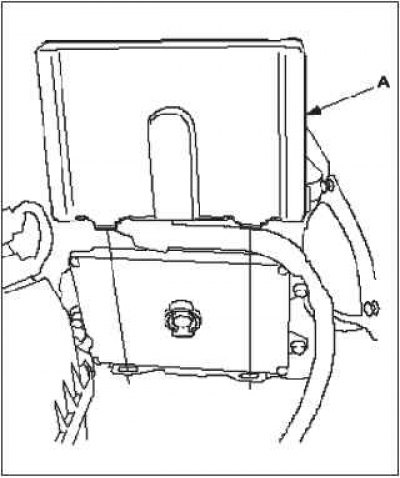
51. Remove access panel A from the floor.
52. Disconnect the 4P connector from the fuel pump.
53. Check for continuity between terminal No.2 of the 4P fuel pump connector and body ground.
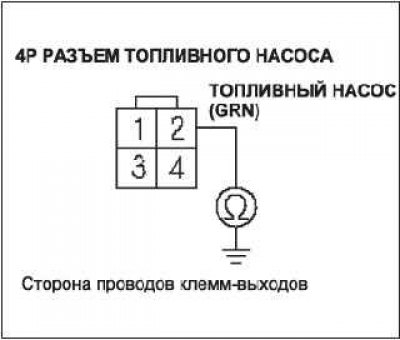
Is the connection continuous?
- YES - Repair short circuit in wire between fuel pump and PGM-FI module main relay 2 ("FUEL PUMP"). Also replace fuse #2 "FUEL PUMP" (15A).
- NO - go to step 54.
54. Reinstall the PGM-Fl Fuel Pump A Main Relay 2 into the under-dash fuse/relay box.
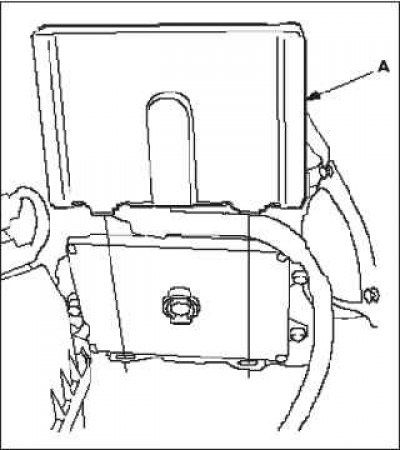
55. Check for continuity between terminal No.2 of the 4P fuel pump connector and body ground.
Is the connection continuous?
- YES - Replace PGM-FI module main relay 2 ("FUEL PUMP"). Also replace fuse #2 "FUEL PUMP" (15A).
- NO - Check the fuel pump and replace it if necessary. Also replace fuse #2 FUEL PUMP (15A).
56. Remove the battery.
57. Disconnect 44P connectors A and C of the ECM
58. Connect the battery.
59. Turn the ignition on by turning the key to the "ON" (II) position.
60. Measure the voltage between ECM connector terminal C36 and body ground.
Is there voltage in the battery?
- YES - go to step 61.
- NO - Repair open in the wire between the ECM (C36) and the fuel pump #2 fuse (15A).
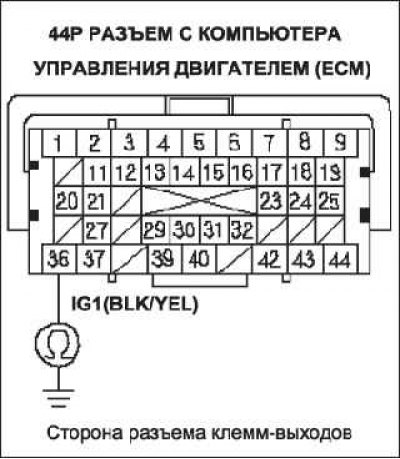
61. Measure the voltage between terminal A6 of the ECM connector and body ground.
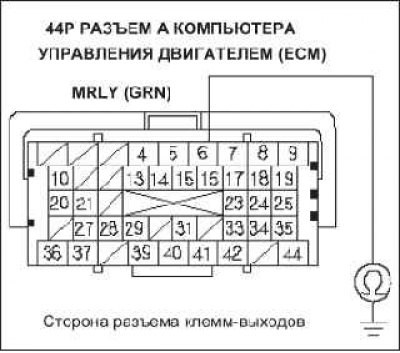
Is there battery voltage?
- YES - go to step 66.
- NO - go to step 62.
62. Turn the ignition key to the "OFF" position.
63. Disconnect the battery.
64. Disconnect the 20P (white) connector from the underhood fuse/relay box.
65. Check for continuity between terminal A6 of the ECM connector and terminal No.16 of the 20P (white) engine compartment fuse/relay box connector.
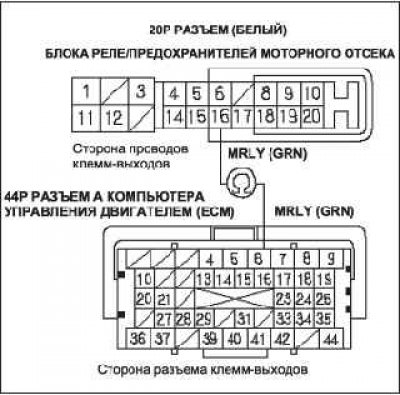
Is the connection continuous?
- YES - Replace the under-hood fuse/relay box. Update the ECM if it does not have the latest software, or temporarily substitute a known-good ECM, then retest. If the fault does not occur with a known-good ECM, replace the removed ECM.
- NO - Repair open in the wire between the ECM (A6) and the underhood fuse/relay box.
66. Turn the ignition key to the "OFF" position.
67. Disconnect the battery.
68. Disconnect the 20P (white) connector from the underhood fuse/relay box.
69. Check for continuity between terminal A8 of the ECM connector and terminal No.5 of the 20P (white) connector of the engine compartment fuse/relay box.
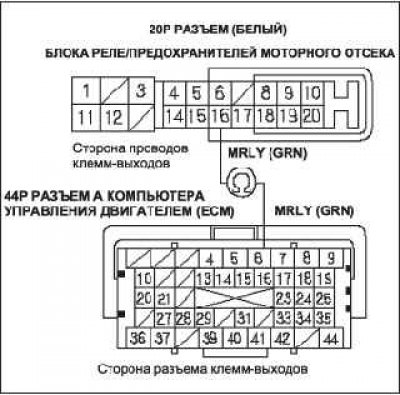
Is the connection continuous?
- YES - go to step 70.
- NO - Repair open in the wire between the ECM (A6) and the underhood fuse/relay box.
70. Check PGM-F module main relay 1.
Is the PGM-FI module main relay 1 OK?
- YES - go to step 71.
- NO - Replace the engine compartment fuse/relay box.
71. Disconnect the 44P connector in the ECM unit.
72. Check for continuity between body ground and ECM connector terminals B1, B36, C2, C40 and C44 individually.
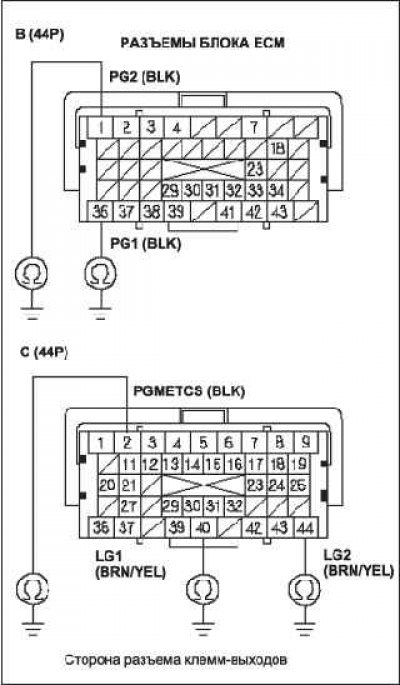
Is the connection continuous?
- YES - go to step 73.
- NO - Repair open in wire between ECM (B1, B36, C2, C40, C44) and the "mass" of GlOl.
73. Check for continuity between terminal C13 of the ECM connector and body ground.
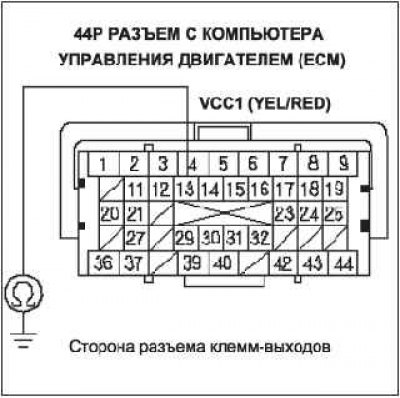
Terminal output connector side
Is the connection continuous?
- YES - go to step 74.
- NO - go to step 75.
74. Continue checking for continuity between ECM connector terminal C13 and body ground by disconnecting these components one by one:
- 3P MAP sensor connector;
- 3P connector crankshaft speed sensor;
Is the circuit between the above components broken when they are separated?
- YES - Replace the part that caused the circuit to break when it was disconnected.
- NO - Repair short in wire between ECM (C13) and MAP sensor, crankshaft speed sensor.
75. Check the continuity of the wire between terminal B18 of the ECM connector and the body ground.
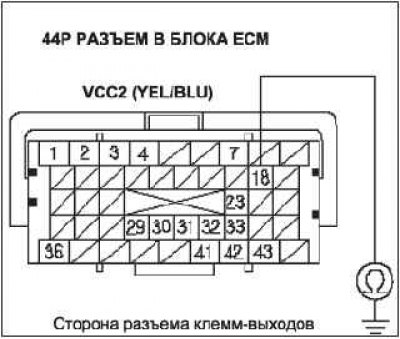
Is the connection continuous?
- YES - go to step 76.
- NO - go to step 77.
76. Continue checking for continuity between ECM/PCM connector terminal B18 and body ground while disconnecting the EGR valve 6P connector.
Is the connection continuous?
- YES - Repair short between ECM (B 18) and EGR valve.
- NO - Replace the EGR valve.
77. Check for continuity between ECM connector terminal C12 and body ground.
Is the connection continuous?
- YES - go to step 78.
- NO - go to step 79.
78. Continue checking for continuity between ECM connector terminal C12 and body ground while disconnecting the throttle body 6P connector.
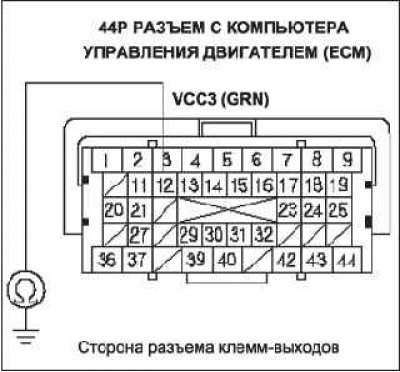
Is the connection continuous?
- YES - Repair short in wire between ECM (C 12) and throttle body
- NO - Replace the throttle body.
79. Check the continuity between terminal A25 of the ECM connector and body ground.
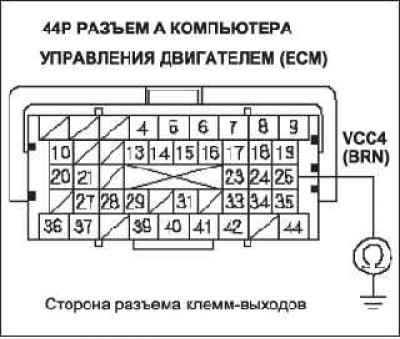
Is the connection continuous?
- YES - go to step 80.
- NO - go to step 81.
80. Continue checking for continuity between ECM connector terminal A25 and body ground while disconnecting the APP sensor 6P connector.
Is the connection continuous?
- YES - Repair short in the wire between the ECM (A25) and the APP sensor A.
- NO - Replace the accelerator pedal module.
81. Check the continuity between terminal A24 of the ECM connector and body ground.
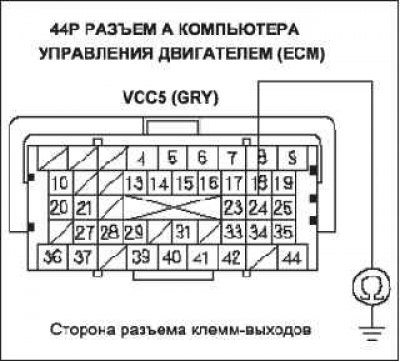
Is the connection continuous?
- YES - go to step 82.
- NO - go to step 83.
82. Continue checking for continuity between ECM connector terminal A24 and body ground while disconnecting the APP sensor 6P connector.
Is the connection continuous?
- YES - Repair short in the wire between the ECM (A24) and the APP sensor B.
- NO - Replace the accelerator pedal module.
83. Check the continuity of the wire between terminal A19 of the ECM connector and the body ground.
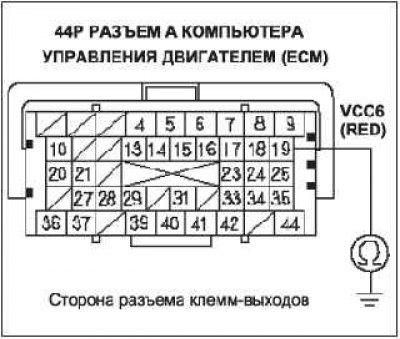
Is the connection continuous?
- YES - go to step 84.
- NO - Update the ECM if it does not have the latest software, or temporarily substitute a known-good ECM, then retest. If the fault does not occur with the known-good ECM, replace the removed ECM.
84. Continue checking for continuity between ECM connector terminal A19 and body ground while disconnecting the A/C pressure sensor 3P connector.
Is the connection continuous?
- YES - Repair short in wire between ECM/PCM (A19) and A/C pressure sensor.
- NO - Replace the A/C pressure sensor.
The article was copied from the website: HONDABOOK