
Troubleshooting B-CAN Network Related Faults Using HDS (preferred method)
HDS can check the F-CAN and B-CAN communication status, read and clear DTCs, display data list and perform function tests.
Note: If the HDS does not communicate with the vehicle, troubleshoot the DLC circuit.
Check if any DTC codes appear on the screen.
1. Connect the HDS to the Data Link Connector A located on the driver's side under the instrument panel.
2. Turn the ignition on by turning the key to the "ON" (II) position.
3. Make sure the HDS is communicating with the vehicle. If not, troubleshoot the DLC circuit.
4. Select a function "BODY ELECTRICAL", then select some system menus and check for DTCs.
Note: For special operations, refer to the owner's manual that comes with the HDS.
5. If other DTCs are displayed, Proceed to the troubleshooting step for the indicated DTCs.
Note: If DTCs B1008 and B1011 are displayed, begin troubleshooting with B1008 (starting with the code with the lowest serial number).
Without HDS (use only if HDS is not available)
Note: If HDS system is not available, using the following method, you can easily check the F-CAN and B-CAN communication status and DTC.
Check if any DTC codes appear on the screen.
1. Turn the ignition on by turning the key to the "ON" (II) position.
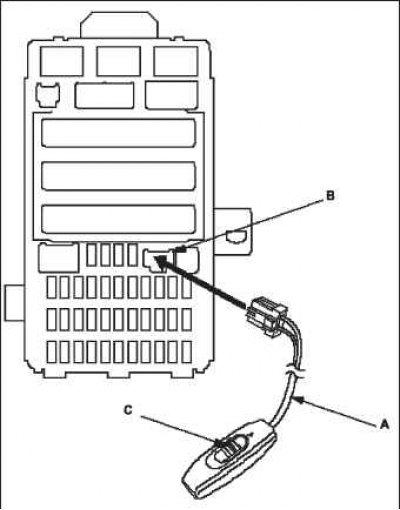
2. Connect the MPCS shorting tools A to the MICU diagnostic connector B and turn on the switch C.
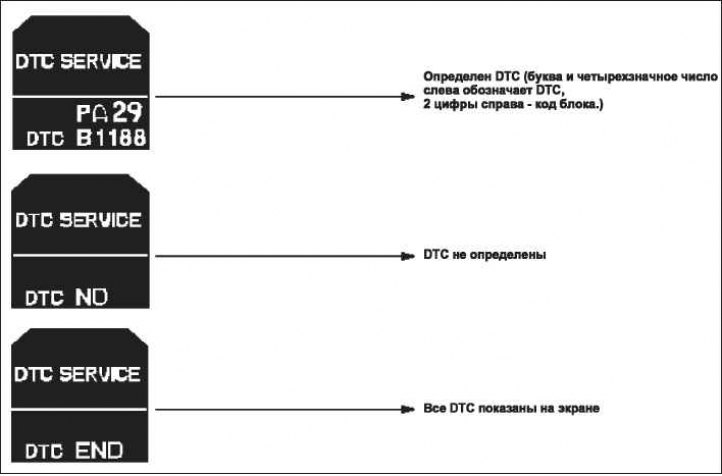
3. After 5-10 seconds, the DTCs detected and stored separately by different B-CAN units will be sequentially illuminated on the odometer/trip display if the communication line between the MICU and the instrument cluster control module is working properly.
Note: The unit in whose memory the fault code is stored can be identified by the number on the display.
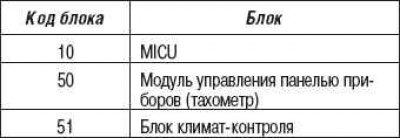
Note: You can also check the communication status of F-CAN and B-CAN by the following methods:
- mICU self-diagnosis function of test mode 1 and test mode 2 can test some communication status and circuit breakers;
- the self-diagnosis function of the instrument cluster control unit (tachometer) can check the communication status.
Clear DTCs from the computer's memory.
While in the DTC status display mode, press and hold the button "SELECT/RESET" ("SELECT/RESET") for at least 10 seconds.