
Note: The ECM remains on for 15 minutes after the ignition switch is turned OFF. Bypassing the SCS after turning the ignition switch OFF will cancel this function. Disabling the ECM during this function without bypassing the SCS may damage the ECM.
1. Make sure you know the anti-theft code for your audio system.
2. Remove the battery.
3. Bypass the SCS circuit with the HDS diagnostic system.
4. Remove cover A.
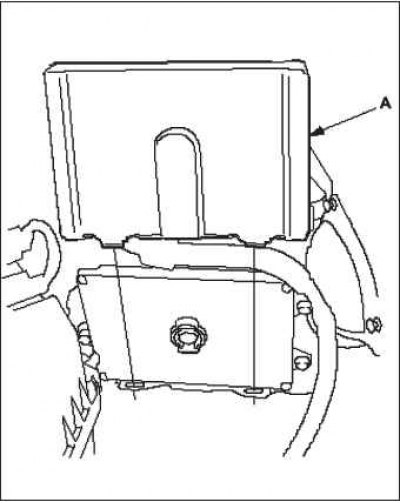
5. Remove the ECM A. Disconnect the ECM B connectors and apply the tester probe to the terminals on the terminal side of the connectors.
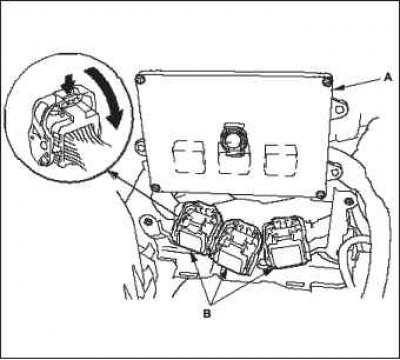
6. Install the battery, then do the following:
- Enter the audio system anti-theft security codes.
- Set the correct time on the clock.
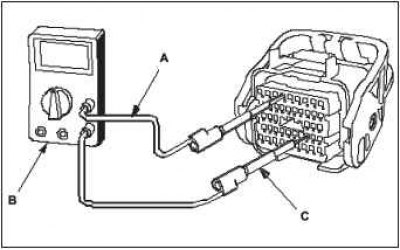
7. Connect one end of the clamp's cord A to the digital multimeter B and the other end to the banana plug (Pomona Electronics Tool #3563 or equivalent) C.
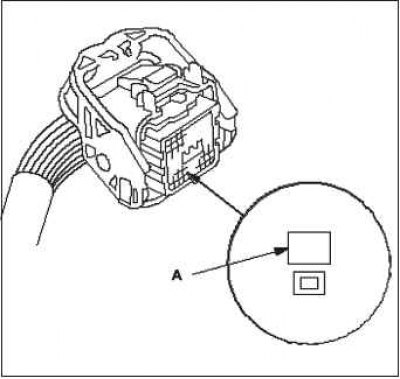
8. When diagnostics/troubleshooting is complete at the ECM connector, use test socket A above the terminal to test the desired terminal.
 |
 |
9. Carefully connect the tester (output) to the test jack of the terminal. Do not force the tips into the terminals.
Note: For best results, always use a tester (output).
To avoid damaging the terminal connectors, do not use test leads, paper clips, or other substitutes. Damage to the terminals will result in loose connections and incorrect data. Do not puncture the insulation of the wire. Piercing the insulation may result in poor quality or intermittent disconnection of the electrical connection.
Reset and replace ECM computer for diagnostics
Use this procedure if you have a known-working ECM computer for performing diagnostics. Restart the ECM computer only if it does not have the latest software version installed.
Note: Do not turn off the ignition while resetting the ECM. If you turn off the ignition before the procedure is completed, the ECM may be damaged.
Note: Updating the ECM software
Note: Make sure you are using the latest software for HDS.
Note: To ensure the latest software version is installed, perform an ECM software update when temporarily or permanently replacing the ECM.
Note: It is not possible to update the ECM computer data using a program that is already installed on it. The computer only accepts new programs.
Note: Before updating the ECM data, make sure the battery is fully charged.
Note: To avoid damage to the ECM, do not turn on any electrical equipment during the data update procedure (audio system, brake system, air conditioning, power windows, sunroof, power door locks, etc.).
Note: If you need to run diagnostics on the Honda Interface Module (HIM) because the red HIM indicator light (#3) or it was flashing during the data update procedure, leave the ignition on (position II), when you disconnect the HIM from the data link connector (DLC). This will prevent damage to the ECM.
Note: High engine bay temperatures may cause the ECM to become too hot to initiate updates. If the engine was running prior to this procedure, open the hood and cool the engine bay wiring harness.
1. Turn on the ignition (position "ON" II), but do not start the engine.
2. Connect the HDS to the DLC A data link connector located on the driver's side under the instrument panel.
3. If the HDS does not have the update function, disconnect it from the vehicle and connect "Honda interface module" (HIM).
4. If the ECM software is the latest, disconnect the HDS or HIM from the DLC and return to the previous procedure.
If the ECM software is not the latest, perform the ECM update procedure as described on the HIM sticker or in the ECM update system.
Note: If the ECM update procedure requires cooling the ECM, follow the on-screen instructions.
5. Perform the ECM Idle Mode Diagnostic Procedure.
6. Perform the procedure for erasing the reference position of the CKP sensor/diagnostics by the reference position of the CKP sensor.
Replacing the ECM computer
1. Make sure you have the anti-theft code for your audio system.
2. Connect the HDS to the DLC A data link connector located on the driver's side under the instrument panel.
3. Turn the ignition on by turning the key to the "ON" (II) position.
4. Verify that the HDS is communicating with the vehicle and the ECM. If not, troubleshoot the DLC circuit.
5. Remove the battery.
6. Remove cover A.
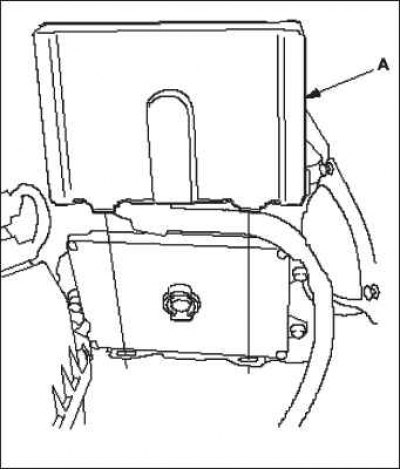
7. Remove bolts D, then remove the ECM E.
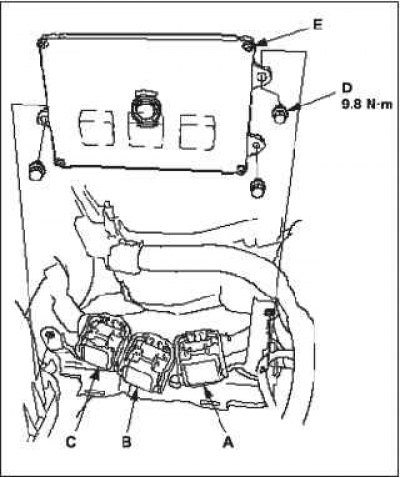
8. Disconnect ECM connectors A, B and C.
Note: ECM connectors A, B, and C have raised symbols.
9. Install the ECM and battery in the reverse order of removal.
10. Turn the ignition on by turning the key to the "ON" (II) position.
Note: DTC P0630 "VIN not Programmed or Mismatch" ("Missing or mismatched vehicle registration number") will be saved, because the identification number (VIN) is not programmed into the ECM unit. Ignore it and continue the procedure.
11. Enter the VIN into the ECM using the HDS.
12. Update the ECM software if it does not have the latest software version.
13. Select a function "IMMOBI SYSTEM" using HDS.
14. Rewrite the immobilizer code using the ECM replacement procedure found in the HDS. This will allow you to start the engine.
15. Reset the ECM using the HDS.
16. Perform the ECM Idle Mode Diagnostic Procedure.
17. Perform the diagnostic procedure using the reference position shown by the CKP sensor.
18. Enter the security code for the audio system and set the clock.