HondaBook.ru
Auto companies Volkswagen Auto companies Ford Auto companies Lada Auto companies Skoda Auto companies BMW Auto companies Mazda Auto companies Peugeot
English Русский
Български
Беларускі
Український
Српски
Hrvatski
Română
Polski
Slovenský
Magyar
Bookmark Contacts Sitemap   


Accord Civic Fit / Jazz CR-V HR-V Others Articles
Civic 3 and 4 (1983-1991) Civic 5 and 6 (1991-2000) Civic 6 (1995-2000) Civic 7 (2000-2005) Civic 8 (2005-2011)

Inspection and replacement of the front brake pad (Honda Civic 8)

  • Main
  • Honda Civic
  • 8 (2005-2011)
  • Chassis and running gear
  • Brake system
  • Inspection and replacement of the front brake pad
0
Contents: Examination ⇊ Replacement ⇊
Warning! Frequent inhalation of dust generated by brake pad wear, regardless of the material, can have hazardous consequences for your health.


Caution: Avoid breathing in dust particles generated by brake lining wear.


Caution! Do not use compressed air or brushes to clean brake assemblies. Use a suitable vacuum cleaner.


Examination


1. Raise the front of the vehicle and place safety supports in appropriate places.

2. Remove the front wheels.

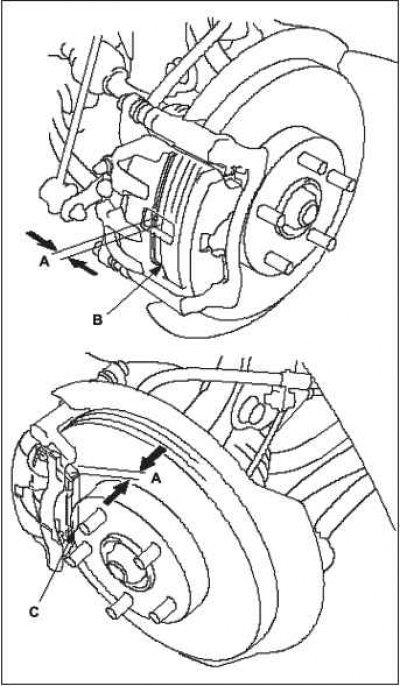
3. Measure the thickness A of the inner B and outer C of the brake pad. When measuring, do not take into account the thickness of the pad itself.

Brake lining thickness.
  • Standard: 11.0 mm.
  • Working range limit: 1.6 mm.

4. If the thickness of the lining is less than…


4. If the thickness of the lining is less than the maximum permissible value, then both front brake linings must be replaced.

Replacement


1. Raise the front of the vehicle and place safety supports in appropriate places.

2. Remove the front wheel.

3. Remove the flange bolt A, holding the caliper pin B with a wrench. Do not damage the guide axle seals and swing the caliper C to the side. Check the hose and cotter pin cuffs for damage or wear.
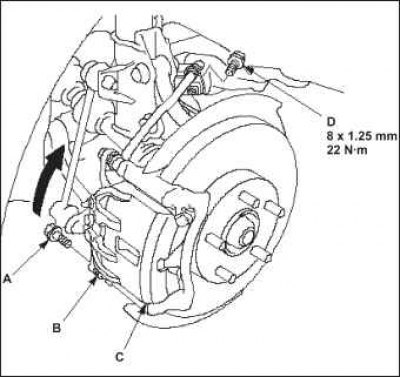


4. Loosen the brake hose mounting bolt D.


4. Loosen the brake hose mounting bolt D.

5. Remove the linings A and piston gasket B.
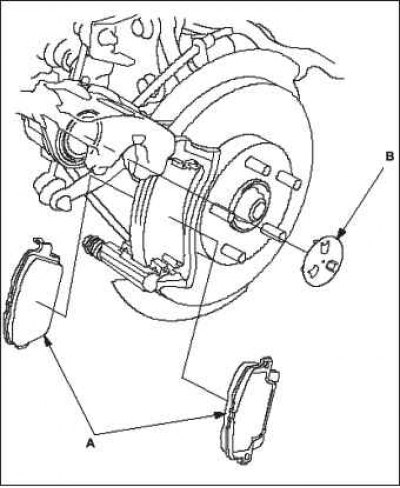
6. Remove the lining retainers A.


6. Remove the lining retainers A.

7. Thoroughly clean the caliper bracket B, remove rust and check that there are no nicks or cracks on it.

8. Check that the brake disc surface is free from cracks and damage.
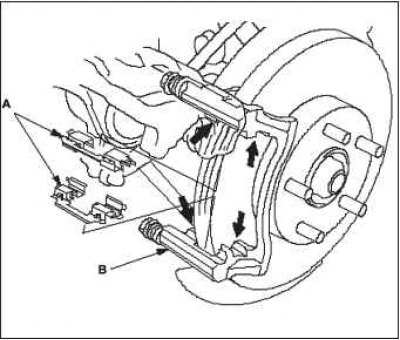
9. Apply a thin layer of Molykote M77 grease to…


9. Apply a thin layer of Molykote M77 grease to the caliper bracket where they touch (indicated by arrows) opposite the clamps.


10. Install the brake pad retaining plates. Wipe off excess grease from the retainers. Avoid getting grease on the disc and pads.

11. Install the brake caliper using piston compressor A onto the caliper body B.
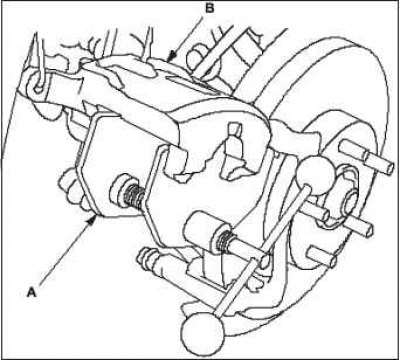
12. Press the piston with the compressor to…


12. Press the piston with the compressor to install the caliper on the pads. Make sure that the piston cup is in the correct position, otherwise it will be damaged during installation of the caliper.

Note: Be careful when pressing the piston, brake fluid may spill out of the master cylinder reservoir.


13. Remove the compressor.

14. Completely clean the bracket from wear products and corrosion and carefully inspect it. There should be no chips or cracks on it.

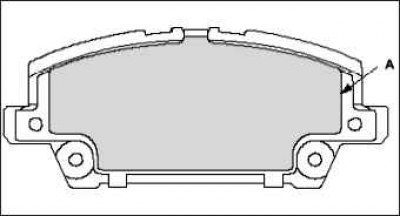
15. Peel off the paper from the adhesive pad A, stick and press it to the surface of the inner pad and outer pad.

Note: The adhesive pad is made of stretchable material and is not removable. Make sure it is firmly attached.


Note: Make sure there is no grease on the gasket surface.


Note: Align the shape of the adhesive pad as shown in the picture.

16. Clean and remove grease from the outer…


16. Clean and remove grease from the outer support side A, piston contact side B and liner C of the front caliper. Make sure there is no grease remaining.
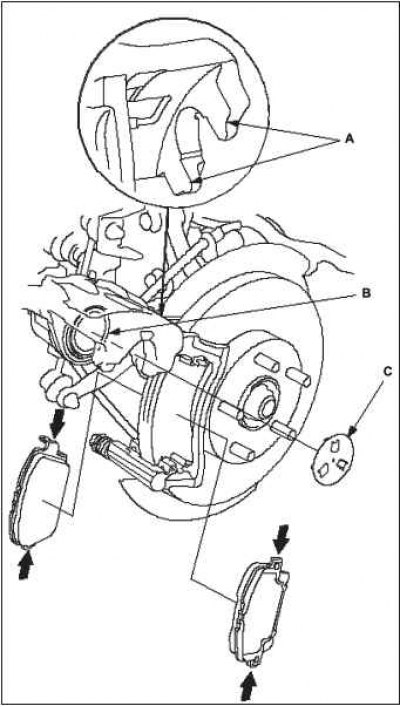


17. Tear off the protective film from the…


17. Tear off the protective film from the adhesive pad that was stuck to the outer and inner plate.

18. Apply a thin layer of Molykote M77 grease to the areas indicated by the arrows. Remove excess grease with a rag. A dirty brake disc or linings reduces braking efficiency. Avoid getting grease on the surface of the brake discs and linings.

19. Install the piston gasket and position the brake pads correctly.

If you do not change the brake pads, but install the old ones, then install them in the same position they were in before removal. Otherwise, the braking efficiency will be reduced until they are broken in.

Note: Do not hold the adhesive pad when installing the brake pad.


Note: Do not allow the adhesive pad to become contaminated.


Note: Be sure to return the piston completely to avoid damaging the adhesive gasket.


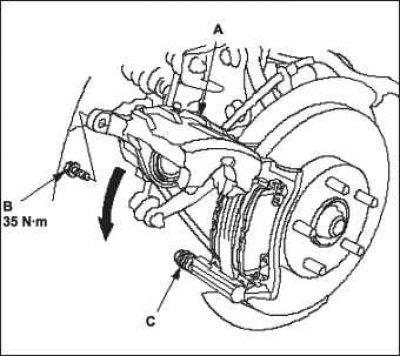
20. Lower caliper A into place. Install new flange bolt B and tighten it to the recommended torque while holding caliper pin C with a spanner. Be careful not to damage the piston boot or pin boot.

21. Install the brake hose mounting bolt and tighten it to the specified torque.

22. Start the engine and press the brake pedal for 10 seconds.


Note: This is necessary to install the adhesive pad.

23. Press the brake pedal several times and make…


23. Press the brake pedal several times and make sure that the brake system is in working order.

Note: Applying the brakes immediately after replacing the entire brake pad set may require an increase in pedal travel. After a few brake pedal presses, normal pedal travel will be restored.


24. After installation, check the hose and pipe connections, which should not show any signs of brake fluid leakage, tighten the connections if necessary. Perform a test drive, then check the system for leaks.

[Original published on this resource: HondaBook]
This article is available at: russian, bulgarian, belarusian, ukrainian, serbian, croatian, romanian, polish, slovak, hungarian
This information has been verified: Yaroslav Shiryaev
Share with friends:
◀ Previous
Civic 8: Brake system
Next ▶

Assembling the master brake cylinder
Disassembling the master brake cylinder
Replacing the master brake cylinder
Replacing the brake hose
Checking the brake fluid level sensor
Replacing the brake pedal
Replacing the brake booster (L13A/R18A)
Checking and adjusting the parking brake
Replacing the parking brake cable
See also other articles from Honda manuals:
Front Disc Brake Pads — Inspection Honda Accord 3 (1985-1989)
Removal the front brake pad support Honda Fit 1 (2001-2008)
Front disc brake pads Honda CR-V 1 (1995-2001, petrol)
Front Brake Pads — Checking and Replacing Honda HR-V 1 (1998-2006, petrol)
Front brake discs — check for runout Honda Avancier 1 (1999-2003, petrol)
Link in different formats to this article
Comments and feedback from visitors
No comments yet


How much will 20 + 27 ?


Civic 8 (2005-2011) 
  • General information
  • Technical data
  • Governing bodies
  • Driving and maintenance
  • Power unit
  • Gasoline engines (L13A)
  • Gasoline engines (R18A)
  • Diesel engines (N22A)
  • Cooling and lubrication (L13A)
  • Cooling and lubrication (R18A)
  • Cooling and lubrication (N22A)
  • Injection system (gasoline)
  • Injection system (diesel)
  • Toxicity reduction system
  • Troubleshooting
  • Transmission
  • Clutch and drive shafts
  • Mechanical gearbox
  • Chassis and running gear
  • Suspension and wheels
  • Steering
  • Brake system
  • Body and interior
  • Exterior (external elements)
  • Doors, locks and windows
  • Electrical equipment
  • Equipment and devices
  • Headlights and lighting
  • Power devices
  • Electrical circuits
Civic 7 (2000-2005) 
  • General information
  • User manual
  • Maintenance
  • Power unit
  • Engines D15B and D17A
  • K20A Engines
  • Overhaul engine
  • Cooling system
  • Lubrication system
  • Fuel injection system
  • Toxicity reduction system
  • Engine electrical equipment
  • Transmission
  • Clutch
  • Manual gearbox
  • Automatic gearbox
  • Variator (CVT)
  • Drive shafts
  • Chassis and running gear
  • Car suspension
  • Steering
  • Brake system
  • Body and interior
  • Exterior (external elements)
  • Interior (internal elements)
  • Doors, locks and windows
  • Heater and air conditioner
  • Manual air conditioner
  • Automatic air conditioner
  • Security system
  • Electrical equipment
  • Equipment and devices
  • Headlights and lighting
  • Windscreen wipers
  • Audio system
  • Electrical diagrams
Civic 6 (1995-2000) 
  • General information
  • Introduction to guide
  • User manual
  • Maintenance
  • Power unit
  • Engine in car (Civic)
  • Engine in car (Integra)
  • Engine overhaul
  • Cooling and heating
  • Power and exhaust systems
  • Engine electrical equipment
  • Engine management systems
  • Transmission
  • Manual gearbox
  • Automatic transmission (AT/CVT)
  • Clutch and drive shafts
  • Chassis and running gear
  • Brake system
  • Car suspension
  • Steering
  • Body and interior
  • Exterior (external elements)
  • Interior (internal elements)
  • Doors, locks and windows
  • Electrical equipment
  • Equipment and devices
  • Electrical circuits
Civic 5 and 6 (1991-2000) 
  • Power unit
  • SOHC engines
  • DOHC engines
  • Engine overhaul
  • Cooling and lubrication system
  • Intake and exhaust system
  • Fuel injection system (SOHC)
  • Fuel injection system (DOHC)
  • Carburetor
  • Transmission
  • Clutch
  • Manual gearbox S4C
  • Manual gearbox S40
  • Automatic gearbox
  • Drive shafts
  • Chassis and running gear
  • Car suspension
  • Steering
  • Brake system
  • Body and interior
  • Body elements
  • Heater and air conditioner
  • Electrical equipment
  • Power devices
  • Equipment and instruments
  • Electrical circuits
Civic 3 and 4 (1983-1991) 
  • General information
  • Maintenance
  • Power unit
  • Engine in a car
  • Engine overhaul
  • Cooling system
  • Power and exhaust system
  • Engine electrical equipment
  • Emission control system
  • Transmission
  • Mechanical gearbox
  • Automatic gearbox
  • Clutch and drive shafts
  • Four-wheel drive
  • Chassis and running gear
  • Brake system
  • Car suspension
  • Steering
  • Body and interior
  • Body elements
  • Electrical equipment
  • Equipment and devices
  • Electrical circuits
HondaBook.ru © 2018–2026 • Mobile version • Sitemap: EN BG BY UA RS HR RO PL SK HU • Feedback • Driver Information • Search system • Bookmark
Accord 3 (1985-1989) • Accord 6 (1997-2002) • Civic 3 and 4 (1983-1991) • Civic 5 and 6 (1991-2000) • Civic 6 (1995-2000) • Civic 7 (2000-2005) • Civic 8 (2005-2011) • Fit 1 (2001-2008) • CR-V 1 (1995-2001) • CR-V 2 (2002-2006) • HR-V 1 (1998-2006) • Avancier 1 (1999-2003) •
 
This website uses cookies to ensure proper functioning. By clicking "OK," you agree.