
HondaBook.ru
Auto companies Volkswagen Auto companies Ford Auto companies Lada Auto companies Skoda Auto companies BMW Auto companies Mazda Auto companies Peugeot
English Русский
Български
Беларускі
Український
Српски
Hrvatski
Română
Polski
Slovenský
Magyar
Bookmark Contacts Sitemap   


Accord Civic Fit / Jazz CR-V HR-V Others Articles
HR-V 1 (1998-2006, petrol)

Front Brake Pads — Checking and Replacing (Honda HR-V 1)

  • Main
  • Honda HR-V
  • 1 (1998-2006, petrol)
  • Chassis and running gear
  • Brake system
  • Front Brake Pads — Checking and Replacing
0
Warning! Frequent inhalation of dust from brake pad surfaces, regardless of the material composition, may pose a health hazard.
  • Do not inhale dust.
  • Do not clean brake surfaces with compressed air or a brush. Use a vacuum cleaner.


1. Slightly loosen the front wheel nuts, then raise the vehicle and secure it on safety stands. Remove the front wheels.

2. Remove the bolt from the caliper and swing it up and to the side. Check the hoses and finger boots for damage or wear.
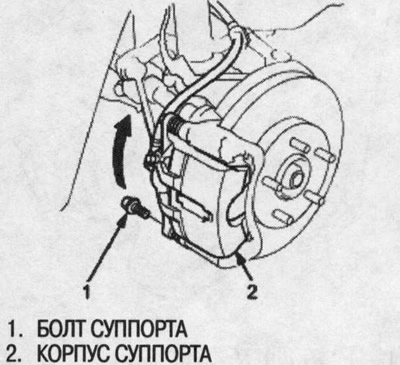
2. Remove the bolt from the caliper and swing it…


3. Remove the brake pad linings, pad retainers and pads.
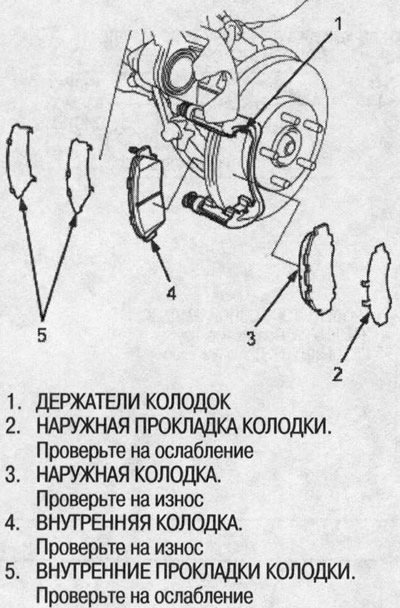
3. Remove the brake pad linings, pad retainers…


4. Using a caliper, measure the thickness of the brake pad friction material. This does not include the thickness of the metal backing.
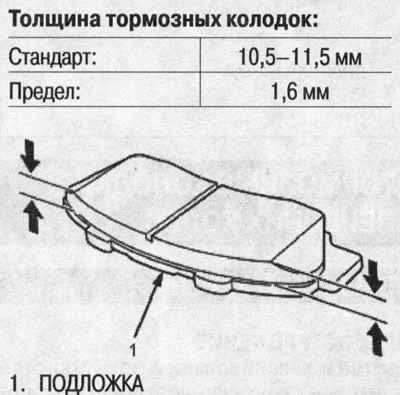
4. Using a caliper, measure the thickness of the…


5. If the thickness of the brake pads is less than the limit value, replace the pads and linings at the same time.


6. Clean the caliper thoroughly; remove rust and check for grooves or cracks.

7. Check the brake disc for damage and cracks.

8. Install the brake shoe holders.
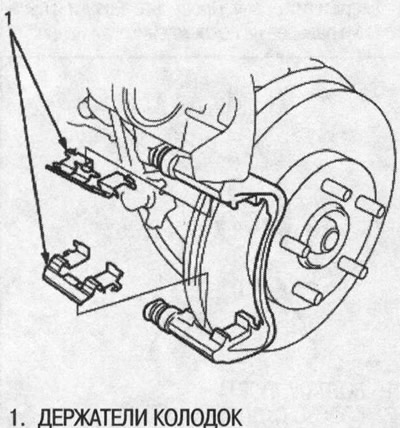
8. Install the brake shoe holders.


9. Apply Molykote M77 or Daikal-ub 528D grease to the pad side of the gaskets and to the back side of the brake pads. Wipe off excess grease from the gaskets.
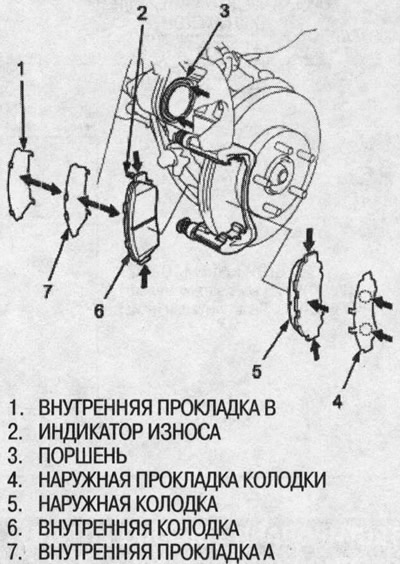
9. Apply Molykote M77 or Daikal-ub 528D grease to…


10. Install the brake pads and linings correctly. Install the pad with the wear indicator facing inward.

Warning!
  • When reusing brake pads, always install them in their original position to avoid loss of braking efficiency.
  • Contaminated brake discs or pads increase the braking distance. Do not allow grease to come into contact with the discs and pads.


11. Press the piston in so that the caliper fits over the pads. Make sure the piston dust boot is in place to avoid damage when the caliper is swung down.


12. Fold the caliper down without damaging the pin boot. Insert the bolt into the caliper and tighten it.
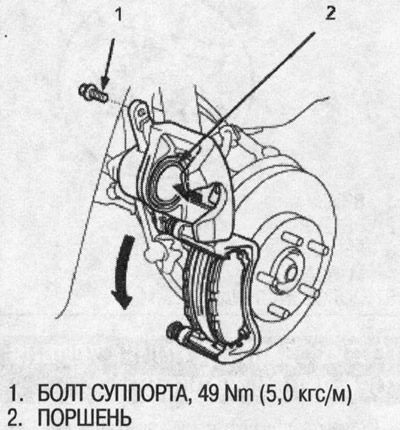
12. Fold the caliper down without damaging the…


13. Press the brake pedal several times to make sure the brakes work, then road test.

Note: Immediately after replacing the brake pad assembly, a greater pedal travel may be required to engage the brake. After a few presses of the brake pedal, normal pedal travel will be restored.


14. After installation, check for leaks at the joints of the hoses and tubes or at the fittings and tighten if necessary.

(The original is located on the website: HondaBook.ru)
This article is available at: russian, bulgarian, belarusian, ukrainian, serbian, croatian, romanian, polish, slovak, hungarian
This information has been verified: Emil Safonov
Share with friends:
◀ Previous
HR-V 1: Brake system
Next ▶

Testing the brake fluid level sensor
Testing the Parking Brake Switch
Brake system indicator wiring diagram
Bleeding the brake system
Parking brake — checking and adjusting
Front Brake Disc — Checking Runout
Checking the thickness and parallelism of the disc
Front Brake Caliper — Disassembly and Assembly
Master cylinder, brake booster — removal and installation
Master cylinder, brake booster — disassembly
See also other articles from Honda manuals:
Front Disc Brake Pads — Inspection Honda Accord 3 (1985-1989)
Checking and replacing the brake fluid level switch sensor Honda Civic 6 (1995-2000)
Replacing the front brake pads Honda Fit 1 (2001-2008)
Checking and replacing the front brake pads — on a 15-inch brake disc Honda CR-V 2 (2002-2006, petrol)
Front Brake Pads — Checking and Replacing Honda Avancier 1 (1999-2003, petrol)
Link in different formats to this article
Comments and feedback from visitors
No comments yet


How much will 50 + 22 ?


HR-V 1 (1998-2006, petrol) 
  • General information
  • User manual
  • Maintenance
  • Power unit
  • Engine repair
  • Lubrication system
  • Cooling system
  • Fuel injection and control
  • Power and exhaust system
  • Engine electrical equipment
  • Transmission
  • Clutch
  • Mechanical gearbox
  • Automatic gearbox
  • Rear differential
  • Drive shafts and cardan
  • Chassis and running gear
  • Steering
  • Car suspension
  • Brake system
  • Body and interior
  • Exterior (external elements)
  • Interior (internal elements)
  • Doors, locks and windows
  • Electrical equipment
  • Equipment and devices
  • Lighting system
  • Electrical circuits
HondaBook.ru © 2018–2026 • Mobile version • Sitemap: EN BG BY UA RS HR RO PL SK HU • Feedback • Driver Information • Search system • Bookmark
Accord 3 (1985-1989) • Accord 6 (1997-2002) • Civic 3 and 4 (1983-1991) • Civic 5 and 6 (1991-2000) • Civic 6 (1995-2000) • Civic 7 (2000-2005) • Civic 8 (2005-2011) • Fit 1 (2001-2008) • CR-V 1 (1995-2001) • CR-V 2 (2002-2006) • HR-V 1 (1998-2006) • Avancier 1 (1999-2003) •
 
This website uses cookies to ensure proper functioning. By clicking "OK," you agree.