
Contents: Removal and installation ⇊ Adjustment ⇊
Removal and installation
1. Remove the front console.
2. Set the shift lever to the "N" (neutral) position, then remove the lock from the shift control cable adjuster.
Note: LHD model shown. RHD is similar.
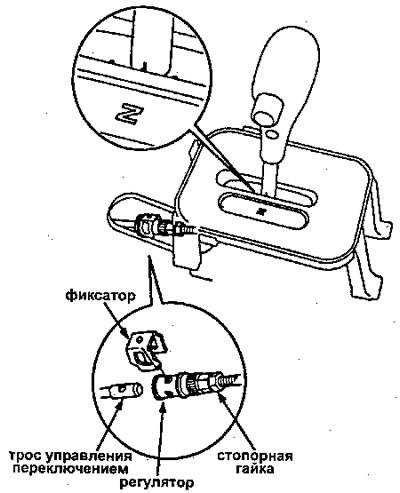
3. Remove the shift control cable bracket.
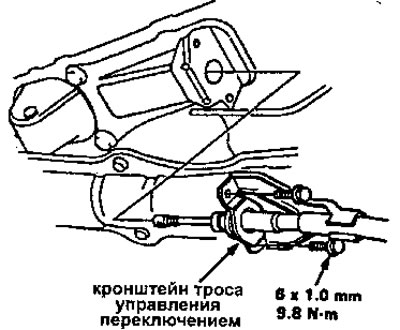
S4NA
4. Remove the engine bracket.
5. Remove the torque converter lower cover and shift cable cover.
6. Remove the cotter pin, then remove the pin and coupling sleeve.
7. Separate the shift control cable from the lever. Do not bend the cable during removal and installation.
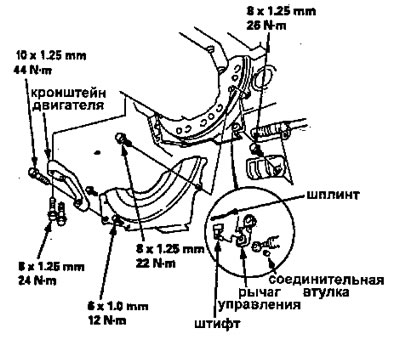
S4PA, S4XA
4. Remove the shift control cable holder.
5. Remove the shift control cable cover.
6. Separate the shift control cable from the lever. Do not bend the cable during removal and installation.
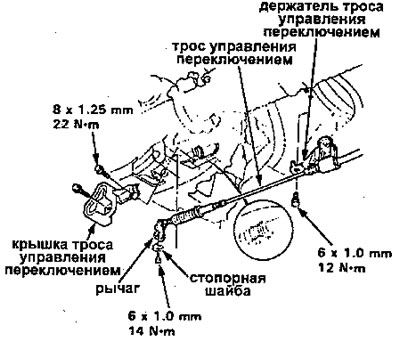
S4NA, S4PA, S4XA
8. Install the shift control cable in the reverse order of removal.
9. Check the cable adjustment.
Adjustment
Warning: Make sure the mounting locations are correct.
1. Remove the front console.
2. Shift to the [N] position, then remove the locking clip from the retainer.
Note: The illustration shows a left-hand drive vehicle; It's the same with the right one.
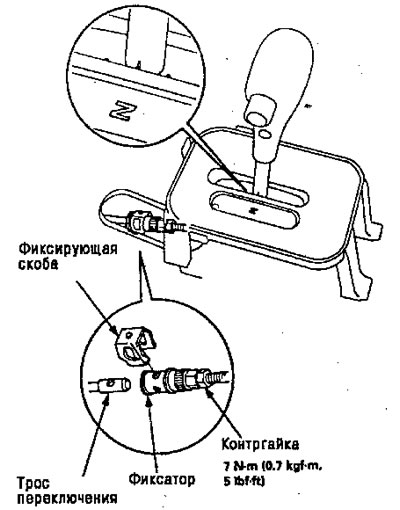
3. Check that the hole in the detent is fully aligned with the hole in the shift cable. There are two holes in the detent. They are located at 90° from each other to ensure adjustment accuracy of up to 1/4 turn.
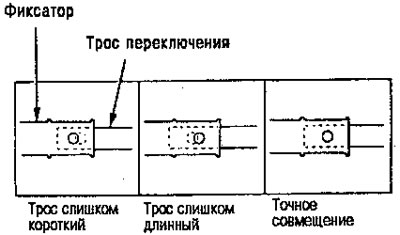
4. If they are not completely aligned, loosen the lock nut on the retainer and adjust as required.
5. Tighten the lock nut to 7 N·m (0.7 kgf·m).
6. Install the locking clip onto the locking device. If you feel the locking clip catching after you install it, the cable is still not adjusted and needs to be readjusted.
7. Make sure the retaining clip is securely fastened to the retainer.
8. Shift the lever into each gear and check that the shift position indicator matches each gear.
9. Start the engine and check the shift lever in all gears. If any of the gears does not work correctly, refer to the "Troubleshooting" section.