
Contents: Security alarm indicator (for some…⇊ Low fuel level alarm ⇊ Button for switching the dimensions…⇊ Speedometer ⇊ Tachometer ⇊ Coolant temperature gauge ⇊ Fuel level indicator in the tank ⇊ RPM indicator ⇊ Fuel consumption indicator ⇊ Multi-information display ⇊ Information messages and icons ⇊ Controls located on the steering…⇊ Information display operating modes ⇊ Odometer ⇊ Trip meters ⇊ Outside air temperature indicator ⇊
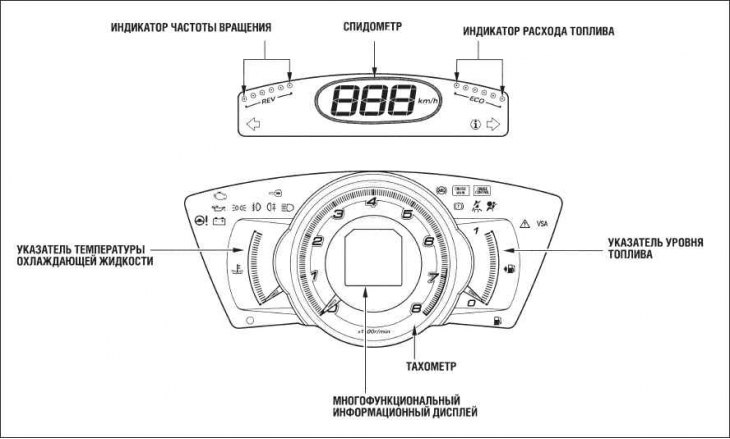
Note: The illustration shows the instrument panel of a vehicle with a gasoline engine.
Security alarm indicator (for some vehicle versions)
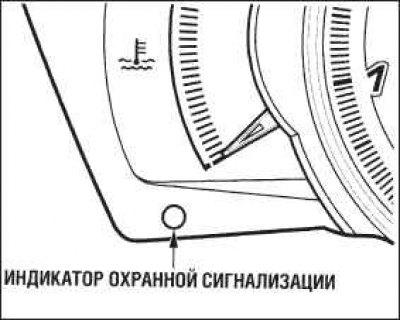
The indicator lights up when the security alarm system is activated.
Low fuel level alarm
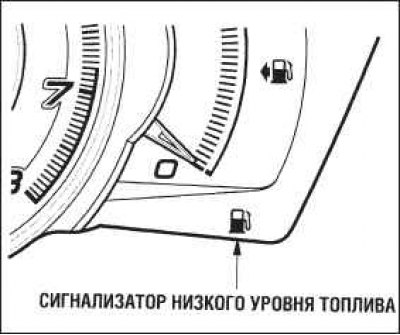
The indicator is located on the fuel gauge panel. The illuminated indicator reminds you to fill the fuel tank.
In addition, the symbol is displayed on the multifunction display
 , which may be accompanied by a warning "FUEL LOW" ("Low fuel level") or "DIESEL FUEL LOW" ("Low level of diesel fuel").
The indicator light means that there is no more than 7.5 liters of fuel left in the tank. After this amount of fuel is used up, the fuel gauge arrow will be set to 0. At the same time, there will still be a minimum reserve supply of fuel left in the tank.
Button for switching the dimensions of the quantities displayed on the display (mph - km/h) (only for vehicles with right-hand steering column position)
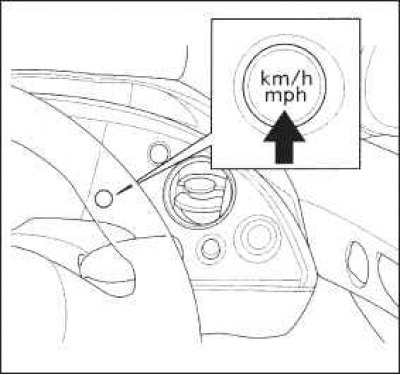
Press and hold the unit switch button until you hear a beep. Each time you press the button, the unit of the speedometer, trip meter, and odometer displayed on the speedometer and multifunction display changes from km (km/h) to miles (mph) or vice versa.
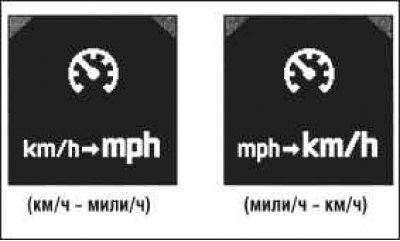
Above is shown the display view when changing the dimensions of the quantities.
When the ignition key is turned to the "ON" (II) position, the dimensions that were set previously are restored.
Vehicles are shipped from the factory with the unit set to "mph" by default. So even if you set the unit to "km/h", the system will revert to the default unit if the battery is disconnected or completely discharged.
Speedometer
The speedometer shows the speed of the vehicle. The speedometer scale, depending on the version of the device, can be graduated in "km/h" or "mph".
For a vehicle with a right-hand steering column, it is possible to switch between the specified dimensions.
The vehicle is equipped with a function that activates a warning sound signal (buzzer) in case the maximum speed of the vehicle is exceeded.
Tachometer
The tachometer shows the engine crankshaft speed. The tachometer scale is graduated in "min⁻¹". To avoid engine failure, do not exceed the maximum permissible crankshaft speed (the tachometer needle should never enter the red zone of the scale).
Coolant temperature gauge
The instrument shows the engine coolant temperature. The normal operating temperature of the engine when the vehicle is operated under normal conditions corresponds to the middle position of the pointer. Under severe operating conditions, for example, in very hot weather or when driving the vehicle on a long uphill slope for a long time, the pointer may rise to the red upper mark on the scale. If the engine temperature has increased so much that the pointer is on the red mark of the scale, you should immediately pull over to the side of the road and stop the vehicle.
Fuel level indicator in the tank
The device shows the relative amount of fuel in the tank. The indicator works with a slight error. When the ignition is turned off, the indicator is set to zero.
Warning! Only for vehicles with gasoline engines. Avoid driving with a minimum amount of fuel in the tank, as this may cause engine misfires and damage to the catalytic converter.
Warning! Only for vehicles with diesel engines. When attempting to restart an engine that has stalled due to lack of fuel in the tank, the engine malfunction indicator or glow plug indicator comes on.
RPM indicator
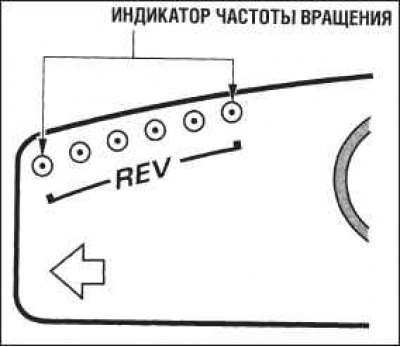
This indicator allows you to quickly assess how close the tachometer needle has come to the red zone of the scale. If all six indicator lights are lit, then the rotation speed has reached the red zone.
To prevent engine damage, reduce engine speed when the tachometer needle is in the red zone of the scale.
Fuel consumption indicator
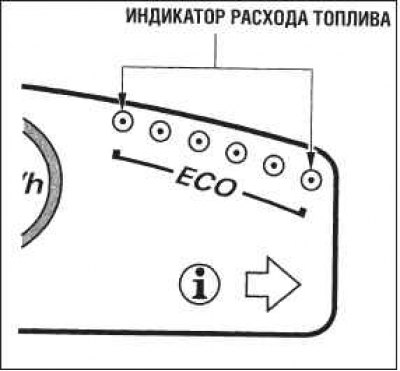
This indicator allows you to visually assess the specific fuel consumption. If all six indicator lamps are lit, the engine is operating in the most economical mode. If all lamps are off, the fuel consumption is excessively high.
Multi-information display
The multifunctional display is located on the instrument panel in the middle of the tachometer. When the ignition is on, the display shows various information in the form of text messages and icons. Some messages help in driving the car. Other messages inform about the state of the car so that the driver can avoid possible problems.
All messages are divided into two types: regular information messages and messages warning the driver about a possible malfunction of the vehicle systems.
You can select the language of text messages, as well as customise some system settings to your liking using the multi-function display and two buttons located on the steering wheel.
Information messages and icons
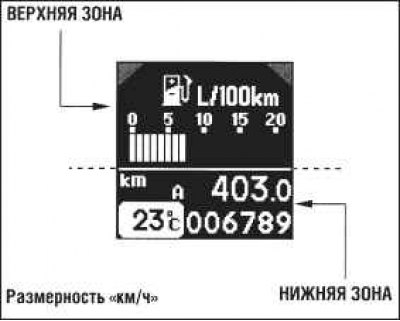
The multifunctional display is divided into two zones: upper and lower. Each zone can display two lines of message.
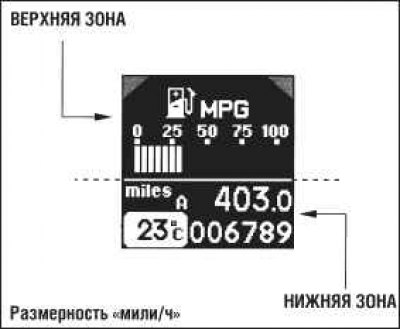
In the normal information message display mode, the upper zone displays the on-board computer readings, and the lower zone displays the odometer readings, trip meter readings, and outside air temperature.
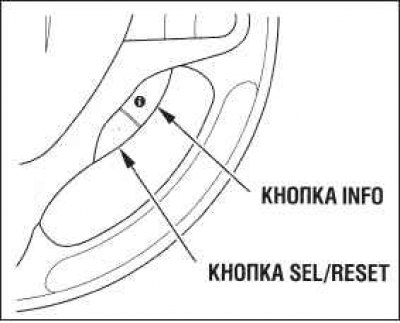
Controls located on the steering wheel (for cars with cruise control system)
 |
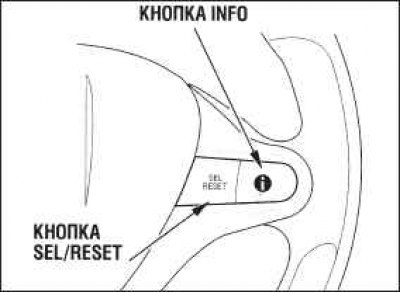 |
When the ignition key is turned to the "ON" (II) position, the fuel consumption information first appears in the upper area of the display. Each time the "INFO" button is pressed, the instantaneous fuel consumption information is successively replaced by the following data: average fuel consumption, estimated remaining range based on the fuel tank, travel time, average driving speed, rear seat belt status, and finally a blank display, as shown on the next page.
If there is a warning message in the system, it is displayed immediately after the instantaneous fuel consumption information. When the ignition key is turned to the "ON" (II) position, messages with the highest priorities are displayed first.
Information display operating modes
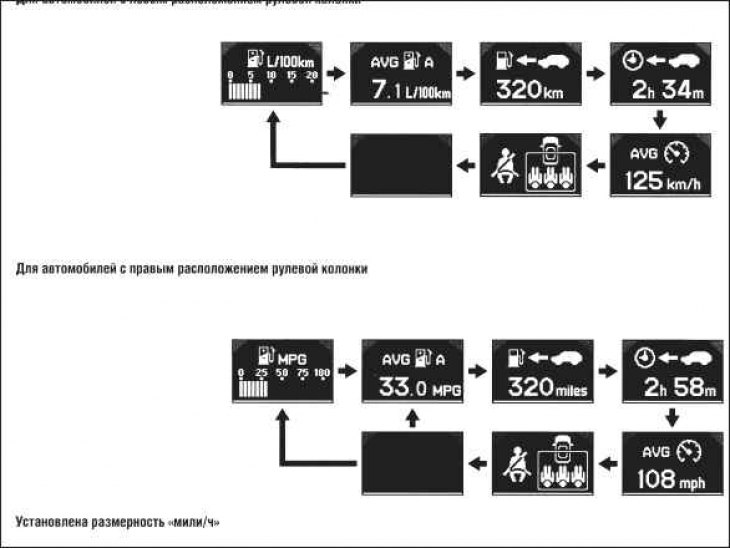
The average fuel consumption is updated on the display every 10 seconds. When you reset the trip odometer, the average fuel consumption counter is also reset. To reset the counters, press and hold the button "SEL/RESET" ("Select/Set") until the value 0.0 appears on the display.
Odometer
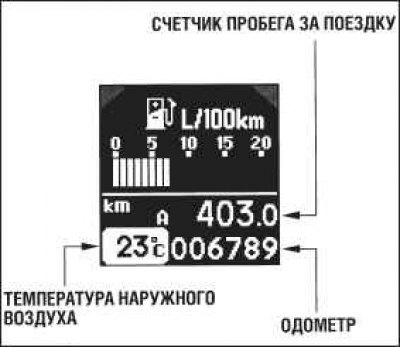
In normal operation, the lower area of the display always shows the odometer, trip meter and outside temperature.
The odometer shows the total number of kilometers (or miles) driven over the entire life of the vehicle.
Trip meters
The trip odometer shows the number of kilometers (or miles) traveled since the odometer was last reset.
The vehicle is equipped with two trip meters: Trip A and Trip B. To switch between trip A and trip B mileage displayed on the display, press the button in sequence "SEL/RESET" ("Choice/Installation"). When the ignition key is switched to the "ON" position (II), the display shows the value that was last displayed earlier.
Each trip odometer operates independently of the other, allowing you to record the distances traveled during different trips.
To reset the trip mileage, display it on the digital display, press the button "SEL/RESET" ("Select/Set") and hold it down until the value "0.0" appears on the display.
An icon appears in the upper area of the display
 or
or  depending on which trip (A or B) is selected in the lower area of the display.
Outside air temperature indicator
The indicator informs the driver of the outside temperature in degrees Celsius.
The temperature sensor is integrated into the front bumper. Therefore, the measured temperature value may be affected by thermal radiation from the road surface, heat emitted by the engine, and heat from exhaust gases of vehicles participating in the road traffic. Therefore, when driving at a speed of less than 30 km/h, the measurement error may be significant.
Temperature values are updated on the display with a delay of several minutes, which is necessary for heating or cooling the sensor to the outside air temperature.