
Examination
Warning! The vehicles covered in this Manual are equipped with airbags (SRS). When performing any work near the impact sensors, steering column or instrument panel, turn off the SRS (see the electrical connection diagrams at the end of Chapter On-board electrical equipment).
1. Remove the console (see Chapter Body).
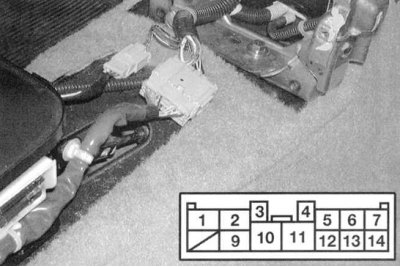
2a. Disconnect the 14-pin electrical connector of the selector lever position sensor-switch (see accompanying illustrations): Civic models.
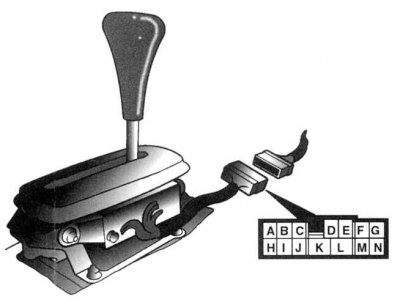
2b. Integra models.
3. Check the sensor-switch for compliance of the sensor-switch states with the conductivity maps (see accompanying illustrations). Move the selector lever alternately to each of the positions without touching the push button. Remember that the free travel of the lever in each position is about 2 mm. If the test results are negative, adjust the sensor-switch (see below).
Selector Lever Position Sensor Switch Conductivity Map (civic models)
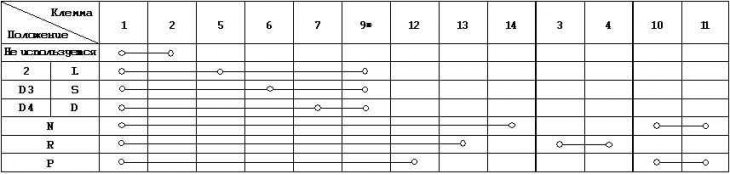
1-7 — Lever position sensor switch
3-4 — Reverse light switch sensor
10—11 — Start permission switch sensor
* — Tempostat
Selector Lever Position Sensor Switch Conductivity Map (integra models models without tempostat)
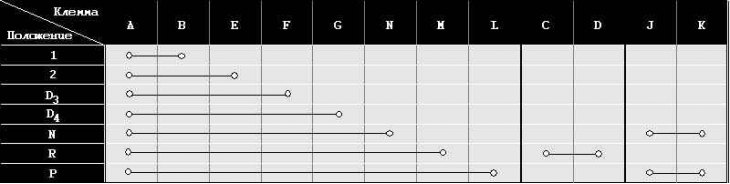
A—L — Lever position sensor switch (models without speedostat)
C—D — Reverse light switch sensor
J—K — Start enable switch sensor
Adjustment
1. Move the selector lever to the "P" position and loosen the nuts securing the sensor switch (see illustration below).
2. Move the lever toward the "D" position until continuity appears between terminals 2 and 14 (Civic)/A and L (Integra) of the sensor-switch connector. Continuity should be maintained within the free play of the lever (about 2 mm).
3. Perform the check described in paragraph 3 (Check) above. Make sure that the engine starts with the shift lever in the "N" position.
4. If the conductivity map requirements are still not met, check the condition of the selector lever retainer and bracket. If no damage can be found, replace the sensor switch.
Replacement
1. Remove the console (see Chapter Body).
2. Disconnect the 14-pin sensor-switch connector (see illustrations above).
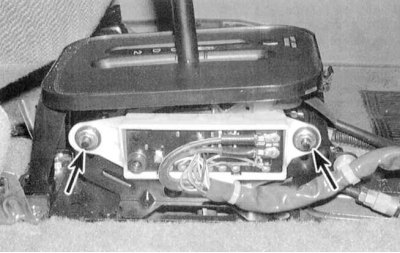
3. Remove the two mounting nuts (see accompanying illustration), remove the washers. Remove the sensor switch.
4. Move the slider of the new sensor switch to the neutral position (position "N").
5. Move the selector lever to the "N" position and install the new switch sensor.
6. Put on the washers and secure the sensor switch with nuts.
7. Perform a check of the switch sensor in accordance with the instructions given in paragraph 3 (Check). Make sure that the engine starts with the selector lever in the "N" position.
8. Connect the electrical connector of the sensor-switch. Secure the wiring harness to all provided fasteners.
9. Reinstall the console (see Chapter Body).
The text of the article is available on the website www.hondabook.ru