
HondaBook.ru
Auto companies Volkswagen Auto companies Ford Auto companies Lada Auto companies Skoda Auto companies BMW Auto companies Mazda Auto companies Peugeot
English Русский
Български
Беларускі
Український
Српски
Hrvatski
Română
Polski
Slovenský
Magyar
Bookmark Contacts Sitemap   


Accord Civic Fit / Jazz CR-V HR-V Others Articles
CR-V 1 (1995-2001, petrol) CR-V 2 (2002-2006, petrol)

Replacing the pressure switch in the 2nd gear clutch (Honda CR-V 2)

  • Main
  • Honda CR-V
  • 2 (2002-2006, petrol)
  • Transmission
  • Automatic gearbox
  • Replacing the pressure switch in the 2nd gear clutch
0
1. Remove the air cleaner housing.

2. Disconnect the connector from the 2nd clutch pressure switch (A).
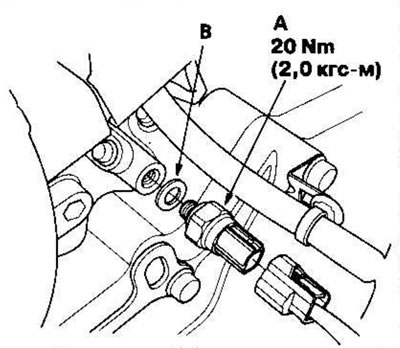
2. Disconnect the connector from the 2nd clutch…


3. Replace the 2nd clutch pressure switch, then screw in a new one, installing a new sealing washer (B). Tighten the switch by the metal part, not the plastic part.

4. Connect the connector, making sure there is no water, oil, dust or foreign particles in it.

5. Install the air cleaner housing.
This article is available at: russian, bulgarian, belarusian, ukrainian, serbian, croatian, romanian, polish, slovak, hungarian
This information has been verified: Mikhail Kopasov
Share with friends:
◀ Previous
CR-V 2: Automatic gearbox
Next ▶

Replacing the speed sensors of the main and intermediate shafts
Replacing the solenoid valves B and C for regulating pressure in the automatic…
Testing of solenoid valves B and C for pressure regulation in automatic…
Replacing the solenoid valve A for regulating pressure in automatic…
Testing the solenoid valve A for regulating the pressure in the automatic…
Replacing the pressure switch in the 3rd gear clutch
Testing/Replacing ATF Temperature Sensor
Testing/Replacing O/D Switch
Checking the ATF fluid level
ATF fluid replacement
See also other articles from Honda manuals:
Checking the condition and replacing the pressure switch in the power… Honda Accord 6 (1997-2002)
Checking and replacing the pressure switch in the power steering… Honda Civic 6 (1995-2000)
Third gear clutch fluid pressure sensor Honda Fit 1 (2001-2008)
Clutch slave disc and pressure plate — installation Honda HR-V 1 (1998-2006, petrol)
Pressure switches in 2nd and 3rd gear clutches — replacement Honda Avancier 1 (1999-2003, petrol)
Link in different formats to this article
Comments and feedback from visitors
No comments yet


How much will 24 + 14 ?


CR-V 2 (2002-2006, petrol) 
  • General information
  • User manual
  • Technical data
  • Maintenance
  • Power unit
  • Engine repair
  • Lubrication system
  • Cooling system
  • Exhaust system
  • Fuel system
  • Engine management
  • Engine electrical equipment
  • Transmission
  • Clutch
  • Manual gearbox
  • Automatic gearbox
  • Rear differential
  • Drive shafts
  • Chassis and running gear
  • Steering
  • Front suspension
  • Rear suspension
  • Brake system
  • Body and interior
  • Exterior (external elements)
  • Interior (internal elements)
  • Doors, locks and windows
CR-V 1 (1995-2001, petrol) 
  • General information
  • Maintenance
  • Tips for car owner
  • Power unit
  • Engine repair
  • Engine overhaul
  • Cooling and lubrication system
  • Engine electrical equipment
  • Control system
  • Fuel system
  • Transmission
  • Clutch and drive shafts
  • Car gearbox
  • Chassis and running gear
  • Front suspension
  • Rear suspension
  • Steering
  • Brake system
  • Body and interior
  • Body service
  • Exterior (external elements)
  • Interior (internal elements)
  • Electrical equipment
  • Equipment and devices
  • Electrical circuits
HondaBook.ru © 2018–2026 • Mobile version • Sitemap: EN BG BY UA RS HR RO PL SK HU • Feedback • Driver Information • Search system • Bookmark
Accord 3 (1985-1989) • Accord 6 (1997-2002) • Civic 3 and 4 (1983-1991) • Civic 5 and 6 (1991-2000) • Civic 6 (1995-2000) • Civic 7 (2000-2005) • Civic 8 (2005-2011) • Fit 1 (2001-2008) • CR-V 1 (1995-2001) • CR-V 2 (2002-2006) • HR-V 1 (1998-2006) • Avancier 1 (1999-2003) •
 
This website uses cookies to ensure proper functioning. By clicking "OK," you agree.