HondaBook.ru
Auto companies Volkswagen Auto companies Ford Auto companies Lada Auto companies Skoda Auto companies BMW Auto companies Mazda Auto companies Peugeot
English Русский
Български
Беларускі
Український
Српски
Hrvatski
Română
Polski
Slovenský
Magyar
Bookmark Contacts Sitemap   


Accord Civic Fit / Jazz CR-V HR-V Others Articles
Civic 3 and 4 (1983-1991) Civic 5 and 6 (1991-2000) Civic 6 (1995-2000) Civic 7 (2000-2005) Civic 8 (2005-2011)

Rear Brake Pads (Honda Civic 5)

  • Main
  • Honda Civic
  • 5 (1991-2000)
  • Chassis and running gear
  • Brake system
  • Rear Brake Pads
0
Contents: Inspection and Replacement ⇊ Checking the rear disc ⇊

Inspection and Replacement


Warning: Never use an air hose or dry brush to clean brake components. Use a vacuum cleaner to avoid inhaling brake dust.


1. Block the front wheels, loosen the rear wheel nuts slightly, support the rear of the vehicle on safe stands, then remove the rear wheels.

2. Release the parking brake and remove the brake mechanism protection.
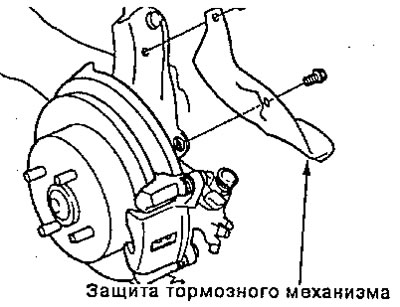
2. Release the parking brake and remove the brake…


3. First remove the brake hose clamp bolt from the longitudinal rod, then remove the two brake mechanism mounting bolts and the brake mechanism from the bracket.

Attention:
  • Clean the outside of the brake assembly thoroughly to prevent dust and dirt from getting inside.
  • Secure the brake mechanism with a piece of wire so that it does not hang on the brake hose.


Note: Check the hoses and axle boots for damage or wear.
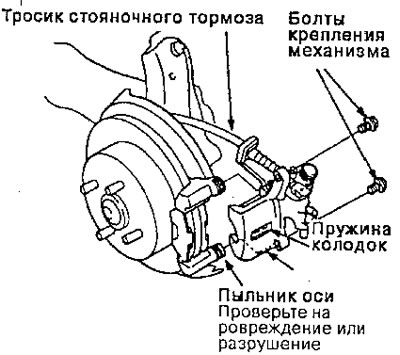

Note: Check the hoses and axle boots for damage…


4. Remove the outer shoe plate, shoes and shoe holders
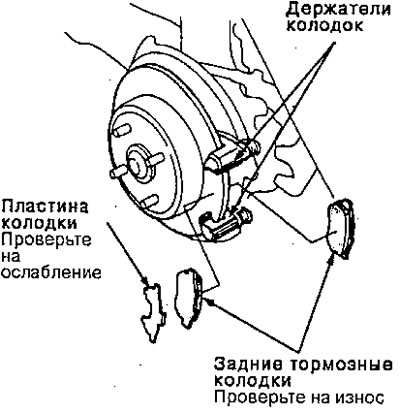


4. Remove the outer shoe plate, shoes and shoe…


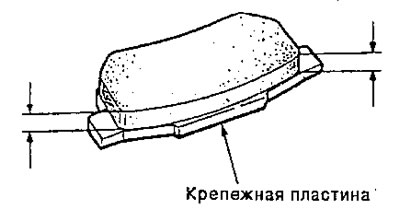
5. Using calipers, measure the thickness of each brake lining.

Brake lining thickness:
  • Standard: 7.0 - 8.0 mm
  • Operational value: 1.6 mm


Operational value: 1.6 mm


Note: The measurement does not include the thickness of the pad mounting plate.


6. Clean the brake mechanism thoroughly; remove any rust and check for any grooves or cracks.

7. Check the brake disc for damage or cracks.

8. Make sure the pad holders are installed in the correct positions.
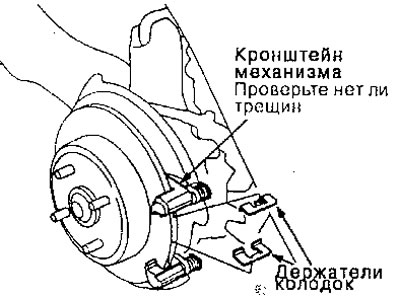
8. Make sure the pad holders are installed in the…


9. Apply grease to the points indicated by the arrows in the figure.


Note: Use the pad grease included in the pad kit or M77 grease (Molikot) and apply a thin layer of grease to the designated points.

  • Piston tip and inner shoe contact surface
  • Brake shoe and bracket contact surface
  • Shoe plate and outer shoe contact surface
  • The shoe plate and the contact surface of the brake housing
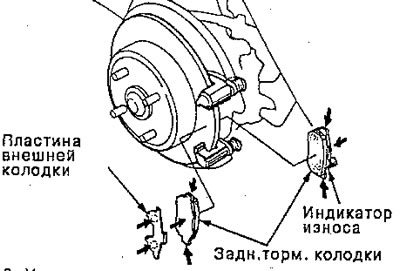
The shoe plate and the contact surface of the…


10. Install the brake pads and outer pad plate onto the brake mechanism bracket

Warning
  • When reusing brake pads, always install the brake pads in their original position to prevent loss of brake effectiveness.
  • Dirty brake discs or pads reduce stopping power. Remove grease from discs and pads.


Note: Install the inner pad with the wear indicator facing down.


11. Turn the brake piston clockwise into place in the cylinder, then align the slot in the piston with the ledge on the inner shoe by turning the piston back.

Note: Coat the dust boot with rubber grease to prevent the piston dust boot from twisting. If the piston dust boot is twisted, pull it out until it fits properly.


12. Install the brake hose clamp onto the trailing arm.

13. Install and tighten the brake mechanism mounting bolts.
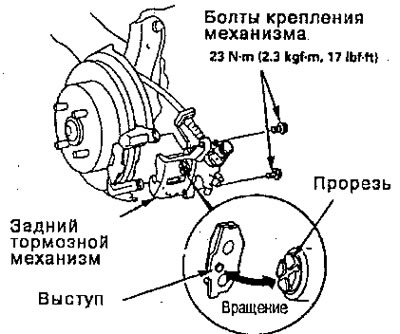
13. Install and tighten the brake mechanism…


14. Install the brake mechanism protection.
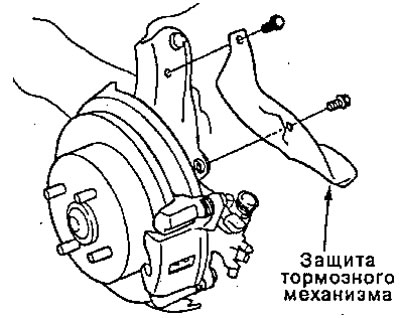


14. Install the brake mechanism protection.


15. After installation, check for leaks in the hose and joints and connections of the line and tighten if necessary.

16. Press the brake pedal several times to make sure the brakes work, then test while driving the vehicle.

Note: Applying the brakes may require more pedal travel immediately after replacing the pads as a set. A few pumps of the brake pedal will restore normal pedal travel.


Checking the rear disc


The procedure for checking the rear brake disc is similar to the procedure for checking the front brake disc.

Brake disc runout:
  • Operational value: 0.10 mm
  • Max. turning limit: 8.0 mm

Brake disc thickness:
  • Standard: 8.9-9.1 mm
  • Max. turning limit: 8.0 mm
  • Parallelism of disk planes: 0.015 mm


(The article was taken from the website «hondabook.ru»)
This article is available at: russian, bulgarian, belarusian, ukrainian, serbian, croatian, romanian, polish, slovak, hungarian
This information has been verified: Mikhail Kopasov
Share with friends:
◀ Previous
Civic 5 and 6: Brake system
Next ▶

Checking the brake booster
Adjusting the tappet clearance
Disassembling the master brake cylinder (For ABS)
Master Brake Cylinder — Brake Booster
Assembly — type C
Rear brake mechanism
Assembly (for ABS)
Rear drum brakes
Disassembling brake pads
Assembly of brake pads
See also other articles from Honda manuals:
Rear Disc Brake Pads — Removal and Installation Honda Accord 3 (1985-1989)
Replacing rear brake pads Honda Fit 1 (2001-2008)
Rear disc brake pads Honda CR-V 1 (1995-2001, petrol)
Front Brake Pads — Checking and Replacing Honda HR-V 1 (1998-2006, petrol)
Rear Brake Pads — Checking and Replacing Honda Avancier 1 (1999-2003, petrol)
Link in different formats to this article
Comments and feedback from visitors
No comments yet


How much will 40 + 34 ?


Civic 8 (2005-2011) 
  • General information
  • Technical data
  • Governing bodies
  • Driving and maintenance
  • Power unit
  • Gasoline engines (L13A)
  • Gasoline engines (R18A)
  • Diesel engines (N22A)
  • Cooling and lubrication (L13A)
  • Cooling and lubrication (R18A)
  • Cooling and lubrication (N22A)
  • Injection system (gasoline)
  • Injection system (diesel)
  • Toxicity reduction system
  • Troubleshooting
  • Transmission
  • Clutch and drive shafts
  • Mechanical gearbox
  • Chassis and running gear
  • Suspension and wheels
  • Steering
  • Brake system
  • Body and interior
  • Exterior (external elements)
  • Doors, locks and windows
  • Electrical equipment
  • Equipment and devices
  • Headlights and lighting
  • Power devices
  • Electrical circuits
Civic 7 (2000-2005) 
  • General information
  • User manual
  • Maintenance
  • Power unit
  • Engines D15B and D17A
  • K20A Engines
  • Overhaul engine
  • Cooling system
  • Lubrication system
  • Fuel injection system
  • Toxicity reduction system
  • Engine electrical equipment
  • Transmission
  • Clutch
  • Manual gearbox
  • Automatic gearbox
  • Variator (CVT)
  • Drive shafts
  • Chassis and running gear
  • Car suspension
  • Steering
  • Brake system
  • Body and interior
  • Exterior (external elements)
  • Interior (internal elements)
  • Doors, locks and windows
  • Heater and air conditioner
  • Manual air conditioner
  • Automatic air conditioner
  • Security system
  • Electrical equipment
  • Equipment and devices
  • Headlights and lighting
  • Windscreen wipers
  • Audio system
  • Electrical diagrams
Civic 6 (1995-2000) 
  • General information
  • Introduction to guide
  • User manual
  • Maintenance
  • Power unit
  • Engine in car (Civic)
  • Engine in car (Integra)
  • Engine overhaul
  • Cooling and heating
  • Power and exhaust systems
  • Engine electrical equipment
  • Engine management systems
  • Transmission
  • Manual gearbox
  • Automatic transmission (AT/CVT)
  • Clutch and drive shafts
  • Chassis and running gear
  • Brake system
  • Car suspension
  • Steering
  • Body and interior
  • Exterior (external elements)
  • Interior (internal elements)
  • Doors, locks and windows
  • Electrical equipment
  • Equipment and devices
  • Electrical circuits
Civic 5 and 6 (1991-2000) 
  • Power unit
  • SOHC engines
  • DOHC engines
  • Engine overhaul
  • Cooling and lubrication system
  • Intake and exhaust system
  • Fuel injection system (SOHC)
  • Fuel injection system (DOHC)
  • Carburetor
  • Transmission
  • Clutch
  • Manual gearbox S4C
  • Manual gearbox S40
  • Automatic gearbox
  • Drive shafts
  • Chassis and running gear
  • Car suspension
  • Steering
  • Brake system
  • Body and interior
  • Body elements
  • Heater and air conditioner
  • Electrical equipment
  • Power devices
  • Equipment and instruments
  • Electrical circuits
Civic 3 and 4 (1983-1991) 
  • General information
  • Maintenance
  • Power unit
  • Engine in a car
  • Engine overhaul
  • Cooling system
  • Power and exhaust system
  • Engine electrical equipment
  • Emission control system
  • Transmission
  • Mechanical gearbox
  • Automatic gearbox
  • Clutch and drive shafts
  • Four-wheel drive
  • Chassis and running gear
  • Brake system
  • Car suspension
  • Steering
  • Body and interior
  • Body elements
  • Electrical equipment
  • Equipment and devices
  • Electrical circuits
HondaBook.ru © 2018–2026 • Mobile version • Sitemap: EN BG BY UA RS HR RO PL SK HU • Feedback • Driver Information • Search system • Bookmark
Accord 3 (1985-1989) • Accord 6 (1997-2002) • Civic 3 and 4 (1983-1991) • Civic 5 and 6 (1991-2000) • Civic 6 (1995-2000) • Civic 7 (2000-2005) • Civic 8 (2005-2011) • Fit 1 (2001-2008) • CR-V 1 (1995-2001) • CR-V 2 (2002-2006) • HR-V 1 (1998-2006) • Avancier 1 (1999-2003) •
 
This website uses cookies to ensure proper functioning. By clicking "OK," you agree.