
Warning! The vehicles covered in this manual are equipped with airbags (SRS). When performing any work near the impact sensors, steering column or instrument panel, turn off the SRS (see Airbags - General Information). Do not test SRS models with any type of diagnostic equipment.
Ignition switch
1. Disconnect the negative cable from the battery first, then the positive cable.
Warning! If the car stereo system is equipped with a security code, make sure you have the correct combination to activate the audio system before disconnecting the battery!
2. Remove the lower section of the instrument panel and the steering column covers (see Chapter Body).
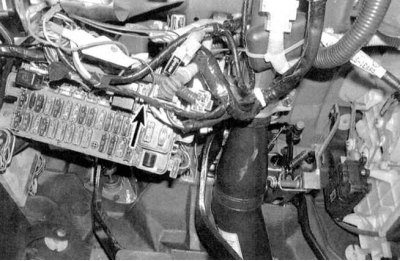
3. Following the switch wiring harness down the steering column to the fuse box, disconnect the electrical connectors (see accompanying illustrations).
4. Check for continuity between the switch terminals (see table below).
5. If any abnormalities in conductivity distribution are detected, replace the switch.
6. Insert the key into the lock and turn it to the LOCK position (Blocking).
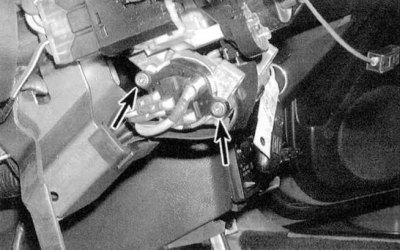
7. Remove the two mounting screws and remove the switch from the steering column (see accompanying illustration).
8. Installation is carried out in reverse order.
Ignition Switch State Map
 |
 |
| Switch position | Presence of conductivity between the terminals |
| Parking position (ACC) | |
| Civic | 3 and 8 |
| Integra | 3 and 11 |
| ON(ON) | |
| Civic | 3, 8, 10 and 12 |
| Integra | 3, 8, 9 and 11 |
| Start (START) | |
| Civic | 1, 3 and 12 |
| Integra | 1, 3 and 8 |
Steering Column Lock Cylinder and Assembly
1. By rotating the cylinder in all of the provided positions, assess the degree of its wear by the amount of play. The position of the key in the lock must correspond to the marking on the assembly body. In case of cylinder failure, the entire lock assembly must be replaced.
2. Disconnect the negative cable from the battery first, then the positive cable.
Warning! If the car stereo system is equipped with a security code, make sure you have the correct combination to activate the audio system before disconnecting the battery!
3. Remove the steering column cover and the lower section of the instrument panel (see Chapter Body).
4. Remove the ignition switch (see above).
5. Loosen the mounting nuts and lower the steering column.
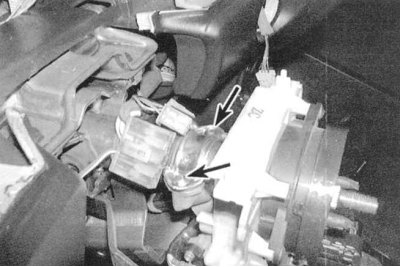
6. The lock assembly is secured to the column with a clamp, pulled tight with two shear head screws (see accompanying illustration). Punch the screw heads, then drill them out (use a 4.8mm drill bit). Remove the clamp and remove the lock assembly from the steering column.
7. Without inserting the key, install the replacement lock in its original place and secure it with bolts and nuts. Tighten the steering column mounting nuts to the instrument panel flange with a force of 12.2 Nm. The tie bolts of the mounting sleeve are tightened with a force of 22 Nm.
8. Reinstall the ignition switch, instrument panel sections and steering column cover.
9. Connect the positive cable to the battery first, then the negative cable.
[The original is located on the website HondaBook.ru]