
Note. If defects in the protective cover are detected, the condition of the corresponding CV joint should be carefully examined. Often, completely restored drive shaft assemblies can be purchased on an exchange basis, which greatly simplifies the situation and allows you to reduce time costs. Before you begin dismantling the components, conduct marketing, finding out the prices of the necessary spare parts. Compare them with the costs of purchasing restored assemblies.
Note. In car accessory stores you can find split protective covers for CV joints. Installation of such covers does not require dismantling the shaft from the car, which is in principle very convenient. However, the authors of this Guide still recommend removing the shafts to check the condition of the CV joints and fill them with fresh grease.
Drive shaft assembly components
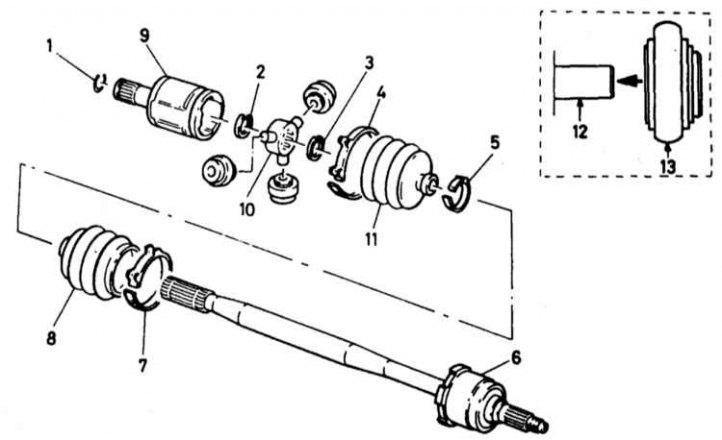
1 - Snap ring; 2 - Outer retaining ring; 3 - Inner retaining ring; 4 - External bandage tape for fastening the protective cover; 5 - Inner bandage tape for fastening the cover; 6 - Outer CV joint; 7 - Cover fastening bandage tape; 8 - CV joint protective cover; 9 - Housing/outer race of the inner CV joint; 10 - Tripod assembly; 11 - CV joint protective cover; 12 - Tripod assembly support element; 13 - Needle roller bearing (or just a tripod bearing roller)
1. Remove the drive shaft (see Removal and installation drive shafts).
2. Clamp the removed shaft in a vice with soft jaws. The shaft assembly components are shown in the accompanying illustration above.
Inner CV joint
Disassembly
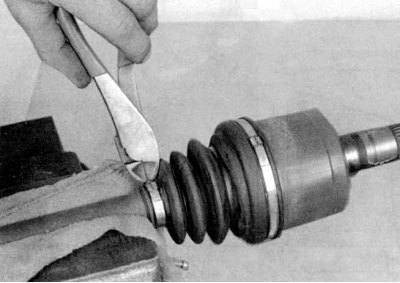
1a. Cut the cover fastening bands and slide the cover from the hinge to the center of the shaft (see accompanying illustrations).
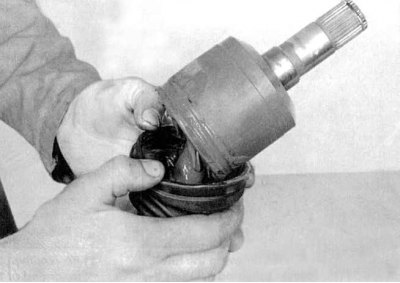
1b. Assess the external condition of the old CV joint; if there is the slightest doubt, the cover should be replaced.
2. Using paint or a scriber, mark the position of the tripod bearing assembly relative to the outer race of the joint. Remove the race from the bearing.
3. Remove the snap ring from the outer shaft journal.
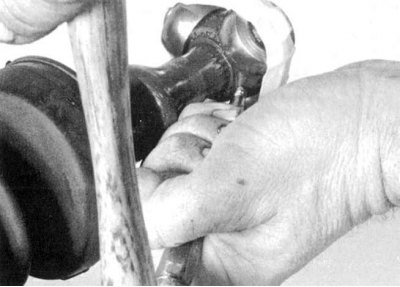
4. Secure the bearing rollers by wrapping them with tape (see accompanying illustration), then knock the tripod assembly off the shaft using a hammer and brass drift.
5. Remove the retaining ring and remove the old protective boot from the drive shaft.
Examination
1. Carefully remove traces of grease from the outer race of the joint and the cavities of the tripod bearing. In order not to mix them up, remove each section of the tripod assembly one by one and wash the needle bearing rollers with solvent.
2. Check the rollers, bearings, tripod assembly bearing part and outer race of the joint for signs of excessive wear of cavities, scoring, cracks and other mechanical damage. Replace the CV joint if necessary.
Assembly
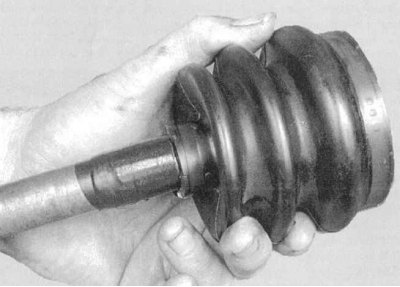
1a. Wrap the splines of the drive shaft journal with tape to protect them from the new CV joint boot from cuts (see accompanying illustration).
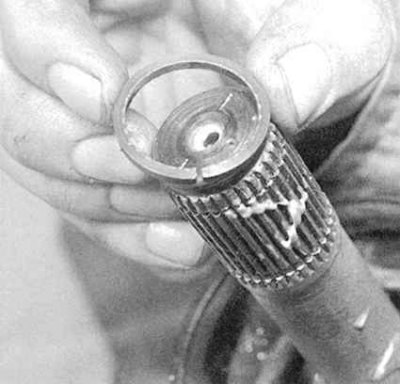
1b. Place the boot on the shaft, remove the tape and install the internal retaining ring (see accompanying illustration).
2. Place the tripod assembly on the shaft.
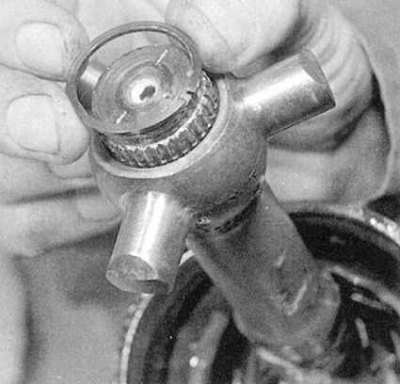
3. Secure the tripod assembly with the outer retaining ring (see accompanying illustration).
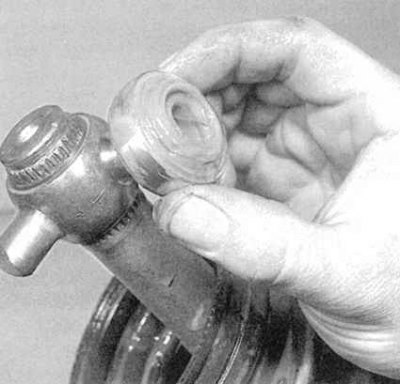
4. Lubricate the inner sides of the roller bearings with a special thick grease in order to temporarily fix them on the supporting elements of the tripod assembly (see accompanying illustration). Make sure that each roller is installed strictly in its original place.
Note: If the rollers are equipped with a rectangular flat, make sure that they are installed with the flats facing the shaft.
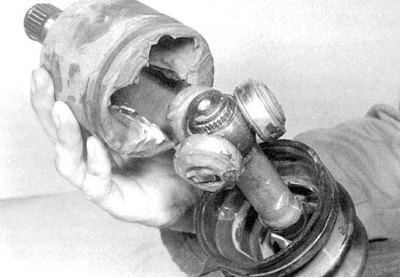
5. Half-fill the outer race of the joint with the grease supplied with the new boot. Fill the boot with the remaining grease. Install the outer race on the shaft (see accompanying illustration). Make sure that the marks for the relative positions of the race and tripod bearing, applied during dismantling, are correctly aligned.
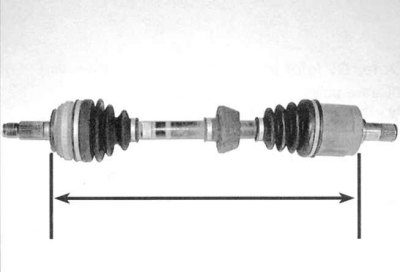
6. Fit the lips of the boot into the grooves on the outer ring of the joint and the shaft body, then adjust the length of the shaft assembly according to the requirements Specifications (see accompanying illustration).
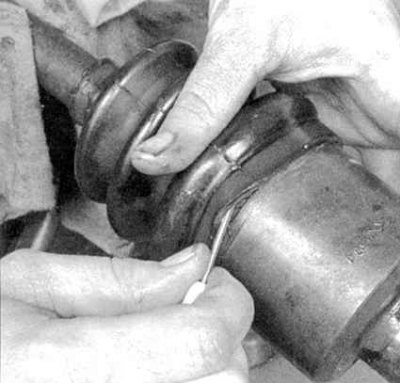
7. After setting the shaft length, release the air from under the cover by prying its outer part (larger diameter) edge with a blunt screwdriver (see accompanying illustration). Try not to damage the case.
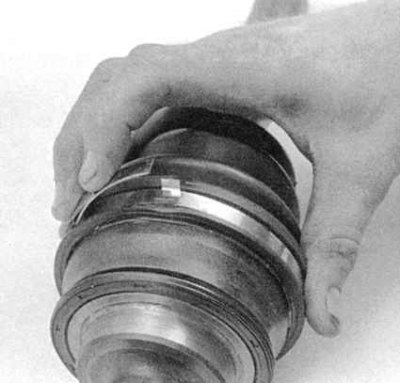
8a. Secure the cover with new bandage tapes (see accompanying illustrations): Fold back the free end of the bandage tape.
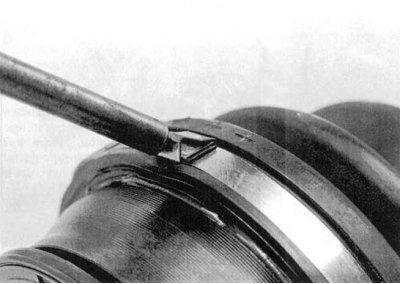
8b. Then bend back the locking tabs.
9. Install the shaft assembly onto the vehicle (see Removal and installation drive shafts).
Outer CV joint
Disassembly
1. Following the instructions above, remove the inner CV joint from the drive shaft and disassemble it.
2. If the shaft is equipped with a dynamic load damper, mark the position of the outer edge of the damper assembly relative to the shaft with paint, then cut the clamp and remove the damper. When replacing components, ensure that the distance between the inner CV joint boot and the damper is maintained (see Fig. Specifications).
3. Cut off the bandage tapes and remove the CV joint protective cover from the shaft.
Note: The outer CV joint cannot be disassembled or removed from the shaft.
Examination
1. Thoroughly wash the inner and outer CV joints with solvent, then dry them using compressed air.
Caution! When using compressed air, do not forget to wear safety glasses!
Note: Since the outer CV joint cannot be disassembled, removing traces of old grease and solvent from it is associated with certain difficulties, but must be done in the most thorough manner.
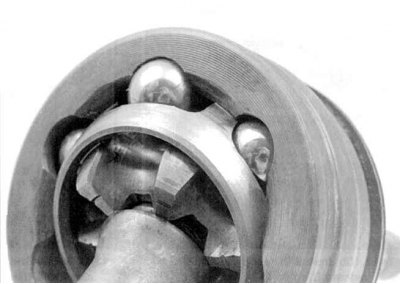
2. Rotate the hinge housing at different angles and carefully examine the condition of the balls, races and bearing separator (see accompanying illustration). If defects are found, replace the shaft assembly.
Assembly
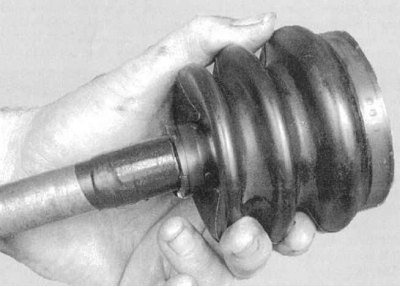
1a. Wrap the splines of the drive shaft journal with tape to protect them from the new CV joint boot from cuts (see accompanying illustration). Place the cover on the shaft, remove the tape, then fill the cover with the grease supplied in the repair kit. Bring the cover into working position and secure it with new bandage tapes.
2. Place the tripod assembly on the shaft.
3. Secure the tripod assembly with the outer retaining ring (see accompanying illustration).
4. If equipped, install the dynamic load damper on the shaft. Ensure that the mounting marks applied during dismantling are correctly aligned.
Note: When replacing the shaft, ensure that the required distance from the damper to the inner CV joint is maintained (see Specifications). Install a new mounting clamp.
5. Wash and assemble the inner CV joint assembly. Install the drive shaft assembly on the vehicle (see Removal and installation drive shafts).
(Article source on the website «HondaBook.ru»)