
HondaBook.ru
Auto companies Volkswagen Auto companies Ford Auto companies Lada Auto companies Skoda Auto companies BMW Auto companies Mazda Auto companies Peugeot
English Русский
Български
Беларускі
Український
Српски
Hrvatski
Română
Polski
Slovenský
Magyar
Bookmark Contacts Sitemap   


Accord Civic Fit / Jazz CR-V HR-V Others Articles
Civic 3 and 4 (1983-1991) Civic 5 and 6 (1991-2000) Civic 6 (1995-2000) Civic 7 (2000-2005) Civic 8 (2005-2011)

Replacing the water pump (Honda Civic 6)

  • Main
  • Honda Civic
  • 6 (1995-2000)
  • Power unit
  • Cooling and heating
  • Replacing the water pump
0
Attention! Proceed with the procedure only after the engine has completely cooled down!


1. Disconnect the negative cable from the battery.

Warning! If the car stereo system is equipped with a security code, make sure you have the correct combination to activate the audio system before disconnecting the battery!


2. Drain the cooling system (see Chapter Routine maintenance). If the coolant has been changed recently, save it for future use.

3. Remove the accessory drive belts (see Chapter Routine maintenance).

4. Remove the timing belt (see Part Engine Repair Without Removing It From The Car - Civic Models). On Integra models, remove the camshaft pulleys and the rear engine shield.

5. Remove the accessory mounting brackets from the water pump.
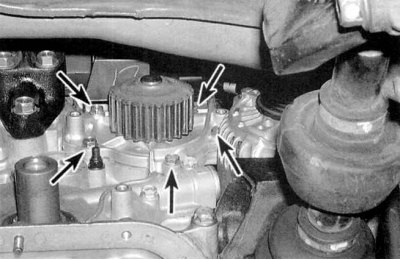
5. Remove the accessory mounting brackets from…


6. Remove the mounting bolts (see accompanying illustration) and separate the pump from the engine. Try to remember the location of the long bolt.

7. Clean the threads of the mounting bolts and bolt holes in the block, completely freeing them from traces of corrosion; if necessary, restore torn threads.

8. Make sure that the new pump matches the old one in size.


9. Remove all traces of sealant and old O-ring material from the mating surface of the engine block.

10. Wipe the mating surfaces of the engine and the new pump with a rag soaked in acetone.
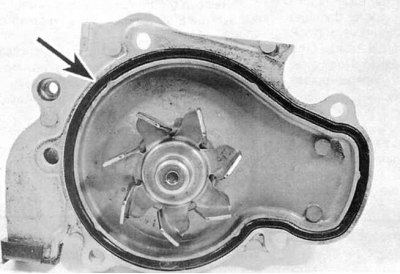
10. Wipe the mating surfaces of the engine and…


11. Lubricate the bottom and sides of the O-ring groove on the new pump body with RTV sealant, then carefully insert the new O-ring into the groove (see accompanying illustration).

12. Carefully press the pump onto the engine block, screw in a pair of mounting bolts and tighten them only by hand for now.

13. Screw in the remaining bolts (if any of them are also used to mount auxiliary brackets, be sure to install the latter as well). In several stages, -

1/4 turn per approach – tighten the fastener to the required torque.

Attention! Overtightening of bolts is not allowed under any circumstances due to the risk of deformation of the mating surfaces!


14. Reinstall all components removed to gain access to the pump.

15. Fill the cooling system and remove air locks from it, check the tension of the auxiliary drive belt (see Chapter Routine maintenance). Start the engine and check for signs of coolant leaks.
This article is available at: russian, bulgarian, belarusian, ukrainian, serbian, croatian, romanian, polish, slovak, hungarian
This information has been verified: Timofey Goryachev
Share with friends:
◀ Previous
Civic 6: Cooling and heating
Next ▶

Checking the condition of the water pump
Removal and installation the oil cooler
Removal and installation the radiator and expansion tank of the cooling system
Checking the cooling system fan and its switching circuit, replacing the fan
Checking the correct operation and replacing the thermostat
Checking and replacing the coolant temperature sensor unit
Checking the heater fan drive motor and the condition of its electrical…
Removal and installation the electric motor of the heater fan drive
Removal and installation the heater and air conditioner control panel assembly,…
Replacing the heater heat exchanger
See also other articles from Honda manuals:
Replacing the water pump Honda Accord 6 (1997-2002)
Replacing the cabin filter Honda Fit 1 (2001-2008)
Replacing the water pump Honda CR-V 2 (2002-2006, petrol)
Water Pump — Checking and Replacing Honda HR-V 1 (1998-2006, petrol)
Replacing the water pump Honda Avancier 1 (1999-2003, petrol)
Link in different formats to this article
Comments and feedback from visitors
No comments yet


How much will 38 + 49 ?


Civic 8 (2005-2011) 
  • General information
  • Technical data
  • Governing bodies
  • Driving and maintenance
  • Power unit
  • Gasoline engines (L13A)
  • Gasoline engines (R18A)
  • Diesel engines (N22A)
  • Cooling and lubrication (L13A)
  • Cooling and lubrication (R18A)
  • Cooling and lubrication (N22A)
  • Injection system (gasoline)
  • Injection system (diesel)
  • Toxicity reduction system
  • Troubleshooting
  • Transmission
  • Clutch and drive shafts
  • Mechanical gearbox
  • Chassis and running gear
  • Suspension and wheels
  • Steering
  • Brake system
  • Body and interior
  • Exterior (external elements)
  • Doors, locks and windows
  • Electrical equipment
  • Equipment and devices
  • Headlights and lighting
  • Power devices
  • Electrical circuits
Civic 7 (2000-2005) 
  • General information
  • User manual
  • Maintenance
  • Power unit
  • Engines D15B and D17A
  • K20A Engines
  • Overhaul engine
  • Cooling system
  • Lubrication system
  • Fuel injection system
  • Toxicity reduction system
  • Engine electrical equipment
  • Transmission
  • Clutch
  • Manual gearbox
  • Automatic gearbox
  • Variator (CVT)
  • Drive shafts
  • Chassis and running gear
  • Car suspension
  • Steering
  • Brake system
  • Body and interior
  • Exterior (external elements)
  • Interior (internal elements)
  • Doors, locks and windows
  • Heater and air conditioner
  • Manual air conditioner
  • Automatic air conditioner
  • Security system
  • Electrical equipment
  • Equipment and devices
  • Headlights and lighting
  • Windscreen wipers
  • Audio system
  • Electrical diagrams
Civic 6 (1995-2000) 
  • General information
  • Introduction to guide
  • User manual
  • Maintenance
  • Power unit
  • Engine in car (Civic)
  • Engine in car (Integra)
  • Engine overhaul
  • Cooling and heating
  • Power and exhaust systems
  • Engine electrical equipment
  • Engine management systems
  • Transmission
  • Manual gearbox
  • Automatic transmission (AT/CVT)
  • Clutch and drive shafts
  • Chassis and running gear
  • Brake system
  • Car suspension
  • Steering
  • Body and interior
  • Exterior (external elements)
  • Interior (internal elements)
  • Doors, locks and windows
  • Electrical equipment
  • Equipment and devices
  • Electrical circuits
Civic 5 and 6 (1991-2000) 
  • Power unit
  • SOHC engines
  • DOHC engines
  • Engine overhaul
  • Cooling and lubrication system
  • Intake and exhaust system
  • Fuel injection system (SOHC)
  • Fuel injection system (DOHC)
  • Carburetor
  • Transmission
  • Clutch
  • Manual gearbox S4C
  • Manual gearbox S40
  • Automatic gearbox
  • Drive shafts
  • Chassis and running gear
  • Car suspension
  • Steering
  • Brake system
  • Body and interior
  • Body elements
  • Heater and air conditioner
  • Electrical equipment
  • Power devices
  • Equipment and instruments
  • Electrical circuits
Civic 3 and 4 (1983-1991) 
  • General information
  • Maintenance
  • Power unit
  • Engine in a car
  • Engine overhaul
  • Cooling system
  • Power and exhaust system
  • Engine electrical equipment
  • Emission control system
  • Transmission
  • Mechanical gearbox
  • Automatic gearbox
  • Clutch and drive shafts
  • Four-wheel drive
  • Chassis and running gear
  • Brake system
  • Car suspension
  • Steering
  • Body and interior
  • Body elements
  • Electrical equipment
  • Equipment and devices
  • Electrical circuits
HondaBook.ru © 2018–2026 • Mobile version • Sitemap: EN BG BY UA RS HR RO PL SK HU • Feedback • Driver Information • Search system • Bookmark
Accord 3 (1985-1989) • Accord 6 (1997-2002) • Civic 3 and 4 (1983-1991) • Civic 5 and 6 (1991-2000) • Civic 6 (1995-2000) • Civic 7 (2000-2005) • Civic 8 (2005-2011) • Fit 1 (2001-2008) • CR-V 1 (1995-2001) • CR-V 2 (2002-2006) • HR-V 1 (1998-2006) • Avancier 1 (1999-2003) •
 
This website uses cookies to ensure proper functioning. By clicking "OK," you agree.