
HondaBook.ru
Auto companies Volkswagen Auto companies Ford Auto companies Lada Auto companies Skoda Auto companies BMW Auto companies Mazda Auto companies Peugeot
English Русский
Български
Беларускі
Український
Српски
Hrvatski
Română
Polski
Slovenský
Magyar
Bookmark Contacts Sitemap   


Accord Civic Fit / Jazz CR-V HR-V Others Articles
Civic 3 and 4 (1983-1991) Civic 5 and 6 (1991-2000) Civic 6 (1995-2000) Civic 7 (2000-2005) Civic 8 (2005-2011)

Installing the crankshaft and checking the main bearing clearances (Honda Civic 6)

  • Main
  • Honda Civic
  • 6 (1995-2000)
  • Power unit
  • Engine overhaul
  • Installing the crankshaft and checking the main bearing clearances
0
Contents: Checking the working clearances of…⇊ Final installation of the crankshaft ⇊
1. Installing the crankshaft is the first step in the actual engine assembly. It is assumed that at this stage the crankshaft and engine block have already been properly cleaned, inspected and reconditioned.

2. Turn the engine upside down.

3. Loosen the mounting bolts and remove the main bearing caps and/or their axle assembly.

4. If you haven't already done so, remove the old main bearing shells from their beds in the block and caps. Wipe the beds with a clean, lint-free cloth - they should be spotlessly clean.

Checking the working clearances of the main bearings


Note: Try not to touch the surfaces of new bearings with bare hands to avoid unwanted contact of bearings with traces of oil and chemically aggressive substances that are always present on fingers.


1. Wipe the backs of the new main bearing shells and insert the ones equipped with an oil groove (if such is provided) halves into their beds in the block. Place the remaining halves of the liners into the corresponding bearing caps. Make sure that the tongues of the liners enter the corresponding mounting grooves in the beds of the block and caps. The oil holes in the block must also be correctly aligned with the holes in the liners.

Warning! Do not attempt to hammer the unfit insert into your bed under any circumstances. Do not lubricate the bearings at this stage!
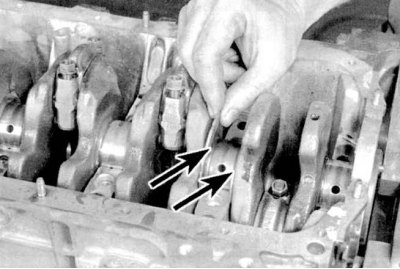

Warning! Do not attempt to hammer the unfit…


2. Thrust inserts (washers) equipped with flanges must be installed in the bed (counting from the timing belt) main bearing (see accompanying illustration). 3. Wipe the bearing surfaces in the block and the crankshaft main journals with a clean, lint-free cloth.


4. Check the patency of the shaft oil holes, clean them if necessary. Any foreign particles contained in the oil flows will eventually inevitably end up in the bearings.

5. Carefully place the thoroughly cleaned crankshaft into the main bearings of the block.

6. Before finally installing the shaft, it is necessary to check the working clearances in its main bearings.
6. Before finally installing the shaft, it is…


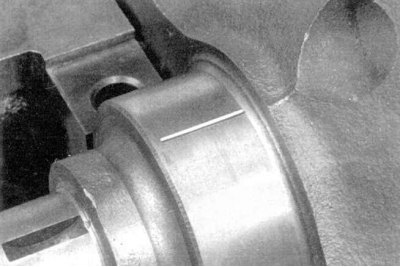
7. Cut calibrated plastic wire from the Plastigage measuring kit into pieces slightly shorter than the width of the bearings and place one piece of wire along each of the main journals of the shaft, parallel to their axis (see accompanying illustration).

8. Wipe the surfaces of the liners in the caps and install the latter and/or their bridge assembly in their regular place. Try not to move the pieces of calibrated wire laid along the shaft journals. Lightly lubricate the threads of the fastening bolts with oil and screw them in, securing the caps.
8. Wipe the surfaces of the liners in the caps…


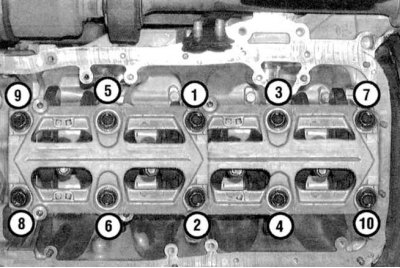
9a. Tighten the cover and/or cover bridge bolts to the specified torque in three stages in the order shown in the accompanying illustration (Civic).


9a. Tighten the cover and/or cover bridge bolts…


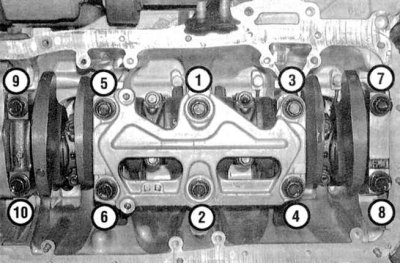
9b. Tighten the cover and/or cover bridge mounting bolts to the specified torque in three stages in the order shown in the accompanying illustration (Integra).

Caution! Do not allow the shaft to turn while tightening the fasteners!


10. Remove the bolts and carefully remove the main caps and/or their axle assembly. Stack the removed caps in the order they are located on the engine. Try not to damage the flattened calibrated wire and do not turn the shaft. If any of the caps cannot be removed, gently tap them with a soft-faced hammer to release them.
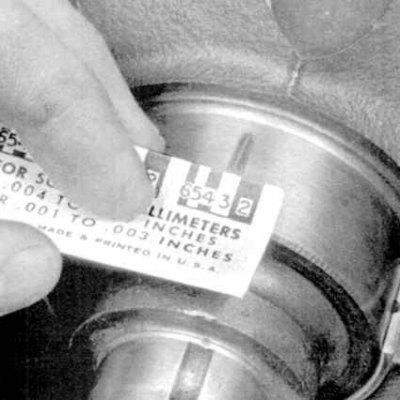
10. Remove the bolts and carefully remove the…


11. Using the width of the flattened threads, measured using the scale on the Plastigage kit packaging, determine the size of the bearing working clearances (see accompanying illustration). Compare the measurement results with the requirements Specifications.


12. If the gap size is outside the permissible limits, it is possible that the wrong size liners were installed (see Checking the condition and selecting the liners of the main and connecting rod bearings of the crankshaft). Before looking for new inserts, make sure that no dirt or oil has gotten under the inserted ones. If the calibrated wire is flattened more at one end than at the other, this indicates the presence of a taper in the neck (see Checking the condition of the crankshaft).

13. Carefully remove the calibrated wire from the necks, scraping off all traces of it with some not very strong tool (for example, the edge of an old credit card). In extreme cases, you can use your own fingernail, the main thing is that there are no scratches or burrs left on the surface of the necks/liners.

Final installation of the crankshaft


Note: If the engine is equipped with a main bearing cap bridge (B18C1, B18C5, D16Y5, D16Y7 or D16Y8), first install the connecting rod and piston group in place (see Installation of connecting rod and piston assemblies and checking the size of working clearances in the connecting rod bearings of the crankshaft). Then bring all pistons to TDC positions so that they do not interfere with the installation of the camshaft.


1. Carefully remove the crankshaft from the engine.

2. Wipe the bearing surfaces in the block and evenly lubricate them with a thin layer of molybdenum-containing assembly engine grease. Do not forget to lubricate the thrust surfaces of the fourth bearing as well.


Caution! Try not to let grease get on the backs of the liners!


3. Make sure the crankshaft journals are absolutely clean, then lubricate (with the same grease) the surfaces of the journals that contact the seals and carefully place the shaft into the block.

4. Wipe and lubricate the surfaces of the liners in the lids.

5. Install the main bearing caps and/or axle assembly onto the engine.

6. Screw in the mounting bolts.

7. In the required order, tighten the bearing cap bolts to the required torque.

8. Turn the crankshaft several times by hand, checking for freedom of rotation.

9. Finally, use a blade type feeler gauge or DTI gauge to determine the amount of shaft end play (see Removal the crankshaft). If the thrust surfaces of the shaft are not worn or damaged, and the bearings are replaced with new ones, the axial clearance should not exceed the permissible limits.

10. Install the new crankshaft rear oil seal (see Replacing the rear crankshaft oil seal).

(Full text available on the portal HondaBook.ru)
This article is available at: russian, bulgarian, belarusian, ukrainian, serbian, croatian, romanian, polish, slovak, hungarian
This information has been verified: Timofey Goryachev
Share with friends:
◀ Previous
Civic 6: Engine overhaul
Next ▶

Installing piston rings
Engine assembly procedure
Checking the condition and selecting the liners of the main and connecting rod…
Checking the condition of the crankshaft
Checking the condition of the connecting rod and piston group components
Replacing the rear crankshaft oil seal
Installation of connecting rod and piston assemblies and checking the size of…
Test run and running-in of the engine after major repairs
See also other articles from Honda manuals:
Installing the crankshaft and checking the main bearing clearances Honda Accord 6 (1997-2002)
Checking the axial clearance of the connecting rod and crankshaft Honda Fit 1 (2001-2008)
Crankshaft Angle Sensor — Checking, Removing and Installing Honda CR-V 1 (1995-2001, petrol)
Valve Rocker Arms and Axles — Checking Clearances Honda HR-V 1 (1998-2006, petrol)
Checking the PGM-Fi Main Relay Honda Avancier 1 (1999-2003, petrol)
Link in different formats to this article
Comments and feedback from visitors
No comments yet


How much will 31 + 26 ?


Civic 8 (2005-2011) 
  • General information
  • Technical data
  • Governing bodies
  • Driving and maintenance
  • Power unit
  • Gasoline engines (L13A)
  • Gasoline engines (R18A)
  • Diesel engines (N22A)
  • Cooling and lubrication (L13A)
  • Cooling and lubrication (R18A)
  • Cooling and lubrication (N22A)
  • Injection system (gasoline)
  • Injection system (diesel)
  • Toxicity reduction system
  • Troubleshooting
  • Transmission
  • Clutch and drive shafts
  • Mechanical gearbox
  • Chassis and running gear
  • Suspension and wheels
  • Steering
  • Brake system
  • Body and interior
  • Exterior (external elements)
  • Doors, locks and windows
  • Electrical equipment
  • Equipment and devices
  • Headlights and lighting
  • Power devices
  • Electrical circuits
Civic 7 (2000-2005) 
  • General information
  • User manual
  • Maintenance
  • Power unit
  • Engines D15B and D17A
  • K20A Engines
  • Overhaul engine
  • Cooling system
  • Lubrication system
  • Fuel injection system
  • Toxicity reduction system
  • Engine electrical equipment
  • Transmission
  • Clutch
  • Manual gearbox
  • Automatic gearbox
  • Variator (CVT)
  • Drive shafts
  • Chassis and running gear
  • Car suspension
  • Steering
  • Brake system
  • Body and interior
  • Exterior (external elements)
  • Interior (internal elements)
  • Doors, locks and windows
  • Heater and air conditioner
  • Manual air conditioner
  • Automatic air conditioner
  • Security system
  • Electrical equipment
  • Equipment and devices
  • Headlights and lighting
  • Windscreen wipers
  • Audio system
  • Electrical diagrams
Civic 6 (1995-2000) 
  • General information
  • Introduction to guide
  • User manual
  • Maintenance
  • Power unit
  • Engine in car (Civic)
  • Engine in car (Integra)
  • Engine overhaul
  • Cooling and heating
  • Power and exhaust systems
  • Engine electrical equipment
  • Engine management systems
  • Transmission
  • Manual gearbox
  • Automatic transmission (AT/CVT)
  • Clutch and drive shafts
  • Chassis and running gear
  • Brake system
  • Car suspension
  • Steering
  • Body and interior
  • Exterior (external elements)
  • Interior (internal elements)
  • Doors, locks and windows
  • Electrical equipment
  • Equipment and devices
  • Electrical circuits
Civic 5 and 6 (1991-2000) 
  • Power unit
  • SOHC engines
  • DOHC engines
  • Engine overhaul
  • Cooling and lubrication system
  • Intake and exhaust system
  • Fuel injection system (SOHC)
  • Fuel injection system (DOHC)
  • Carburetor
  • Transmission
  • Clutch
  • Manual gearbox S4C
  • Manual gearbox S40
  • Automatic gearbox
  • Drive shafts
  • Chassis and running gear
  • Car suspension
  • Steering
  • Brake system
  • Body and interior
  • Body elements
  • Heater and air conditioner
  • Electrical equipment
  • Power devices
  • Equipment and instruments
  • Electrical circuits
Civic 3 and 4 (1983-1991) 
  • General information
  • Maintenance
  • Power unit
  • Engine in a car
  • Engine overhaul
  • Cooling system
  • Power and exhaust system
  • Engine electrical equipment
  • Emission control system
  • Transmission
  • Mechanical gearbox
  • Automatic gearbox
  • Clutch and drive shafts
  • Four-wheel drive
  • Chassis and running gear
  • Brake system
  • Car suspension
  • Steering
  • Body and interior
  • Body elements
  • Electrical equipment
  • Equipment and devices
  • Electrical circuits
HondaBook.ru © 2018–2026 • Mobile version • Sitemap: EN BG BY UA RS HR RO PL SK HU • Feedback • Driver Information • Search system • Bookmark
Accord 3 (1985-1989) • Accord 6 (1997-2002) • Civic 3 and 4 (1983-1991) • Civic 5 and 6 (1991-2000) • Civic 6 (1995-2000) • Civic 7 (2000-2005) • Civic 8 (2005-2011) • Fit 1 (2001-2008) • CR-V 1 (1995-2001) • CR-V 2 (2002-2006) • HR-V 1 (1998-2006) • Avancier 1 (1999-2003) •
 
This website uses cookies to ensure proper functioning. By clicking "OK," you agree.