
Warning! Carrying out battery checks and maintenance requires some special precautions. Remember that the hydrogen released by the electrolyte is a highly explosive gas - do not smoke or approach the work site with an open flame or a lit cigarette. Do not forget that the electrolyte itself is diluted sulfuric acid, which can cause severe chemical burns if it gets into your eyes or on exposed areas of the body. The electrolyte can also easily damage the fabric of clothing and the paintwork of body panels!
When disconnecting the battery, always disconnect the negative cable first – it should be connected last!
Service
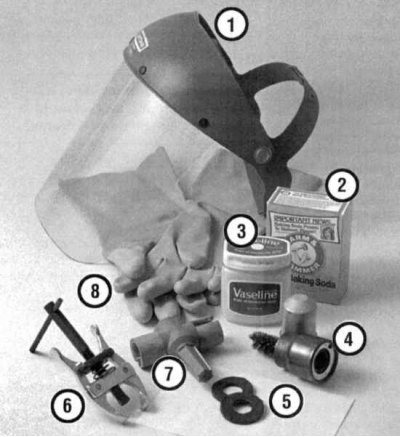 |
Tools and materials needed for battery maintenance
1. Face shield/safety glasses - when removing traces of corrosion with a hard brush, crystallized acid particles can easily get into the eyes. 2. Baking soda - an aqueous solution of baking soda is used to neutralize traces of corrosion. 3. Acid-free Vaseline - lubricating the battery terminals will help prevent corrosion in the future. 4. Battery terminal/wire end stripper - specially shaped brush attachments made of hard wire will help to effectively clean battery terminals and terminal clamps. 5. Impregnated felt washers - installing such a washer directly under the terminal clamp will prevent the development of corrosion. 6. Puller - sometimes the clamps are seated on the terminals very tightly and cannot be removed even if the fasteners are completely released. 7. Battery terminal/wire end stripper - despite the fact that it differs in design from that mentioned in paragraph 4, it is intended to perform the same tasks. 8. Rubber gloves - do not neglect the use of this protective agent - do not forget that the battery contains sulfuric acid! |
1. A conscientious attitude to the implementation of routine preventive maintenance procedures for the battery is the only guarantee of a quick and trouble-free engine start. Before you begin servicing the battery, make sure you have all the necessary materials and tools at hand to ensure the safety of the work (see illustration above).
2. There are a number of additional precautions that must be taken when servicing the battery. Before starting work, be sure to turn off the engine and all electrical consumers. Disconnect the negative cable from the battery.
3. Remember that hydrogen is released in the battery cans, which is not only highly flammable, but also explosive. Never approach the work site with an open flame or a lit cigarette, try to use only non-sparking tools. Charge the battery in a well-ventilated area.
4. The electrolyte is a solution of sulfuric acid, which is not only poisonous but also highly chemically aggressive. Do not allow the electrolyte to come into contact with your eyes, exposed areas of the body, or clothing. When servicing the battery, wear protective glasses and gloves, and do not allow children to approach the work area.
5. Examine the external condition of the battery. If the positive battery terminal with the clamp on it is equipped with a rubber protective cover, make sure that the latter is not damaged. The cover must completely cover the metal components of the terminal connection. Check the condition and reliability of the fastening of the terminal connections, inspect the cover and battery cover for cracks and other damage. Make sure that the clamping bolts are securely fastened. Assess the condition of the insulation of the battery wires along their entire length.
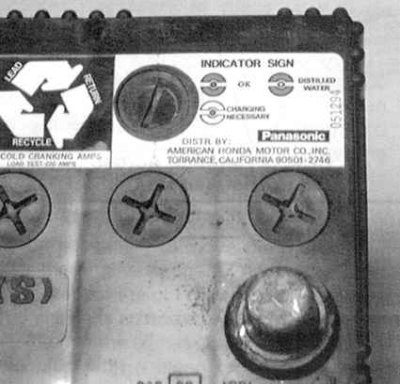
6. Some models are equipped with sealed batteries equipped with a charge level indicator (see accompanying illustration). Compare the color of the indicator spot in the viewing window with the status map printed on a special label pasted to the battery case. Check the battery condition regularly, and charge it in a timely manner if necessary.
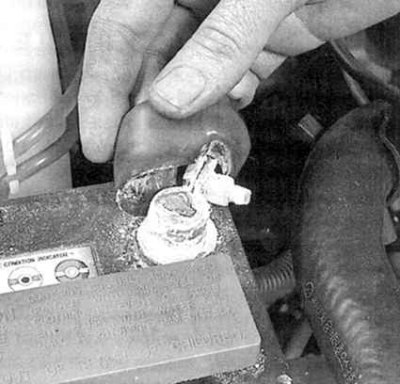
7a. If traces of corrosion in the form of a white powdery coating are found on the surface of the battery (see accompanying illustration), especially near the terminals, it is necessary to remove the battery from the vehicle to perform a thorough external cleaning.
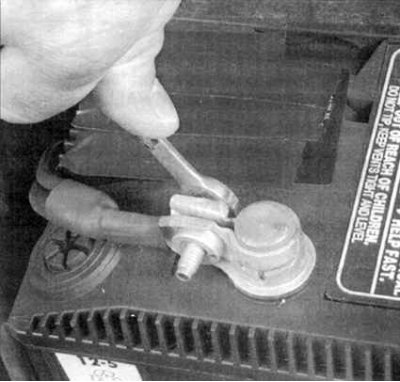
7b. Loosen the terminal clamp bolts with a wrench (first negative!) (see accompanying illustration) and carefully disconnect the wires from the battery. Release the clamping bar fastener, lift the latter and remove the battery from the engine compartment.
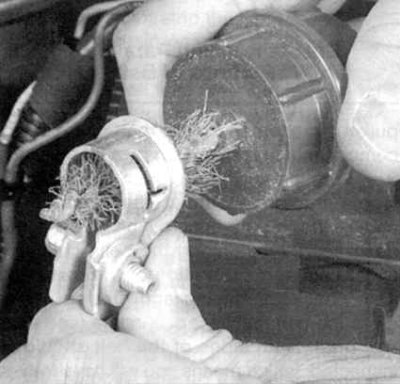
8a. Thoroughly clean the contact surfaces of the terminal clamps and battery terminals with a special brush and a solution of baking soda (see accompanying illustrations).
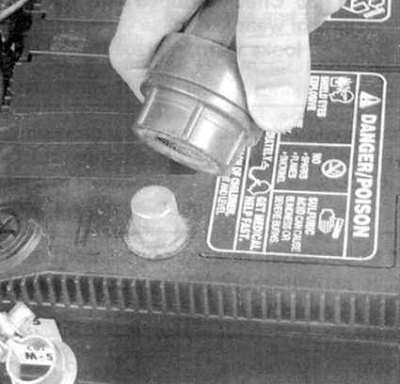
8b. Clean the battery terminals with the same solution and wash the surface of its cover - make sure that the solution does not get inside the jars. Clean in a protective mask/glasses and rubber gloves to avoid getting acid particles in your eyes and on your hands. Also try to choose appropriate clothing that you won't be sorry to throw away later. After finishing cleaning, rinse the treated surfaces with clean water.
9. Check the condition of the battery tray and the clamping bar mounting studs. Wash the tray with a solution of baking soda, treat the areas damaged by corrosion with a zinc-based primer.
10. Before installing the battery, make sure that no tools or materials are left on the tray.
11. Do not overtighten the clamp bar nuts.
12. To protect the terminal connections from corrosion, place specially treated felt washers on the battery terminals, connect the wires, and cover the terminal assemblies with acid-free petroleum jelly.
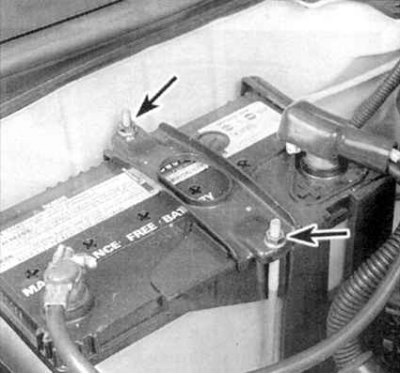
13. Ensure that the clamp fasteners are securely tightened.
Charger
Warning! During charging, highly flammable and fire hazardous hydrogen is released in the battery cells! Do not smoke or approach the charging area with an open flame. Wear protective glasses when approaching the battery installation area. Before connecting or disconnecting the battery from the charger, make sure that the device is disconnected from the power supply.
Note: The authors of this Manual recommend charging the battery outside the vehicle, as the gas released during the procedure is chemically aggressive towards paintwork. Performing a quick charge without disconnecting the wires from the battery may result in failure of the vehicle's electrical components.
The best way to restore the battery charge level, which has been discharged to such a degree that it is no longer capable of starting the engine, is to slowly charge it. This method of charging is also most favorable for batteries of cars used for short trips. Maintaining the battery charge level is especially important in the winter season, when the most unfavorable conditions are created in terms of the load on the battery during difficult engine starts and increased intensity of operation of electricity consumers.
It is best to use a device for continuous charging with a small current (1÷2 A), sometimes also called a trickle charger). Such chargers provide the most favorable battery charging mode with a minimum load on the latter. For faster battery charging, you can use a power source with a higher current, but remember that the maximum permissible charging current should not exceed 1/10 of the battery capacity (its ampere-hour characteristics). With forced charging, which, according to some users, allows the charge level to be restored in one or two hours, the load on the battery becomes so high that it often fails irreversibly - try to avoid this method of recharging, resorting to it only in extreme emergency situations.
The average duration of the battery charging period should be specified in the instructions supplied with the charger. Typically, it is between 12 and 16 hours.
Remove the caps from the necks of all battery cans (if any are provided) and plug the holes with a clean rag to prevent electrolyte from splashing out. Disconnect the negative cable from the battery and, observing the polarity, connect the clamps of the charger cable tips to the battery terminals (positive to positive, negative to negative). Plug the charger into the network. If the device is equipped with a selector switch, make sure that it is set to 12 V.
When using a power source with a charging current greater than two amperes, check the battery regularly to ensure that it does not overheat. During slow charging, after the initial two-hour check, the battery can safely be left to charge unattended overnight.
If the jars of the battery being charged are equipped with filler necks with removable caps, try to check the specific gravity of the electrolyte every hour during the first few hours of charging. Many manufacturers produce fairly inexpensive devices called hydrometers specifically for this purpose, which can be purchased at almost any car accessory store. When using a hydrometer, follow the manufacturer's instructions. Continue charging the battery until the density of the electrolyte stops changing during the last two hourly measurements, provided that it "boils" (bubbles) freely in the jars. Remember that in a serviceable battery, the difference between the specific gravities of the electrolyte in all the jars should be very small.
Some batteries are placed in a sealed case and equipped with a built-in hydrometer, allowing you to visually determine the battery charge level by the color of the color spot in the viewing window of the case. A normal bright color of the color spot indicates a high battery charge level. A dark color of the spot indicates that the battery still needs recharging.
In batteries with a sealed case without a built-in hydrometer (charge level indicator) the charge level can be checked by connecting a voltmeter to the battery terminals. The output voltage of a fully charged battery should be at least 12.6 V after removing the surface charge.