
HondaBook.ru
Auto companies Volkswagen Auto companies Ford Auto companies Lada Auto companies Skoda Auto companies BMW Auto companies Mazda Auto companies Peugeot
English Русский
Български
Беларускі
Український
Српски
Hrvatski
Română
Polski
Slovenský
Magyar
Bookmark Contacts Sitemap   


Accord Civic Fit / Jazz CR-V HR-V Others Articles
Civic 3 and 4 (1983-1991) Civic 5 and 6 (1991-2000) Civic 6 (1995-2000) Civic 7 (2000-2005) Civic 8 (2005-2011)

Removal, inspection and installation of clutch assembly components (Honda Civic 6)

  • Main
  • Honda Civic
  • 6 (1995-2000)
  • Transmission
  • Clutch and drive shafts
  • Removal, inspection and installation of clutch assembly components
0
Contents: Removal ⇊ Examination ⇊ Installation ⇊
Warning! Remember that dust generated during wear of the clutch slave disk friction linings may contain asbestos, which is harmful to health. Do not blow off dust with compressed air and try not to inhale it. Do not use petroleum-based solvents to wipe clutch components – use only special brake cleaners or pure methyl alcohol. Place used rags in a hermetically sealed container.


Removal


1. In order to provide access to the clutch assembly, the gearbox is usually removed, leaving the engine in the car. If the engine has already been removed for general or major repairs, the condition of the clutch components must be checked without fail. Considering the relatively low cost of the parts and the fairly high volume of mechanical work to provide access to the clutch assembly, it makes sense to replace the latter regardless of the condition of the components. Below is a description of the procedure for removing the clutch without removing the engine from the car.

2. Remove the gearbox (see 5-speed manual transmission). Support the engine with a jack or hang it from above with a winch (preferably the latter). If you use a jack, remember to place a wooden block between its head and the oil pan to distribute the load.

Attention! The oil intake of the oil pump is located very close to the bottom of the oil pan and can easily be damaged if the latter is deformed.


3. The clutch release fork and release bearing can be left in place in the transmission housing.


4. To prevent the driven disk from falling out when removing the basket, insert a special clutch centering tool into its hub.
4. To prevent the driven disk from falling out…


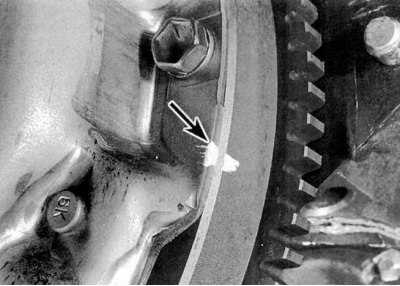
5. Carefully inspect the surfaces of the flywheel and clutch basket assembly for markings (usually in the form of letters X or O painted in white). If you cannot find the marking, apply it yourself, clearly marking the position of the basket relative to the flywheel (see accompanying illustration).
5. Carefully inspect the surfaces of the flywheel…


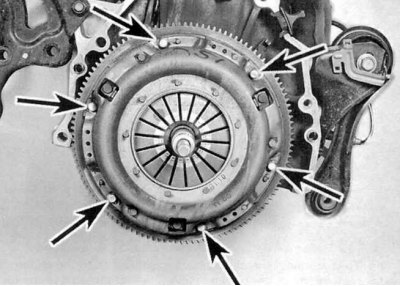
6. Working diagonally, in several steps, evenly loosen the bolts securing the clutch basket to the flywheel (see accompanying illustration), completely unloading the spring. While securely supporting the clutch assembly, remove the bolts completely, then separate the basket from the flywheel and remove the entire assembly from the vehicle.


Examination


1. Most often, the malfunction of the clutch is associated with wear of the friction linings of the driven disk. However, it is necessary to carefully examine the condition of all components of the assembly.

2. Examine the flywheel working surface for cracks, traces of overheating, grooves and other damage. Minor defects can be eliminated by turning in a car service workshop (it is recommended to perform turning regardless of the surface condition). A description of the flywheel removal and installation procedures is given in the corresponding Section of the Chapter Engine.
2. Examine the flywheel working surface for…


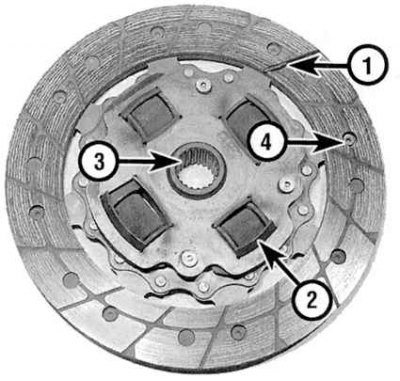
3. Assess the degree of wear of the friction linings of the driven clutch disc. The surface of the linings should rise above the rivet heads by at least 1.6 mm. Make sure that all rivets are tightly seated, check the torsion springs/dampers for cracks, signs of deformation and other mechanical damage (see accompanying illustration). As mentioned above, it is wise to replace clutch components every time they are removed, so pay attention to the slightest errors.

4. The release bearing is always replaced together with the driven disk (see Removal, condition check and installation of the release bearing and clutch release fork). While you're at it, check the condition of the guide bearing in the crankshaft journal (see Checking the condition and replacing the guide bearing).


4. The release bearing is always replaced…


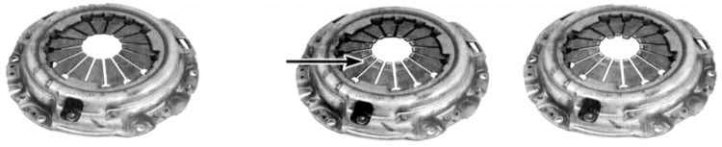
5a. Assess the condition of the machined surfaces and petals of the diaphragm spring of the pressure plate (see accompanying illustrations).
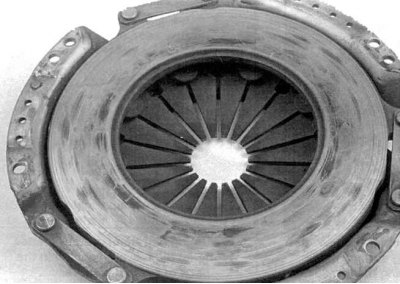
5a. Assess the condition of the machined surfaces…


5b. Check the friction surface for damage. If any defects are found, replace the basket assembly. Light polishing marks can be removed with fine-grained sandpaper. A reconditioned assembly can always be purchased on an exchange basis from Honda service centers.

Installation


1. Before installation, wipe the machined surfaces of the flywheel and pressure plate with a rag soaked in acetone. It is extremely important to achieve complete degreasing of the working surfaces of the components, as well as the friction linings of the driven disk. Touch the components only with clean hands.


2. Press the basket assembly with the tool for centering the components inserted and fixed into it with the driven disk to the flywheel. Make sure that the clutch disks are turned towards the flywheel and marked with the appropriate marking (like "flywheel side") sides. If there is no marking, remember that the driven disk must be installed with torsion springs/dampers to the gearbox.

3. Hand tighten the assembly-to-flywheel mounting bolts.
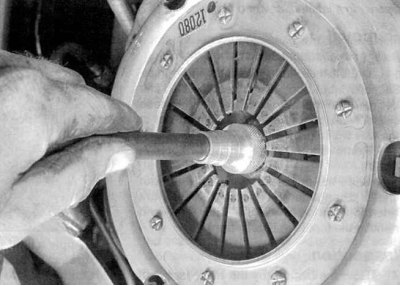
3. Hand tighten the assembly-to-flywheel mounting…


4. Center the clutch assembly components. A special tool is inserted through the driven disk hub and inserted into a pocket in the end of the crankshaft journal (see accompanying illustration). To align the components, move the tool in different directions in the vertical plane. Moving diagonally, tighten the assembly mounting bolts tightly in several steps, then tighten them to the required force. Remove the clutch centering tool.

5. Pack the inner groove of the release bearing with high-melting grease (see Removal, condition check and installation of the release bearing and clutch release fork). Also lubricate the contact surfaces of the clutch release lever and the gearbox input shaft bearing holder.


6. Install the release bearing (see Checking the condition and replacing the guide bearing).

7. Install the gearbox and all components removed for access.

[Refer to the original source on the website Hondabook.ru]
This article is available at: russian, bulgarian, belarusian, ukrainian, serbian, croatian, romanian, polish, slovak, hungarian
This information has been verified: Timofey Goryachev
Share with friends:
◀ Previous
Civic 6: Clutch and drive shafts
Next ▶

Bleeding air from the hydraulic circuit of the clutch release drive
Removal and installation the clutch slave cylinder
Removal and installation the clutch master cylinder
Clutch — General information and component condition check
Clutch and Drive Shaft Specifications
Checking the condition and replacing the guide bearing
Removal, checking and installation the release bearing and clutch release fork
Adjusting the clutch pedal
Checking, replacing and adjusting the starter circuit breaker switch sensor
Removal and installation drive shafts
See also other articles from Honda manuals:
Clutch components Honda Accord 3 (1985-1989)
Clutch components — device Honda Fit 1 (2001-2008)
Clutch master cylinder Honda CR-V 1 (1995-2001, petrol)
Lubrication points of vehicle components Honda HR-V 1 (1998-2006, petrol)
Location of cooling system components Honda Avancier 1 (1999-2003, petrol)
Link in different formats to this article
Comments and feedback from visitors
No comments yet


How much will 44 + 40 ?


Civic 8 (2005-2011) 
  • General information
  • Technical data
  • Governing bodies
  • Driving and maintenance
  • Power unit
  • Gasoline engines (L13A)
  • Gasoline engines (R18A)
  • Diesel engines (N22A)
  • Cooling and lubrication (L13A)
  • Cooling and lubrication (R18A)
  • Cooling and lubrication (N22A)
  • Injection system (gasoline)
  • Injection system (diesel)
  • Toxicity reduction system
  • Troubleshooting
  • Transmission
  • Clutch and drive shafts
  • Mechanical gearbox
  • Chassis and running gear
  • Suspension and wheels
  • Steering
  • Brake system
  • Body and interior
  • Exterior (external elements)
  • Doors, locks and windows
  • Electrical equipment
  • Equipment and devices
  • Headlights and lighting
  • Power devices
  • Electrical circuits
Civic 7 (2000-2005) 
  • General information
  • User manual
  • Maintenance
  • Power unit
  • Engines D15B and D17A
  • K20A Engines
  • Overhaul engine
  • Cooling system
  • Lubrication system
  • Fuel injection system
  • Toxicity reduction system
  • Engine electrical equipment
  • Transmission
  • Clutch
  • Manual gearbox
  • Automatic gearbox
  • Variator (CVT)
  • Drive shafts
  • Chassis and running gear
  • Car suspension
  • Steering
  • Brake system
  • Body and interior
  • Exterior (external elements)
  • Interior (internal elements)
  • Doors, locks and windows
  • Heater and air conditioner
  • Manual air conditioner
  • Automatic air conditioner
  • Security system
  • Electrical equipment
  • Equipment and devices
  • Headlights and lighting
  • Windscreen wipers
  • Audio system
  • Electrical diagrams
Civic 6 (1995-2000) 
  • General information
  • Introduction to guide
  • User manual
  • Maintenance
  • Power unit
  • Engine in car (Civic)
  • Engine in car (Integra)
  • Engine overhaul
  • Cooling and heating
  • Power and exhaust systems
  • Engine electrical equipment
  • Engine management systems
  • Transmission
  • Manual gearbox
  • Automatic transmission (AT/CVT)
  • Clutch and drive shafts
  • Chassis and running gear
  • Brake system
  • Car suspension
  • Steering
  • Body and interior
  • Exterior (external elements)
  • Interior (internal elements)
  • Doors, locks and windows
  • Electrical equipment
  • Equipment and devices
  • Electrical circuits
Civic 5 and 6 (1991-2000) 
  • Power unit
  • SOHC engines
  • DOHC engines
  • Engine overhaul
  • Cooling and lubrication system
  • Intake and exhaust system
  • Fuel injection system (SOHC)
  • Fuel injection system (DOHC)
  • Carburetor
  • Transmission
  • Clutch
  • Manual gearbox S4C
  • Manual gearbox S40
  • Automatic gearbox
  • Drive shafts
  • Chassis and running gear
  • Car suspension
  • Steering
  • Brake system
  • Body and interior
  • Body elements
  • Heater and air conditioner
  • Electrical equipment
  • Power devices
  • Equipment and instruments
  • Electrical circuits
Civic 3 and 4 (1983-1991) 
  • General information
  • Maintenance
  • Power unit
  • Engine in a car
  • Engine overhaul
  • Cooling system
  • Power and exhaust system
  • Engine electrical equipment
  • Emission control system
  • Transmission
  • Mechanical gearbox
  • Automatic gearbox
  • Clutch and drive shafts
  • Four-wheel drive
  • Chassis and running gear
  • Brake system
  • Car suspension
  • Steering
  • Body and interior
  • Body elements
  • Electrical equipment
  • Equipment and devices
  • Electrical circuits
HondaBook.ru © 2018–2026 • Mobile version • Sitemap: EN BG BY UA RS HR RO PL SK HU • Feedback • Driver Information • Search system • Bookmark
Accord 3 (1985-1989) • Accord 6 (1997-2002) • Civic 3 and 4 (1983-1991) • Civic 5 and 6 (1991-2000) • Civic 6 (1995-2000) • Civic 7 (2000-2005) • Civic 8 (2005-2011) • Fit 1 (2001-2008) • CR-V 1 (1995-2001) • CR-V 2 (2002-2006) • HR-V 1 (1998-2006) • Avancier 1 (1999-2003) •
 
This website uses cookies to ensure proper functioning. By clicking "OK," you agree.