


Vehicle electrical equipment and instruments Honda Avancier 1
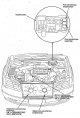


Instrument cluster — component layout
If there are components of the supplemental restraint system nearby, refer to the Supplemental Restraint System (SRS) chapter when performing work.
If there are components of the supplemental restraint system nearby, refer to the Supplemental Restraint System (SRS) chapter when performing work.


Instrument cluster — removal
1. Remove the lower instrument cluster trim ( see chapter Body ). 2. Disconnect the 10-pin auxiliary instrument cluster connector. 3. Remove 2 screws and sub-assembly from lower instrument cluster trim. 4. Remove the...
1. Remove the lower instrument cluster trim ( see chapter Body ). 2. Disconnect the 10-pin auxiliary instrument cluster connector. 3. Remove 2 screws and sub-assembly from lower instrument cluster trim. 4. Remove the...

Instrument cluster — check
Check if the automatic transmission malfunction code 9 is displayed ( see chapter Automatic transmission ). Check the serviceability and installation condition of fuse No.9 (10A) in the fuse box on the driver's side...
Check if the automatic transmission malfunction code 9 is displayed ( see chapter Automatic transmission ). Check the serviceability and installation condition of fuse No.9 (10A) in the fuse box on the driver's side...


Security indicator — input signal check
1. Remove the instrument cluster (see above). 2. Disconnect all connectors from the instrument cluster. 3. Check all the following input signals, if they are normal but the indicators are not working normally, then the...
1. Remove the instrument cluster (see above). 2. Disconnect all connectors from the instrument cluster. 3. Check all the following input signals, if they are normal but the indicators are not working normally, then the...

Automatic transmission selector lever position indicators — component locations
If there are components of the additional passive safety system nearby, during the work see chapter Supplemental Restraint System (SRS) .
If there are components of the additional passive safety system nearby, during the work see chapter Supplemental Restraint System (SRS) .
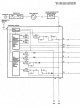

Automatic transmission selector lever position indicators — input signal testing
1. Remove the instrument cluster (see above). 2. Disconnect all connectors from the instrument cluster. 3. Check the input signals and if they are normal, but the indicators do not work normally, then the automatic...
1. Remove the instrument cluster (see above). 2. Disconnect all connectors from the instrument cluster. 3. Check the input signals and if they are normal, but the indicators do not work normally, then the automatic...

Checking the automatic transmission range switch
1. Disconnect the 10-pin connector from the automatic transmission range switch. 2. Check the continuity between the contacts in different positions of the automatic transmission selector lever and make sure that there...
1. Disconnect the 10-pin connector from the automatic transmission range switch. 2. Check the continuity between the contacts in different positions of the automatic transmission selector lever and make sure that there...

MPCS (Multiplex Control System) Control System
Component Locations The MPCS system consists of two units (driver side and front passenger side) that improve the operation of each previously used unified unit (window lift control units, outside rearview mirrors, door...
Component Locations The MPCS system consists of two units (driver side and front passenger side) that improve the operation of each previously used unified unit (window lift control units, outside rearview mirrors, door...

Automatic transmission selector lever lock system (with ignition key lock system)
Component Locations Electrical diagram Checking the automatic transmission selector lever lock solenoid Lock operation 1. Remove the lower center cover ( see chapter Body ). 2. Disconnect the 2-pin connector from the...
Component Locations Electrical diagram Checking the automatic transmission selector lever lock solenoid Lock operation 1. Remove the lower center cover ( see chapter Body ). 2. Disconnect the 2-pin connector from the...

External rearview mirrors with electric drive
Component Locations Electrical diagram Examination Before checking, make sure that fuse No.4 (7.5A) in the driver's side fuse box is in good condition and securely connected. 1. Remove the driver's side deflector ( see...
Component Locations Electrical diagram Examination Before checking, make sure that fuse No.4 (7.5A) in the driver's side fuse box is in good condition and securely connected. 1. Remove the driver's side deflector ( see...

Window lifts — control
Component Locations Electrical diagram Driver's door window reset After performing the following operations, the driver's door window regulator switches to the backup mode and raising and lowering the window with the...
Component Locations Electrical diagram Driver's door window reset After performing the following operations, the driver's door window regulator switches to the backup mode and raising and lowering the window with the...

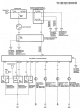

Door locks with electric drives — checking the input signals of the remote control system of door locks
If the remote door lock system does not work, check the transmitter (see below) before checking the input signals. 1. Remove the lower central cover (see chapter Body). 2. Disconnect the 7-pin connector from the...
If the remote door lock system does not work, check the transmitter (see below) before checking the input signals. 1. Remove the lower central cover (see chapter Body). 2. Disconnect the 7-pin connector from the...

Door locks with electric drives — transmitter check
If the key is in the ignition or a door is open, the remote door lock system will not operate. If the driver's door is not opened within approximately 30 seconds after unlocking, it will lock automatically. Before...
If the key is in the ignition or a door is open, the remote door lock system will not operate. If the driver's door is not opened within approximately 30 seconds after unlocking, it will lock automatically. Before...

Door locks with electric drives — transmitter registration
You can register up to three transmitters (if you register a fourth transmitter, the code of the first transmitter will be cancelled). If you need to register a transmitter that has not been registered previously,...
You can register up to three transmitters (if you register a fourth transmitter, the code of the first transmitter will be cancelled). If you need to register a transmitter that has not been registered previously,...

Checking door lock drives with electric drives
1. Remove the door trim ( see chapter Body ). 2. Disconnect the 2-pin connector from the lock actuator assembly. 3. Apply battery voltage to the terminals as shown below and check that the rod moves to LOCK and UNLOCK...
1. Remove the door trim ( see chapter Body ). 2. Disconnect the 2-pin connector from the lock actuator assembly. 3. Apply battery voltage to the terminals as shown below and check that the rod moves to LOCK and UNLOCK...

Checking the rear side door lock drive with electric drives
1. Remove the door trim ( see chapter Body ) and disconnect the 2-pin connector from the lock actuator. 2. Apply battery voltage to the terminals as shown below and check that the rod moves to LOCK and UNLOCK side....
1. Remove the door trim ( see chapter Body ) and disconnect the 2-pin connector from the lock actuator. 2. Apply battery voltage to the terminals as shown below and check that the rod moves to LOCK and UNLOCK side....
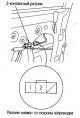
Checking the driver's door lock cylinder switch
1. Remove the driver's door trim ( see chapter Body ). 2. Disconnect the 3-pin connector from the lock cylinder switch. 3. Check the continuity between the contacts in each switch position and make sure that continuity...
1. Remove the driver's door trim ( see chapter Body ). 2. Disconnect the 3-pin connector from the lock cylinder switch. 3. Check the continuity between the contacts in each switch position and make sure that continuity...
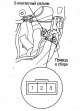
Checking the switch of the locking lever of the driver's door with electric drives
1. Remove the driver's door trim ( see chapter Body ). 2. Disconnect the 3-pin connector from the lock actuator assembly. 3. Check the continuity between the various contacts in each switch position and make sure that...
1. Remove the driver's door trim ( see chapter Body ). 2. Disconnect the 3-pin connector from the lock actuator assembly. 3. Check the continuity between the various contacts in each switch position and make sure that...
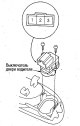
Checking the driver's door lock switch with electric drives
1. Remove the driver's door trim ( see chapter Body ). 2. Disconnect the 3-pin connector from the driver's door lock switch. 3. Check the continuity between the various contacts at each switch position and make sure...
1. Remove the driver's door trim ( see chapter Body ). 2. Disconnect the 3-pin connector from the driver's door lock switch. 3. Check the continuity between the various contacts at each switch position and make sure...

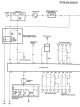
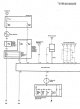

Audio system unit
Audio system unit contact assignment Audio Amplifier Pin Assignment (Premium Audio Models) CD Changer Pin Assignment (Premium Audio Models) Removal the audio system unit 1. Remove the center panel ( see chapter Body )....
Audio system unit contact assignment Audio Amplifier Pin Assignment (Premium Audio Models) CD Changer Pin Assignment (Premium Audio Models) Removal the audio system unit 1. Remove the center panel ( see chapter Body )....
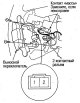
Checking the remote audio system switch
1. Unscrew 2 screws. 2. Disconnect the 2-pin connector and remove the switch. 3. Measure the resistance between contacts No.1 and No.2 in different switch positions. If the switch is OK but the audio control is...
1. Unscrew 2 screws. 2. Disconnect the 2-pin connector and remove the switch. 3. Measure the resistance between contacts No.1 and No.2 in different switch positions. If the switch is OK but the audio control is...

Removal the speakers
Front/Rear Speakers 1. Remove the door trim ( see chapter Body ). 2. Unscrew 3 screws. 3. Disconnect the 2-pin connector and remove the speaker and spacer. 4. Install in the reverse order of removal. High frequency...
Front/Rear Speakers 1. Remove the door trim ( see chapter Body ). 2. Unscrew 3 screws. 3. Disconnect the 2-pin connector and remove the speaker and spacer. 4. Install in the reverse order of removal. High frequency...
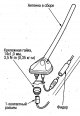
Removal the antenna
1. Remove the rear part of the ceiling trim ( see chapter Body ). 2. Disconnect the 1-pin antenna feeder connector. 3. Unscrew the fastening nut and remove the antenna.
1. Remove the rear part of the ceiling trim ( see chapter Body ). 2. Disconnect the 1-pin antenna feeder connector. 3. Unscrew the fastening nut and remove the antenna.
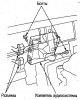
Removal the audio amplifier (models with Premium audio system)
1. Remove the center panel ( see chapter Body ). 2. Remove the center bottom cover ( see chapter Body ). 3. Unscrew 2 bolts from the amplifier. 4. Disconnect all connectors and remove the audio amplifier.
1. Remove the center panel ( see chapter Body ). 2. Remove the center bottom cover ( see chapter Body ). 3. Unscrew 2 bolts from the amplifier. 4. Disconnect all connectors and remove the audio amplifier.

Removal the CD changer (models with Premium audio system)
1. Remove the left side luggage compartment trim. 2. Disconnect the 14-pin CD changer connector. 3. Remove the 4 bolts from the mounting posts and remove the CD changer. When transporting the CD changer, be sure to...
1. Remove the left side luggage compartment trim. 2. Disconnect the 14-pin CD changer connector. 3. Remove the 4 bolts from the mounting posts and remove the CD changer. When transporting the CD changer, be sure to...

Cigarette lighter — replacement
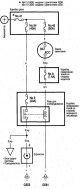
1. Remove the cigarette lighter. 2. Remove the cigarette lighter socket and disconnect the 2-pin connector. 3. Remove the backlight ring assembly and disconnect the 2-pin connector from it. 4. Install in the reverse...
1. Remove the cigarette lighter. 2. Remove the cigarette lighter socket and disconnect the 2-pin connector. 3. Remove the backlight ring assembly and disconnect the 2-pin connector from it. 4. Install in the reverse...

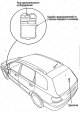

Electrical outlet — replacement
1. Remove the right side trim ( see chapter Body ). 2. Disconnect the 2-pin connector from the socket. 3. Install in the reverse order of removal. During installation, align the notch on the panel with the protrusion on...
1. Remove the right side trim ( see chapter Body ). 2. Disconnect the 2-pin connector from the socket. 3. Install in the reverse order of removal. During installation, align the notch on the panel with the protrusion on...


Rear Window Defogger — Check
Before checking the heater, check fuse #53 (30A) of the relay box and fuse #3 (7.5A) of the driver's side fuse box. 1. Wrap the ends of the tester probes with aluminum foil as shown in the figure. 2. Turn the ignition...
Before checking the heater, check fuse #53 (30A) of the relay box and fuse #3 (7.5A) of the driver's side fuse box. 1. Wrap the ends of the tester probes with aluminum foil as shown in the figure. 2. Turn the ignition...

Rear Window Defogger — Heating Element Repair
1. Thoroughly clean the break area with pure alcohol. 2. Apply protective tape along the line on both sides of the break area. 3. Using a thin copper wire, lightly clean both ends of the conductive line at the breakage...
1. Thoroughly clean the break area with pure alcohol. 2. Apply protective tape along the line on both sides of the break area. 3. Using a thin copper wire, lightly clean both ends of the conductive line at the breakage...

Rear Window Defogger — Checking the Noise Suppressing Condenser
Connect the (+) of the capacitor tester to contact #1 and the (-) of the tester to contact #2 and measure the capacitance of the capacitor. Attention. Do not reverse the polarity of the tester, as the capacitor may be...
Connect the (+) of the capacitor tester to contact #1 and the (-) of the tester to contact #2 and measure the capacitance of the capacitor. Attention. Do not reverse the polarity of the tester, as the capacitor may be...


Checking the horns
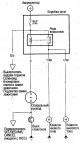
1. Remove the front grille ( see chapter Body ). 2. Disconnect the 1-pin connectors and remove the horns. 3. Apply battery voltage to the terminal and post as shown in the figure and check that the horns work.
1. Remove the front grille ( see chapter Body ). 2. Disconnect the 1-pin connectors and remove the horns. 3. Apply battery voltage to the terminal and post as shown in the figure and check that the horns work.

Checking the horn switch
If there are components of the additional passive safety system nearby, during the execution of work see chapter Supplemental Restraint System (SRS) . 1. Remove the steering column cover ( see chapter Steering ). 2....
If there are components of the additional passive safety system nearby, during the execution of work see chapter Supplemental Restraint System (SRS) . 1. Remove the steering column cover ( see chapter Steering ). 2....


Checking the Power Seat Switch
1. Remove the driver's seat and remove the tilt mechanism cover ( see chapter Body ). 2. Disconnect the 12-pin connector from the switch. 3. Unscrew 2 screws and remove the switch. 4. Check the continuity between the...
1. Remove the driver's seat and remove the tilt mechanism cover ( see chapter Body ). 2. Disconnect the 12-pin connector from the switch. 3. Unscrew 2 screws and remove the switch. 4. Check the continuity between the...
Checking the electric motors of the electric seat
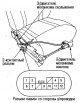
1. Remove the driver's seat and remove the tilt mechanism cover ( see chapter Body ). 2. Disconnect the 12-pin connector from the switch. 3. Apply battery voltage to the contacts as shown in the figure and make sure...
1. Remove the driver's seat and remove the tilt mechanism cover ( see chapter Body ). 2. Disconnect the 12-pin connector from the switch. 3. Apply battery voltage to the contacts as shown in the figure and make sure...



Checking/replacing the windshield wiper/washer switch
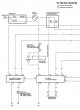
1. Remove the steering column cover ( see chapter Steering ). 2. Disconnect the 14-pin switch connector. 3. Unscrew 2 screws, slide the switch to the side and remove it. 4. Check the continuity between the various...
1. Remove the steering column cover ( see chapter Steering ). 2. Disconnect the 14-pin switch connector. 3. Unscrew 2 screws, slide the switch to the side and remove it. 4. Check the continuity between the various...
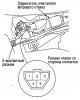
Checking the windshield wiper motor
1. Remove the windshield wiper arms and scoop-type air intake (see below). 2. Disconnect the 5-pin connector from the windshield wiper motor. 3. Apply voltage from the battery to the terminals as shown in the figure and...
1. Remove the windshield wiper arms and scoop-type air intake (see below). 2. Disconnect the 5-pin connector from the windshield wiper motor. 3. Apply voltage from the battery to the terminals as shown in the figure and...

Checking the rear window wiper motor
1. Open the rear door and remove the lower door trim. 2. Disconnect the 4-pin connector from the rear window wiper motor. 3. Apply voltage from the battery to terminals No.1 (+) and No.3 (-) and check whether the...
1. Open the rear door and remove the lower door trim. 2. Disconnect the 4-pin connector from the rear window wiper motor. 3. Apply voltage from the battery to terminals No.1 (+) and No.3 (-) and check whether the...

Checking windshield washer electric motors
1. Remove the right inner fender*1 (left inner fender*2) ( see chapter Body ). *1: Models with J30A engine *2: Models with F23A engine 2. Disconnect the windshield washer motor connectors. 3. Apply battery voltage...
1. Remove the right inner fender*1 (left inner fender*2) ( see chapter Body ). *1: Models with J30A engine *2: Models with F23A engine 2. Disconnect the windshield washer motor connectors. 3. Apply battery voltage...

Windshield Wiper Arms/Link/Motor Replacement
Caution: Do not scratch the hood and body. 1. Remove the windshield wiper arms. 2. Remove the scoop-type air intake. 3. Disconnect the 5-pin connector from the electric motor. 4. Remove the 3 mounting bolts and remove...
Caution: Do not scratch the hood and body. 1. Remove the windshield wiper arms. 2. Remove the scoop-type air intake. 3. Disconnect the 5-pin connector from the electric motor. 4. Remove the 3 mounting bolts and remove...

Replacing the rear window wiper arm/motor
Caution: Do not scratch the rear door. 1. Remove the rear window wiper arm. 2. Remove the pivot axle cover and unscrew the special nut. 3. Open the rear door and remove the rear door lower trim (see chapter Body). 4....
Caution: Do not scratch the rear door. 1. Remove the rear window wiper arm. 2. Remove the pivot axle cover and unscrew the special nut. 3. Open the rear door and remove the rear door lower trim (see chapter Body). 4....

Replacement of the reservoir/washer motors
Caution: Do not scratch the body and removable components. 1. Remove the right inner fender*1 (left inner fender*2) ( see chapter Body ). *1: Models with J30A engine *2: Models with F23A engine 2. Disconnect the 2-pin...
Caution: Do not scratch the body and removable components. 1. Remove the right inner fender*1 (left inner fender*2) ( see chapter Body ). *1: Models with J30A engine *2: Models with F23A engine 2. Disconnect the 2-pin...
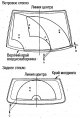
Adjusting windshield wiper arms/washer jet angle
1. Stop the wiper arms in the auto stop mode and make sure they stop at the set positions. Lever stop locations: Windscreen wiper arms (distance from edge of air intake): A: approx. 30-40mm H: approx. 25-35mm Rear...
1. Stop the wiper arms in the auto stop mode and make sure they stop at the set positions. Lever stop locations: Windscreen wiper arms (distance from edge of air intake): A: approx. 30-40mm H: approx. 25-35mm Rear...
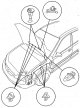
Replacing the washer tubes
Caution: Do not scratch the body and removed components. 1. Remove the right inner fender *1 (left inner fender *2) ( see chapter Body ). *1: Models with J30A engine *2: Models with F23A engine 2. Disconnect the tubes...
Caution: Do not scratch the body and removed components. 1. Remove the right inner fender *1 (left inner fender *2) ( see chapter Body ). *1: Models with J30A engine *2: Models with F23A engine 2. Disconnect the tubes...


Checking the seat belt tensioner
1. Remove the center lower trim ( see chapter Body ) and disconnect the 2-pin connector from the seat belt tensioner. 2. Turn the ignition key to the ON (II) position. 3. Check the voltage between terminals No.1 (+) and...
1. Remove the center lower trim ( see chapter Body ) and disconnect the 2-pin connector from the seat belt tensioner. 2. Turn the ignition key to the ON (II) position. 3. Check the voltage between terminals No.1 (+) and...
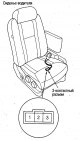
Checking the seat belt switch
1. Move the seat forward and disconnect the 3-pin connector from the back of the seat. 2. Check the conductivity between the contacts under different belt conditions and make sure that there is conductivity only between...
1. Move the seat forward and disconnect the 3-pin connector from the back of the seat. 2. Check the conductivity between the contacts under different belt conditions and make sure that there is conductivity only between...


Complex Information Display — Removing the Display Unit
1. Remove the instrument cluster panel (see above). 2. Remove 3 screws from the display unit. 3. Disconnect the 20-pin connector and remove the display assembly.
1. Remove the instrument cluster panel (see above). 2. Remove 3 screws from the display unit. 3. Disconnect the 20-pin connector and remove the display assembly.


Complex information display — input signal testing
1. Remove the display unit (see above). 2. Disconnect the 20-pin connector from the display assembly. 3. Check the input signals shown in the table. If all signals are normal and the complex information display does not...
1. Remove the display unit (see above). 2. Disconnect the 20-pin connector from the display assembly. 3. Check the input signals shown in the table. If all signals are normal and the complex information display does not...

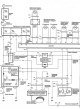

Supplemental Restraint System (SRS) Wiring Connectors
Note *1: Please note that the connector designations shown are used only in this chapter and are not used in other chapters. Note *2. A: Inertial lock connector. B: Connector with automatic circuit closing mechanism (if...
Note *1: Please note that the connector designations shown are used only in this chapter and are not used in other chapters. Note *2. A: Inertial lock connector. B: Connector with automatic circuit closing mechanism (if...


Reading passive safety system (SRS) fault codes
The diagnostic trouble code (DTC) can be identified by the flashing SRS indicator light by connecting the Honda PGM tester or DLC terminal box to the 16-pin diagnostic connector. Reading fault codes using the DLC...
The diagnostic trouble code (DTC) can be identified by the flashing SRS indicator light by connecting the Honda PGM tester or DLC terminal box to the 16-pin diagnostic connector. Reading fault codes using the DLC...


Driver's front airbag — removal and installation
Caution: Before starting work, disconnect the cables from the battery and wait at least 3 minutes. Removal 1. Remove the panel, then remove the D1 connector from the holder. Disconnect the D 1i and D 1o . 2. Remove the...
Caution: Before starting work, disconnect the cables from the battery and wait at least 3 minutes. Removal 1. Remove the panel, then remove the D1 connector from the holder. Disconnect the D 1i and D 1o . 2. Remove the...

Front passenger airbag — removal and installation
Caution: Before starting work, disconnect the cables from the battery and wait at least 3 minutes. Removal 1. Remove the glove box. 2. Remove the P connector and disconnect the P connectors 1i and R 1o . 3. Remove the 3...
Caution: Before starting work, disconnect the cables from the battery and wait at least 3 minutes. Removal 1. Remove the glove box. 2. Remove the P connector and disconnect the P connectors 1i and R 1o . 3. Remove the 3...

Side airbags — removal and installation
Caution: Before starting work, disconnect the cables from the battery and wait at least 3 minutes. Please follow the recommendations during removal ch. Body . 1. Disconnect the 2-pin side airbag connector. 2. Remove the...
Caution: Before starting work, disconnect the cables from the battery and wait at least 3 minutes. Please follow the recommendations during removal ch. Body . 1. Disconnect the 2-pin side airbag connector. 2. Remove the...

Wiring Coil — Removal and Installation
Caution: Before starting work, disconnect the cables from the battery and wait at least 3 minutes. Removal 1. Turn the front wheels to the straight-ahead position and make sure the steering wheel is also in this...
Caution: Before starting work, disconnect the cables from the battery and wait at least 3 minutes. Removal 1. Turn the front wheels to the straight-ahead position and make sure the steering wheel is also in this...

Seat belts and pretensioners — removal and installation
Attention. Before starting work, disconnect the cables from the battery and wait at least 3 minutes. Replace the seat belt together with the pretensioner, see chapter Body . Removal 1. Unscrew the lower anchor bolt...
Attention. Before starting work, disconnect the cables from the battery and wait at least 3 minutes. Replace the seat belt together with the pretensioner, see chapter Body . Removal 1. Unscrew the lower anchor bolt...

SRS seat belt and pretensioner unit — removal and installation
Caution: Before starting work, disconnect the cables from the battery and wait at least 3 minutes. Removal 1. Disconnect the connectors of the driver and front passenger front airbags and seat belts, see above. 2....
Caution: Before starting work, disconnect the cables from the battery and wait at least 3 minutes. Removal 1. Disconnect the connectors of the driver and front passenger front airbags and seat belts, see above. 2....
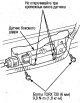
Side Impact Sensor — Removal and Installation
Caution: Before starting work, disconnect the cables from the battery and wait at least 3 minutes. Removal 1. Disconnect the driver and front passenger side airbag connectors, see above. 2. Remove the front seat side...
Caution: Before starting work, disconnect the cables from the battery and wait at least 3 minutes. Removal 1. Disconnect the driver and front passenger side airbag connectors, see above. 2. Remove the front seat side...

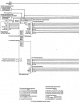

Connector Locations — Pin Assignments
GPS Antenna Connector 20-pin connector of the navigation system unit Electrical wiring with SIG signals 1: between the navigation system unit and the display unit. 16-pin connector of the navigation system unit...
GPS Antenna Connector 20-pin connector of the navigation system unit Electrical wiring with SIG signals 1: between the navigation system unit and the display unit. 16-pin connector of the navigation system unit...

Removal the navigation system switch
1. Remove the center panel, see chapter Body . 2. Disconnect the connector from the back of the center panel. Press the switch and remove it.
1. Remove the center panel, see chapter Body . 2. Disconnect the connector from the back of the center panel. Press the switch and remove it.

Removal the navigation system display unit
1. Remove the navigation system switch. 2. Remove the instrument cluster panel, see chapter Body . 3. Remove the display unit.
1. Remove the navigation system switch. 2. Remove the instrument cluster panel, see chapter Body . 3. Remove the display unit.

Removal the navigation system unit
1. Disconnect the front passenger seat fasteners, see chapter Body . 2. Slowly slide the seat back toward the rear seat and disconnect the navigation system unit connectors. 3. Remove the navigation system unit together...
1. Disconnect the front passenger seat fasteners, see chapter Body . 2. Slowly slide the seat back toward the rear seat and disconnect the navigation system unit connectors. 3. Remove the navigation system unit together...

Removal the TV tuner of the navigation system
1. Remove the panel in the luggage compartment. 2. Slide the TV tuner to the left forward and remove it.
1. Remove the panel in the luggage compartment. 2. Slide the TV tuner to the left forward and remove it.

Removal the GPS navigation system antenna
1. Remove the instrument cluster panel, see chapter Body . 2. Remove the display unit, see above. 3. Remove the GPS antenna.
1. Remove the instrument cluster panel, see chapter Body . 2. Remove the display unit, see above. 3. Remove the GPS antenna.
This section is available on: russian, bulgarian, belarusian, ukrainian, serbian, croatian, romanian, polish, slovak, hungarian
Link in different formats to this section
TEXTHTMLBB Code
- General information
- Controls and instruments
- User manual
- Power unit
- Engine maintenance
- Engine repair
- Cooling system
- Engine management
- Power and exhaust system
- Transmission
- Automatic gearbox
- Drive shafts and differential
- Chassis and running gear
- Steering
- Car suspension
- Brake system
- Body and interior
- Doors, locks and windows
- Interior (internal elements)
- Exterior (external elements)
- Air conditioner
- Electrical equipment
- Power devices
- Equipment and devices
- Headlights and lighting
- Electrical circuits