


Vehicle power equipment Honda Avancier 1


Load of fuses, «ground» — power relay
Checking the relay 4-pin relays 1. Remove the relay. All relays are tested in the same way. 2. Check the conductivity between contacts No.1 and No.2. 3. Check the conductivity of contacts No.3 and No.4. 4. Apply voltage...
Checking the relay 4-pin relays 1. Remove the relay. All relays are tested in the same way. 2. Check the conductivity between contacts No.1 and No.2. 3. Check the conductivity of contacts No.3 and No.4. 4. Apply voltage...
Fuses load, «ground» — ignition switch
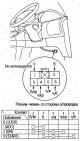
Examination If there are additional safety system components nearby, during the work see chapter Supplemental Restraint System (SRS) . 1. Disconnect the 6-pin connector from the driver's side fuse box. 2. Check the...
Examination If there are additional safety system components nearby, during the work see chapter Supplemental Restraint System (SRS) . 1. Disconnect the 6-pin connector from the driver's side fuse box. 2. Check the...

Relay/Fuse Box
*1: Models with F23A engine *2: Models with J30A engine Driver side fuse box Front Passenger Side Fuse Box Fuse Load Wiring of the "mass"
*1: Models with F23A engine *2: Models with J30A engine Driver side fuse box Front Passenger Side Fuse Box Fuse Load Wiring of the "mass"


Checking the starter on a car
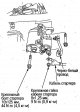
The ambient temperature should be within 15-38°C. Measuring instruments must have the following measurement limits: Ammeter: 0-400A Voltmeter: 0-20V, error no more than 0.1 V Tachometer: 0-1200 rpm. 1. Connect the...
The ambient temperature should be within 15-38°C. Measuring instruments must have the following measurement limits: Ammeter: 0-400A Voltmeter: 0-20V, error no more than 0.1 V Tachometer: 0-1200 rpm. 1. Connect the...
Starter replacement
1. Disconnect the (-) battery cable. 2. Disconnect the cable from terminal B of the starter. 3. Disconnect the black/white wire from the S terminal of the starter magnetic switch. 4. Loosen the starter mounting bolt and...
1. Disconnect the (-) battery cable. 2. Disconnect the cable from terminal B of the starter. 3. Disconnect the black/white wire from the S terminal of the starter magnetic switch. 4. Loosen the starter mounting bolt and...


Checking the electromagnetic switch
1. Remove the starter. 2. Remove the gear cover and remove the electromagnetic switch from it. 3. Check the conductivity between all contacts of the electromagnetic switch and make sure that there is conductivity...
1. Remove the starter. 2. Remove the gear cover and remove the electromagnetic switch from it. 3. Check the conductivity between all contacts of the electromagnetic switch and make sure that there is conductivity...

Checking the brush holders
1. Make sure there is no conductivity between the (+) and (-) brush holders. 2. Insert the brush holders and press them against the commutator. Attach 1 dynamometer to the spring and measure the force required to move...
1. Make sure there is no conductivity between the (+) and (-) brush holders. 2. Insert the brush holders and press them against the commutator. Attach 1 dynamometer to the spring and measure the force required to move...

Checking the gear/clutch
1. Press the gear/coupling in the axial direction and check the smoothness of its movement. If it does not move smoothly, lubricate it, and if necessary, replace the gear/coupling with a new one. 2. While holding the...
1. Press the gear/coupling in the axial direction and check the smoothness of its movement. If it does not move smoothly, lubricate it, and if necessary, replace the gear/coupling with a new one. 2. While holding the...

Checking the rotor
1. Check the rotor for wear and damage. 2. Measure the outer diameter of the commutator and if the wear is greater than the limit, replace the rotor. - Commutator outer diameter: Standard: 28.0-28.1 mm Limit: 27.5 mm 3....
1. Check the rotor for wear and damage. 2. Measure the outer diameter of the commutator and if the wear is greater than the limit, replace the rotor. - Commutator outer diameter: Standard: 28.0-28.1 mm Limit: 27.5 mm 3....

Checking the brushes
Measure the length of the brushes and if it is less than the maximum, replace the brushes. Caution: Before installing new brushes, sand the working ends of the brushes with sandpaper #500 or #600. Standard brush length:...
Measure the length of the brushes and if it is less than the maximum, replace the brushes. Caution: Before installing new brushes, sand the working ends of the brushes with sandpaper #500 or #600. Standard brush length:...

Installing brushes
1. Lift each spring and secure the brushes into the holders as shown in the figure. 2. Install the rotor into the stator and press the brushes against the commutator. 3. Install the back cover onto the holder. Make sure...
1. Lift each spring and secure the brushes into the holders as shown in the figure. 2. Install the rotor into the stator and press the brushes against the commutator. 3. Install the back cover onto the holder. Make sure...

Checking the starter
Attention. For testing, use wires with a larger cross-section (the same or larger cross-section as the car starter wiring). Perform each check for no more than 5 seconds. Perform the test with a fully charged battery....
Attention. For testing, use wires with a larger cross-section (the same or larger cross-section as the car starter wiring). Perform each check for no more than 5 seconds. Perform the test with a fully charged battery....

Ignition System — Component Locations
For information on checking the ignition timing angle, see below. About checking and adjusting idle speed. see chapter Engine Management System .
For information on checking the ignition timing angle, see below. About checking and adjusting idle speed. see chapter Engine Management System .


Checking the ignition timing angle
Start the engine, warm it up until the radiator fan turns on twice, then warm it up again at 3000/min for more than 2 minutes and drive. 1. Check the idle speed and, if it is not within the norm, make adjustments ( see...
Start the engine, warm it up until the radiator fan turns on twice, then warm it up again at 3000/min for more than 2 minutes and drive. 1. Check the idle speed and, if it is not within the norm, make adjustments ( see...

Replacing the ignition distributor
Removal 1. Disconnect the connector from the distributor. 2. Disconnect the high-voltage cables from the distributor cap. 3. Loosen the mounting bolts and remove the distributor from the cylinder head. Installation 1....
Removal 1. Disconnect the connector from the distributor. 2. Disconnect the high-voltage cables from the distributor cap. 3. Loosen the mounting bolts and remove the distributor from the cylinder head. Installation 1....

Disassembly and assembly of the ignition distributor
Make sure that the electrical wiring is connected correctly to the ignition unit contacts.
Make sure that the electrical wiring is connected correctly to the ignition unit contacts.

Checking the input signal of the ignition unit
If the PGM-Fi indicator light is flashing, see chapter Engine Management System . Perform the ignition module input signal test after the basic fuel and ignition system test. Checking the ignition unit Checking the...
If the PGM-Fi indicator light is flashing, see chapter Engine Management System . Perform the ignition module input signal test after the basic fuel and ignition system test. Checking the ignition unit Checking the...


Generator replacement
1. Disconnect the negative cable from the battery. 2. Disconnect terminal B and 4-pin connector from the generator. 3. Loosen the adjusting bolt, lock nut and mounting bolt and remove the alternator belt. 4. Remove the...
1. Disconnect the negative cable from the battery. 2. Disconnect terminal B and 4-pin connector from the generator. 3. Loosen the adjusting bolt, lock nut and mounting bolt and remove the alternator belt. 4. Remove the...

Disassembly and assembly of the generator
Separate the pulley, front cover and rotor only if replacing the front bearing. To remove the rotor, loosen the lock nut using open-end wrenches (10mm and 22mm) or an impact wrench (22mm).
Separate the pulley, front cover and rotor only if replacing the front bearing. To remove the rotor, loosen the lock nut using open-end wrenches (10mm and 22mm) or an impact wrench (22mm).

Checking the generator rectifier
Separate the rectifier from the stator. Check the continuity between the terminals below by reversing the polarity of the tester probes and ensure that continuity exists in only one direction. Between contacts B-P (Р ₁,...
Separate the rectifier from the stator. Check the continuity between the terminals below by reversing the polarity of the tester probes and ensure that continuity exists in only one direction. Between contacts B-P (Р ₁,...

Checking the generator brushes
1. Measure the lengths of the brushes Standard length: 10.5mm Maximum length: 1.5 mm Take the measurement as shown in the figure. 2. If the brushes are worn out more than normal, replace them.
1. Measure the lengths of the brushes Standard length: 10.5mm Maximum length: 1.5 mm Take the measurement as shown in the figure. 2. If the brushes are worn out more than normal, replace them.

Checking the generator stator
The stator check is performed with the rectifier removed. 1. Check for conductivity between the terminals. 2. Make sure there is no conductivity between the terminals and the stator core. Testing insulation resistance...
The stator check is performed with the rectifier removed. 1. Check for conductivity between the terminals. 2. Make sure there is no conductivity between the terminals and the stator core. Testing insulation resistance...

Checking the generator rotor
1. Measure the resistance between the slip rings. Standard resistance: 2.2-3.0Ω 2. Make sure that there is no conductivity between the slip rings and the rotor shaft. Insulation resistance measured with a megohmmeter...
1. Measure the resistance between the slip rings. Standard resistance: 2.2-3.0Ω 2. Make sure that there is no conductivity between the slip rings and the rotor shaft. Insulation resistance measured with a megohmmeter...
This section is available on: russian, bulgarian, belarusian, ukrainian, serbian, croatian, romanian, polish, slovak, hungarian
Link in different formats to this section
TEXTHTMLBB Code
- General information
- Controls and instruments
- User manual
- Power unit
- Engine maintenance
- Engine repair
- Cooling system
- Engine management
- Power and exhaust system
- Transmission
- Automatic gearbox
- Drive shafts and differential
- Chassis and running gear
- Steering
- Car suspension
- Brake system
- Body and interior
- Doors, locks and windows
- Interior (internal elements)
- Exterior (external elements)
- Air conditioner
- Electrical equipment
- Power devices
- Equipment and devices
- Headlights and lighting
- Electrical circuits