


Electrical equipment of the car engine Honda HR-V 1

Testing the starter
Locations of Launch System Components Note: Left hand drive model shown; the layout on the right-hand drive model is similar. 1. Battery 2. Automatic transmission selector switch 3. Starter Note: Before testing, the...
Locations of Launch System Components Note: Left hand drive model shown; the layout on the right-hand drive model is similar. 1. Battery 2. Automatic transmission selector switch 3. Starter Note: Before testing, the...

Starter replacement
1. Disconnect the negative cable from the battery. 2. Disconnect the starter cable from terminal B on the solenoid, then disconnect the BLACK/WHITE wire from terminal S. 1. 10x1.25 mm, 44 Nm (4.5 kgf/m); 2. 10 x 1.25...
1. Disconnect the negative cable from the battery. 2. Disconnect the starter cable from terminal B on the solenoid, then disconnect the BLACK/WHITE wire from terminal S. 1. 10x1.25 mm, 44 Nm (4.5 kgf/m); 2. 10 x 1.25...
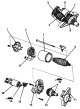
Description of the starter design
1. end cap; 2. brush; 3. rotor housing; 4. rotor; 5. brush holder; 6. starter solenoid; 7. solenoid lever; 8. freewheel clutch; 9. rotor; 10. molybdenum disulfide; 11.gear housing cover; 12. freewheel clutch; 13. gear...
1. end cap; 2. brush; 3. rotor housing; 4. rotor; 5. brush holder; 6. starter solenoid; 7. solenoid lever; 8. freewheel clutch; 9. rotor; 10. molybdenum disulfide; 11.gear housing cover; 12. freewheel clutch; 13. gear...

Checking the starter brushes
Measure the length of the brushes. If the length of the brushes is greatly reduced due to wear, replace the brushes (or the brush holder assembly). Note: To ensure that the new brushes are seated in place after they are...
Measure the length of the brushes. If the length of the brushes is greatly reduced due to wear, replace the brushes (or the brush holder assembly). Note: To ensure that the new brushes are seated in place after they are...

Checking the starter overrunning clutch
1. Move the freewheel on the shaft. Does it move freely? If not, replace it. 2. Spin the freewheel in both directions. Does it lock in one direction and spin freely in the opposite direction? If it does not lock in...
1. Move the freewheel on the shaft. Does it move freely? If not, replace it. 2. Spin the freewheel in both directions. Does it lock in one direction and spin freely in the opposite direction? If it does not lock in...

Checking and testing the starter rotor
1. Check the rotor for wear or damage due to contact with the excitation winding. Replace the rotor if necessary. 2. Check the surface of the commutator and its diameter. If the surface is dirty or scorched, sand or...
1. Check the rotor for wear or damage due to contact with the excitation winding. Replace the rotor if necessary. 2. Check the surface of the commutator and its diameter. If the surface is dirty or scorched, sand or...

Testing the starter brush holder
1. Make sure there is no continuity between the positive and negative brush holders. If there is continuity, replace the brush holder assembly. 1. Positive (+) brush holder 2. Negative (-) brush holder 3. Positive (+)...
1. Make sure there is no continuity between the positive and negative brush holders. If there is continuity, replace the brush holder assembly. 1. Positive (+) brush holder 2. Negative (-) brush holder 3. Positive (+)...

Assembling the starter
Note: Please refer to the figure above when assembling. 1. Pry up the brush springs with a screwdriver, then pull the brushes out of the holders approximately halfway and release the springs so that the brushes are...
Note: Please refer to the figure above when assembling. 1. Pry up the brush springs with a screwdriver, then pull the brushes out of the holders approximately halfway and release the springs so that the brushes are...

Checking the starter operation
1. Disconnect the wire from terminal M. 2. Make the connection as shown below, using the largest possible wire cross-section (preferably the type used in cars). 3. Connect the battery as shown in the figure. If the...
1. Disconnect the wire from terminal M. 2. Make the connection as shown below, using the largest possible wire cross-section (preferably the type used in cars). 3. Connect the battery as shown in the figure. If the...

Ignition system — basic information
Note: Left hand drive model shown; the layout on the right-hand drive model is similar. Ignition timing control system: 1. high voltage wires; 2. spark plugs; 3. distributor Electrical diagram (ignition system)
Note: Left hand drive model shown; the layout on the right-hand drive model is similar. Ignition timing control system: 1. high voltage wires; 2. spark plugs; 3. distributor Electrical diagram (ignition system)
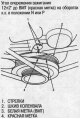
Checking and adjusting the ignition timing angle
1. Check the idle speed and adjust if necessary. 2. Remove the 2-pin diagnostic connector (BROWN and BLACK wires), then insert the shorting jumper (P/N 07PAZ-0010100) into it. 3. Start the engine. Maintain the speed at...
1. Check the idle speed and adjust if necessary. 2. Remove the 2-pin diagnostic connector (BROWN and BLACK wires), then insert the shorting jumper (P/N 07PAZ-0010100) into it. 3. Start the engine. Maintain the speed at...
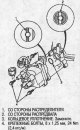
Replacing the ignition distributor
Removal 1. Disconnect the connector from the distributor. 2. Disconnect the high voltage wires from the distributor cap. 3. Remove the mounting bolts from the distributor, then remove the distributor from the cylinder...
Removal 1. Disconnect the connector from the distributor. 2. Disconnect the high voltage wires from the distributor cap. 3. Remove the mounting bolts from the distributor, then remove the distributor from the cylinder...
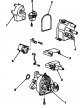
Ignition distributor repair
1. back cover; 2. distributor runner; 3. lid seal. check for damage; 4. Distributor cap. Check for cracks, wear, damage and dirt. Clean or replace.; 5. magnetic shield; 6. ignition coil; 7. distributor housing. check...
1. back cover; 2. distributor runner; 3. lid seal. check for damage; 4. Distributor cap. Check for cracks, wear, damage and dirt. Clean or replace.; 5. magnetic shield; 6. ignition coil; 7. distributor housing. check...

Testing the ignition coil
Using an ohmmeter, measure the resistance between the terminals. If the resistance is different from the nominal value, replace the ignition coil. Note: Resistance varies with coil temperature: nominal values are given...
Using an ohmmeter, measure the resistance between the terminals. If the resistance is different from the nominal value, replace the ignition coil. Note: Resistance varies with coil temperature: nominal values are given...
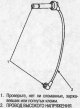
Checking and testing high voltage wires
1. Carefully disconnect the high voltage wires by pulling the rubber boots. Do not bend the wires; You can break them from the inside. 2. Check the condition of the high-tension wire terminals. If any terminal is rusty,...
1. Carefully disconnect the high voltage wires by pulling the rubber boots. Do not bend the wires; You can break them from the inside. 2. Check the condition of the high-tension wire terminals. If any terminal is rusty,...
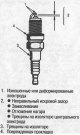
Checking spark plugs
1. Check the electrodes and ceramic insulator: Burning or wear of electrodes can occur due to: Early ignition Spark plug tightening is loose Spark plug heat range too high Insufficient cooling Spark plug contamination...
1. Check the electrodes and ceramic insulator: Burning or wear of electrodes can occur due to: Early ignition Spark plug tightening is loose Spark plug heat range too high Insufficient cooling Spark plug contamination...

Charging system — basic information
Note: Left hand drive model shown; the layout on the right-hand drive model is similar. Component arrangement: 1. battery; 2. Underhood fuse/relay box (with built-in electrical load detector (ELD) unit); 3. Charging...
Note: Left hand drive model shown; the layout on the right-hand drive model is similar. Component arrangement: 1. battery; 2. Underhood fuse/relay box (with built-in electrical load detector (ELD) unit); 3. Charging...

Generator replacement
1. First disconnect the cable from the negative battery terminal, then from the positive one. 2. Remove the harness holder from the upper bracket. 3. Disconnect the 4- (or 3-) pin connector and terminal B wire from the...
1. First disconnect the cable from the negative battery terminal, then from the positive one. 2. Remove the harness holder from the upper bracket. 3. Disconnect the 4- (or 3-) pin connector and terminal B wire from the...

Testing the rectifier (Denso)
Note: Diodes allow current to flow in one direction and prevent it from flowing in the opposite direction. Since the generator rectifier consists of eight diodes (four pairs), it is necessary to test for continuity in...
Note: Diodes allow current to flow in one direction and prevent it from flowing in the opposite direction. Since the generator rectifier consists of eight diodes (four pairs), it is necessary to test for continuity in...

Rectifier Testing (Mitsubishi)
Note: Diodes allow current to flow in one direction and prevent it from flowing in the opposite direction. Since the generator rectifier consists of six diodes, it is necessary to test for continuity in both directions...
Note: Diodes allow current to flow in one direction and prevent it from flowing in the opposite direction. Since the generator rectifier consists of six diodes, it is necessary to test for continuity in both directions...
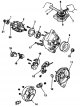
Generator repair (Denso)
Note: Separating the pulley, drive shaft side housing and rotor is only necessary when replacing the front bearing. Loosen the pulley with tools as shown in the figure. Use an impact wrench if necessary. 1. rear...
Note: Separating the pulley, drive shaft side housing and rotor is only necessary when replacing the front bearing. Loosen the pulley with tools as shown in the figure. Use an impact wrench if necessary. 1. rear...
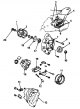
Generator repair (Mitsubishi)
Note: Remove the pulley only when replacing the front bearing. Loosen the pulley lock nut with a 10mm and 22mm socket wrench. Use an impact wrench if necessary. 1. Caution: Do not allow grease or oil to come into...
Note: Remove the pulley only when replacing the front bearing. Loosen the pulley lock nut with a 10mm and 22mm socket wrench. Use an impact wrench if necessary. 1. Caution: Do not allow grease or oil to come into...
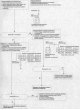
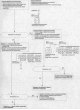
Testing the Generator Control System (KG, KE, KQ and KU Models)
Testing the Generator Control System (KG, KE, KQ and KU Models) Note: Before performing Malfunction Indicator Lamp (MIL) testing, check that the Electrical Load Detector (ELD) unit is operating properly.
Testing the Generator Control System (KG, KE, KQ and KU Models) Note: Before performing Malfunction Indicator Lamp (MIL) testing, check that the Electrical Load Detector (ELD) unit is operating properly.

Generator/regulator testing
Generator/regulator testing Caution: Use caution when performing testing as the radiator and condenser fans will turn on without warning while the engine is running.
Generator/regulator testing Caution: Use caution when performing testing as the radiator and condenser fans will turn on without warning while the engine is running.

Rectifier Removal (Mitsubishi)
1. Remove the four through bolts. 2. Heat the rear bearing seat with a 1000W hair dryer for about five minutes (50-60°C). 3. Separate the rear housing from the housing on the drive shaft side by inserting a flat-bladed...
1. Remove the four through bolts. 2. Heat the rear bearing seat with a 1000W hair dryer for about five minutes (50-60°C). 3. Separate the rear housing from the housing on the drive shaft side by inserting a flat-bladed...

Checking the Generator Brushes (Denso)
1. Remove the end cover, then take out the brush holder by unscrewing the two screws. 2. Measure the length of the brushes with a caliper. Generator brush length: Standard (new): 10.5 mm Wear limit: 1.5 mm 3. If the...
1. Remove the end cover, then take out the brush holder by unscrewing the two screws. 2. Measure the length of the brushes with a caliper. Generator brush length: Standard (new): 10.5 mm Wear limit: 1.5 mm 3. If the...

Checking the Generator Brushes (Mitsubishi)
1. Separate the drive shaft side housing from the rear housing as described above. 2. Separate the back housing from the stator/rectifier assembly by removing the four screws and terminal nut from the back housing ( see...
1. Separate the drive shaft side housing from the rear housing as described above. 2. Separate the back housing from the stator/rectifier assembly by removing the four screws and terminal nut from the back housing ( see...

Testing of generator rotor slip rings
1. Check the resistance between the slip rings. 2. It should be 1.8-3.0 Ohm. If the resistance is normal, proceed to step 2. If the resistance differs from the nominal value, replace the generator. 3. Make sure there is...
1. Check the resistance between the slip rings. 2. It should be 1.8-3.0 Ohm. If the resistance is normal, proceed to step 2. If the resistance differs from the nominal value, replace the generator. 3. Make sure there is...

Testing the generator stator
1. Check for continuity between each pair of terminals. 2. Make sure there is no conductivity between the terminals and the coil core. 3. If the coil fails the continuity test, replace the generator.
1. Check for continuity between each pair of terminals. 2. Make sure there is no conductivity between the terminals and the coil core. 3. If the coil fails the continuity test, replace the generator.

Replacing the rear bearing (Mitsubishi)
1. Press out the rear bearing. Make sure the tips of the puller jaws are thin enough to fit between the bearing and slip rings. Do not reinstall a removed bearing. 2. Press in the new bearing using a hand press. To...
1. Press out the rear bearing. Make sure the tips of the puller jaws are thin enough to fit between the bearing and slip rings. Do not reinstall a removed bearing. 2. Press in the new bearing using a hand press. To...

Generator assembly (Mitsubishi)
1. Press the brushes in, then insert a pin or drill (diameter about 1.8 mm) and fix them in this position. 2. Heat the rear bearing seat in the rear housing. After heating, immediately begin assembly before the rear...
1. Press the brushes in, then insert a pin or drill (diameter about 1.8 mm) and fix them in this position. 2. Heat the rear bearing seat in the rear housing. After heating, immediately begin assembly before the rear...

Checking and adjusting the alternator drive belt
Note: When installing a new belt, first adjust the sag or tension to the new belt value, then adjust the sag or tension to the used belt value by starting the engine and letting it run for 5 minutes. Sag: Used belt:...
Note: When installing a new belt, first adjust the sag or tension to the new belt value, then adjust the sag or tension to the used belt value by starting the engine and letting it run for 5 minutes. Sag: Used belt:...

Engine Electrical Specifications
Engine Electrical Specifications *1: When installing a new belt, adjust the deflection to the values for the new belt. Start the engine, let it run for 5 minutes, and then turn it off. Adjust the deflection or tension...
Engine Electrical Specifications *1: When installing a new belt, adjust the deflection to the values for the new belt. Start the engine, let it run for 5 minutes, and then turn it off. Adjust the deflection or tension...
This section is available on: russian, bulgarian, belarusian, ukrainian, serbian, croatian, romanian, polish, slovak, hungarian
Link in different formats to this section
TEXTHTMLBB Code
- General information
- User manual
- Maintenance
- Power unit
- Engine repair
- Lubrication system
- Cooling system
- Fuel injection and control
- Power and exhaust system
- Engine electrical equipment
- Transmission
- Clutch
- Mechanical gearbox
- Automatic gearbox
- Rear differential
- Drive shafts and cardan
- Chassis and running gear
- Steering
- Car suspension
- Brake system
- Body and interior
- Exterior (external elements)
- Interior (internal elements)
- Doors, locks and windows
- Electrical equipment
- Equipment and devices
- Lighting system
- Electrical circuits