HondaBook.ru
Auto companies Volkswagen Auto companies Ford Auto companies Lada Auto companies Skoda Auto companies BMW Auto companies Mazda Auto companies Peugeot
English Русский
Български
Беларускі
Український
Српски
Hrvatski
Română
Polski
Slovenský
Magyar
Bookmark Contacts Sitemap   


Accord Civic Fit / Jazz CR-V HR-V Others Articles
CR-V 1 (1995-2001, petrol) CR-V 2 (2002-2006, petrol)

Checking the front brake pads (Honda CR-V 2)

  • Main
  • Honda CR-V
  • 2 (2002-2006, petrol)
  • Chassis and running gear
  • Brake system
  • Checking the front brake pads
0
Warning:

Frequent inhalation of dust from brake pad surfaces, regardless of the material composition, can pose a health hazard.
  • Do not inhale dust.
  • Do not clean brake surfaces with compressed air or a brush. Use a vacuum cleaner.


Examination


1. Raise the front of the vehicle and support it securely. Remove the front wheels.

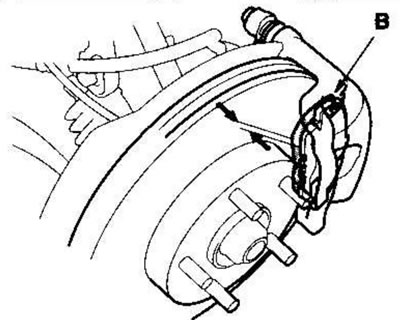
2. Check the thickness of the inner (A) and outer (B) brake pads. This does not include the thickness of the metal substrate.

Inner pad:
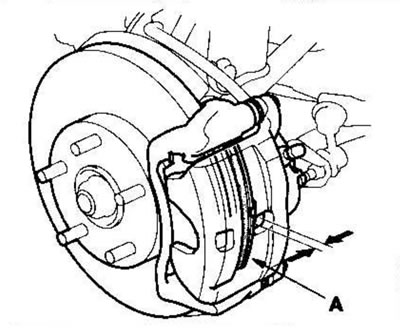


Inner pad:


Outer shoe:


Outer shoe:


Thickness of brake pads
Standard10.5-11.5 mm
Limit1.6 mm

3. If the brake pad thickness is less than the specified limit, replace the pads as a set.
This article is available at: russian, bulgarian, belarusian, ukrainian, serbian, croatian, romanian, polish, slovak, hungarian
This information has been verified: Mikhail Kopasov
Share with friends:
◀ Previous
CR-V 2: Brake system
Next ▶

Testing the Brake Fluid Level Switch
Testing the Parking Brake Switch
Brake system indicator wiring diagram
Bleeding the brake system
Large adjustment of the parking brake
Checking and replacing the front brake pads — on a 15-inch brake disc
Replacing the front brake pads — on a 14-inch brake disc
Checking the runout of the front brake disc
Checking the thickness and parallelism of the front brake disc
Front Wheel Brake Caliper Repair
See also other articles from Honda manuals:
Front Disc Brake Pads — Inspection Honda Accord 3 (1985-1989)
Front brake pads Honda Civic 5 and 6 (1991-2000)
Replacing the front brake pads Honda Fit 1 (2001-2008)
Front Brake Pads — Checking and Replacing Honda HR-V 1 (1998-2006, petrol)
Front Brake Pads — Checking and Replacing Honda Avancier 1 (1999-2003, petrol)
Link in different formats to this article
Comments and feedback from visitors
No comments yet


How much will 16 + 32 ?


CR-V 2 (2002-2006, petrol) 
  • General information
  • User manual
  • Technical data
  • Maintenance
  • Power unit
  • Engine repair
  • Lubrication system
  • Cooling system
  • Exhaust system
  • Fuel system
  • Engine management
  • Engine electrical equipment
  • Transmission
  • Clutch
  • Manual gearbox
  • Automatic gearbox
  • Rear differential
  • Drive shafts
  • Chassis and running gear
  • Steering
  • Front suspension
  • Rear suspension
  • Brake system
  • Body and interior
  • Exterior (external elements)
  • Interior (internal elements)
  • Doors, locks and windows
CR-V 1 (1995-2001, petrol) 
  • General information
  • Maintenance
  • Tips for car owner
  • Power unit
  • Engine repair
  • Engine overhaul
  • Cooling and lubrication system
  • Engine electrical equipment
  • Control system
  • Fuel system
  • Transmission
  • Clutch and drive shafts
  • Car gearbox
  • Chassis and running gear
  • Front suspension
  • Rear suspension
  • Steering
  • Brake system
  • Body and interior
  • Body service
  • Exterior (external elements)
  • Interior (internal elements)
  • Electrical equipment
  • Equipment and devices
  • Electrical circuits
HondaBook.ru © 2018–2026 • Mobile version • Sitemap: EN BG BY UA RS HR RO PL SK HU • Feedback • Driver Information • Search system • Bookmark
Accord 3 (1985-1989) • Accord 6 (1997-2002) • Civic 3 and 4 (1983-1991) • Civic 5 and 6 (1991-2000) • Civic 6 (1995-2000) • Civic 7 (2000-2005) • Civic 8 (2005-2011) • Fit 1 (2001-2008) • CR-V 1 (1995-2001) • CR-V 2 (2002-2006) • HR-V 1 (1998-2006) • Avancier 1 (1999-2003) •
 
This website uses cookies to ensure proper functioning. By clicking "OK," you agree.