
2. Remove the wheel.
3. If necessary, disconnect the brake hose clamp from the shock absorber or knuckle by unscrewing the mounting bolts.
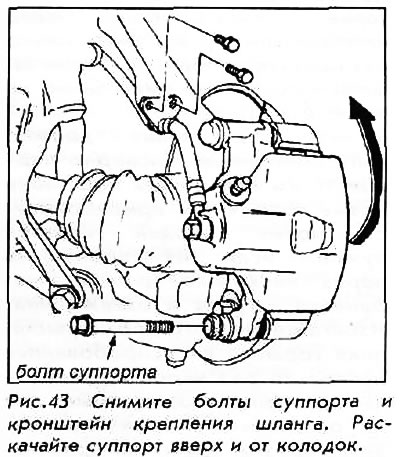
4. Unscrew the lower caliper mounting bolt and turn the caliper upward away from the pads.
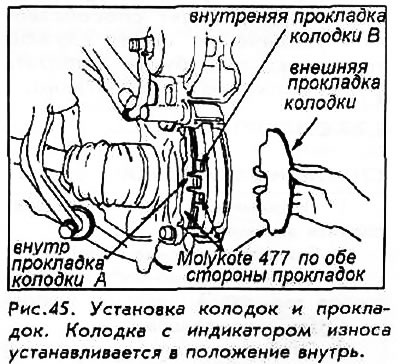
5. Remove the pad gasket and mount. Remove the pads from the caliper.
To install:
6. Clean the caliper completely; remove any rust from the disc or rotor ridges. Check the brake rotor for nicks or cracks. If there is any deep scratch, the rotor must be replaced.
7. Install the pad mount. Lubricate both surfaces of the gasket and the back of the brake pad. DO NOT apply lubricant to the brake surface of the pad.
8. Install the pads and linings. The pad with the wear indicator is placed inside.
9. Insert the caliper piston so that the caliper is over the pads. This is most easily accomplished with a large C-clamp. As the piston is inserted back into the caliper, fluid will tend to flow into the master cylinder reservoir. You may need to drain some fluid to prevent overflow.
10. Replace the caliper and tighten the mounting bolt to 45 Nm.
11. Reattach the brake hose if it has moved. Install the wheel and lower the car to the ground.
12. Check the master cylinder and add fluid as required, then replace the master cylinder cap cylinder.
13. Press the brake pedal several times and make sure that the movement feels normal. The first time you press the brake pedal, it may give the effect of a very "long" pedal due to the pistons being pulled back. Always press the brakes several times before driving. After replacing the pads, bleeding is usually not necessary.
Braking should be moderate for about the first 10 km or until the new pads are bedded in. New pads will seat better if they are subjected to several moderate heating and cooling cycles. Avoid heavy braking until the brakes have been tested several times at intervals necessary to allow them to cool down. Taking the time to properly seat the pads in this way will help to extend the life of the brakes; they will work more calmly and efficiently.
[Original article on the website «www.hondabook.ru»]