HondaBook.ru
Auto companies Volkswagen Auto companies Ford Auto companies Lada Auto companies Skoda Auto companies BMW Auto companies Mazda Auto companies Peugeot
English Русский
Български
Беларускі
Український
Српски
Hrvatski
Română
Polski
Slovenský
Magyar
Bookmark Contacts Sitemap   


Accord Civic Fit / Jazz CR-V HR-V Others Articles
CR-V 1 (1995-2001, petrol) CR-V 2 (2002-2006, petrol)

Headlights — Bulb Replacement (Honda CR-V 1)

  • Main
  • Honda CR-V
  • 1 (1995-2001, petrol)
  • Electrical equipment
  • Equipment and devices
  • Headlights — Bulb Replacement
0
1. On 4-cylinder Odysseys, to replace the passenger side headlight bulb, remove the air cleaner cover.

2. On 6-cylinder Odysseys, to replace the driver's side headlight bulb, remove the air cleaner cover.

3. Squeeze the clips and disconnect the connector from the headlight.

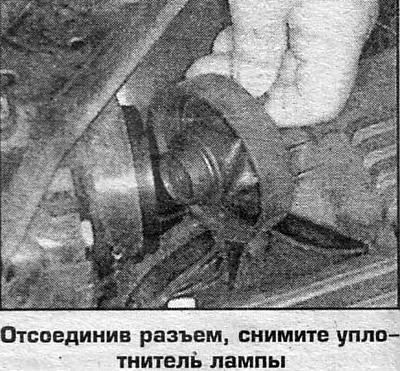
4. Remove the seal by pulling the rubber tab.

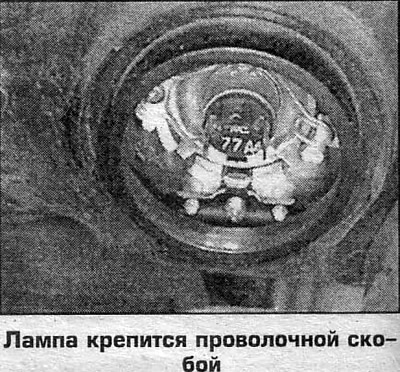
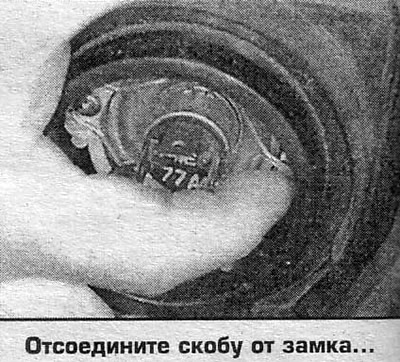
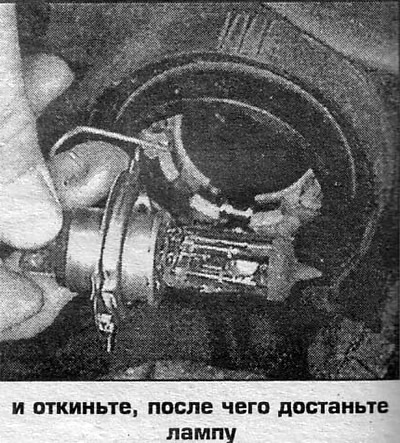
5. Fold back the wire clip and remove the lamp.

6. Installation is carried out in reverse order. Do not touch the glass bulb of the lamp with your fingers.
6. Installation is carried out in reverse order.…

6. Installation is carried out in reverse order.…
This article is available at: russian, bulgarian, belarusian, ukrainian, serbian, croatian, romanian, polish, slovak, hungarian
This information has been verified: Emil Safonov
Share with friends:
◀ Previous
CR-V 1: Equipment and devices
Next ▶

Reverse signal switch — removal and installation
Pointers — removal and installation
Instrument cluster — removal and installation
Windscreen washer pump — removal and installation
Rear Window Wiper Motor — Removal and Installation
Headlight beam adjustment
Front direction indicators and side lights
Rear direction indicators and side lights
Side turn signal repeater (CR-V models only)
Upper brake lights
See also other articles from Honda manuals:
Headlights — Description and Replacement of Bulbs Honda Accord 3 (1985-1989)
Headlights — removal and installation Honda Civic 3 and 4 (1983-1991)
Headlights and side lights Honda Fit 1 (2001-2008)
Headlights — replacement and adjustment Honda HR-V 1 (1998-2006, petrol)
Headlights — replacement, fault diagnostics Honda Avancier 1 (1999-2003, petrol)
Link in different formats to this article
Comments and feedback from visitors
No comments yet


How much will 35 + 36 ?


CR-V 2 (2002-2006, petrol) 
  • General information
  • User manual
  • Technical data
  • Maintenance
  • Power unit
  • Engine repair
  • Lubrication system
  • Cooling system
  • Exhaust system
  • Fuel system
  • Engine management
  • Engine electrical equipment
  • Transmission
  • Clutch
  • Manual gearbox
  • Automatic gearbox
  • Rear differential
  • Drive shafts
  • Chassis and running gear
  • Steering
  • Front suspension
  • Rear suspension
  • Brake system
  • Body and interior
  • Exterior (external elements)
  • Interior (internal elements)
  • Doors, locks and windows
CR-V 1 (1995-2001, petrol) 
  • General information
  • Maintenance
  • Tips for car owner
  • Power unit
  • Engine repair
  • Engine overhaul
  • Cooling and lubrication system
  • Engine electrical equipment
  • Control system
  • Fuel system
  • Transmission
  • Clutch and drive shafts
  • Car gearbox
  • Chassis and running gear
  • Front suspension
  • Rear suspension
  • Steering
  • Brake system
  • Body and interior
  • Body service
  • Exterior (external elements)
  • Interior (internal elements)
  • Electrical equipment
  • Equipment and devices
  • Electrical circuits
HondaBook.ru © 2018–2026 • Mobile version • Sitemap: EN BG BY UA RS HR RO PL SK HU • Feedback • Driver Information • Search system • Bookmark
Accord 3 (1985-1989) • Accord 6 (1997-2002) • Civic 3 and 4 (1983-1991) • Civic 5 and 6 (1991-2000) • Civic 6 (1995-2000) • Civic 7 (2000-2005) • Civic 8 (2005-2011) • Fit 1 (2001-2008) • CR-V 1 (1995-2001) • CR-V 2 (2002-2006) • HR-V 1 (1998-2006) • Avancier 1 (1999-2003) •
 
This website uses cookies to ensure proper functioning. By clicking "OK," you agree.