HondaBook.ru
Auto companies Volkswagen Auto companies Ford Auto companies Lada Auto companies Skoda Auto companies BMW Auto companies Mazda Auto companies Peugeot
English Русский
Български
Беларускі
Український
Српски
Hrvatski
Română
Polski
Slovenský
Magyar
Bookmark Contacts Sitemap   


Accord Civic Fit / Jazz CR-V HR-V Others Articles
HR-V 1 (1998-2006, petrol)

Steering gear — removal (Honda HR-V 1)

  • Main
  • Honda HR-V
  • 1 (1998-2006, petrol)
  • Chassis and running gear
  • Steering
  • Steering gear — removal
0
Perform the removal taking into account the following:
  • Using solvent and a brush, wash away oil and dirt from the valve body assembly, its tubes and the end of the steering gear. Blow with compressed air.
  • Before disconnecting the steering column joint, remove the steering wheel. Otherwise, the coiled cable may be damaged.

1. Drain the power steering fluid as described above.

2. Raise the front of the vehicle and support it securely.

3. Remove the front wheels.

4. Remove the driver's airbag.

5. Remove the steering wheel (see above).

6. Remove the steering column joint cover.
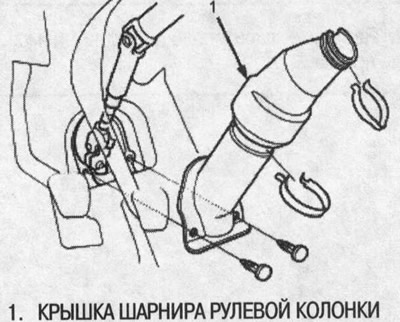
6. Remove the steering column joint cover.


7. Loosen the steering column hinge bolts and detach the steering column hinge by moving the hinge toward the column.
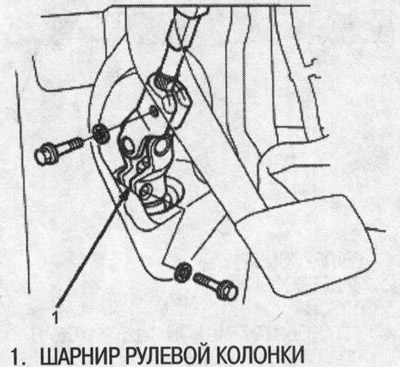
7. Loosen the steering column hinge bolts and…


8. Remove the cotter pin from the 12mm nut and loosen the nut.
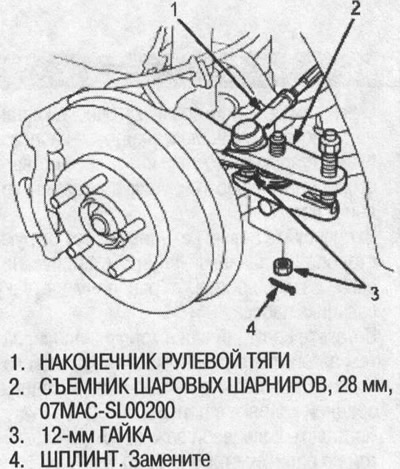


8. Remove the cotter pin from the 12mm nut and…


9. Using a special tool, separate the steering rod ball joint and steering knuckle.

10. Loosen the 14mm socket nut and disconnect the feed tube. Remove the clamp from the feed tube.
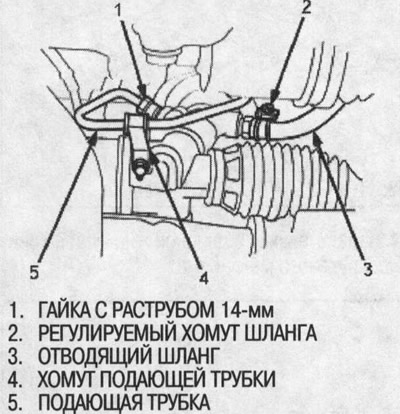
10. Loosen the 14mm socket nut and disconnect the…


11.Loosen the adjustable hose clamp and disconnect the outlet hose.

12. After disconnecting the hoses and tubes, to prevent foreign material from entering the valve body assembly, plug or seal them with a piece of adhesive tape or similar material.

Note: Do not loosen the cylinder tubes between the valve body assembly and the cylinder.


13. Disconnect the right and left stabilizer springs from the stabilizer link.
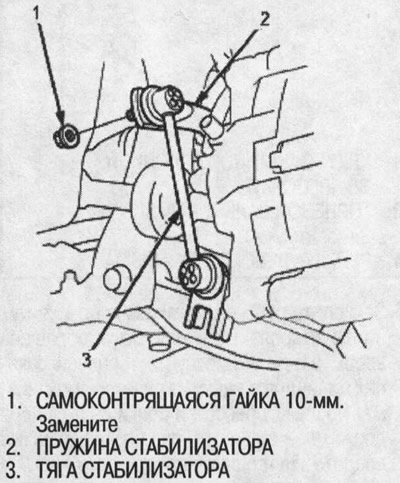
13. Disconnect the right and left stabilizer…


14. Disconnect the right and left lower suspension arms from the steering knuckle.


15. Remove the stabilizer holders and mounting bushings.
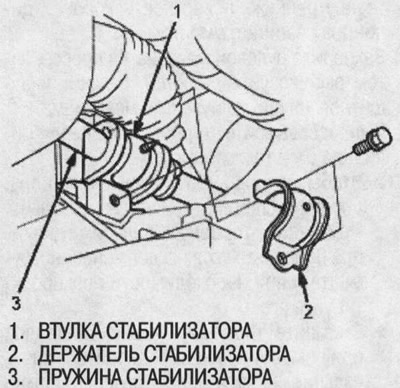
15. Remove the stabilizer holders and mounting…


16. Tilt the steering knuckle forward. Turn the stabilizer spring and place the end of the stabilizer under the bottom of the drive shaft.

Also place the stabilizer spring on the opposite side under the drive shaft.

Lower the lower control arm and slide the end of the stabilizer bar under the bottom of the lower control arm.
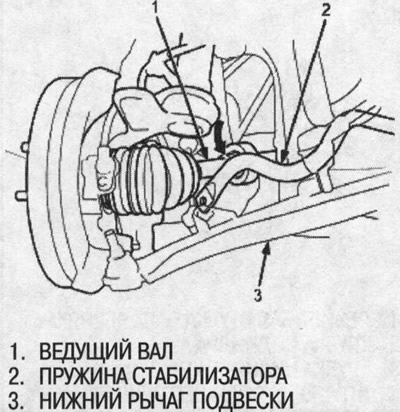
Lower the lower control arm and slide the end of…


17. Tilt the stabilizer spring obliquely. Remove the stabilizer spring by pulling it toward the passenger side and turning it.

Note: The stabilizer spring is installed differently on the right and left sides. To avoid confusion during installation, mark the springs.


18. Grasp the steering rod on the passenger side and pull the rack towards the passenger side.


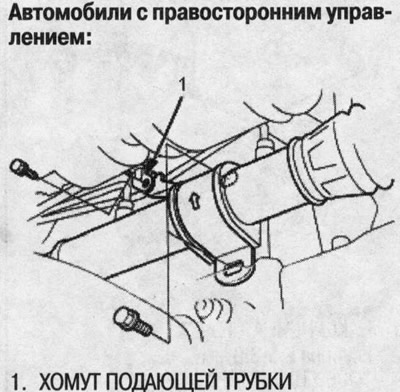
19. Remove the 10mm mounting bolts from the steering gear mounting bracket B. Do not remove the bracket. Right-hand drive vehicles only: Remove the feed pipe clamp from bracket B.
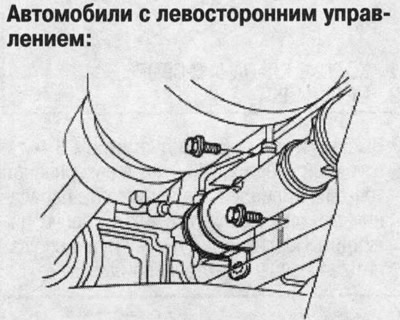
19. Remove the 10mm mounting bolts from the…

20. Remove the 10mm mounting bolts from steering gear mounting bracket A. Do not remove the bracket.
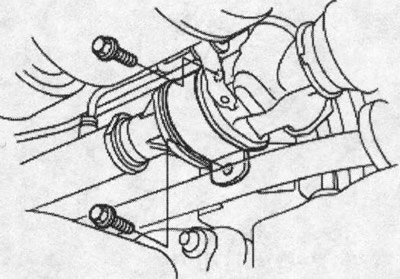
20. Remove the 10mm mounting bolts from steering…


21. Disconnect the shift cable (CVT models only).


22. Move the steering gear towards the opening in the frame on the passenger side by pushing it.
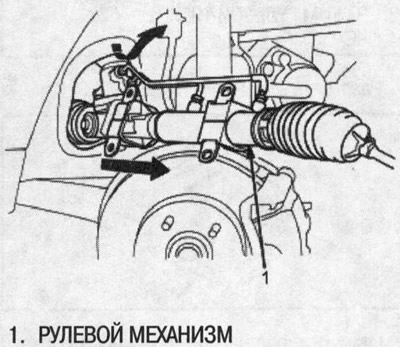
22. Move the steering gear towards the opening in…


23. Remove the steering gear by pushing it towards the passenger side and tilting it.

24. Remove the steering gear mounting brackets and support pads.
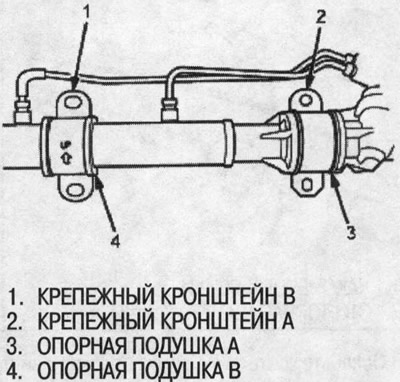
24. Remove the steering gear mounting brackets…
This article is available at: russian, bulgarian, belarusian, ukrainian, serbian, croatian, romanian, polish, slovak, hungarian
This information has been verified: Emil Safonov
Share with friends:
◀ Previous
HR-V 1: Steering
Next ▶

Power Steering Pump — Assembly
Power Steering Pump — Check
Power Steering Pump — Disassembly
Power Steering Pump — Replacement
Power Steering Hoses and Tubes
Disassembling the steering rack
Disassembling the steering gear valve body
Steering gear — assembly
Steering gear valve body assembly
Steering rack assembly
See also other articles from Honda manuals:
Replacing the steering gear protective covers Honda Accord 6 (1997-2002)
Steering gear dust boots — replacement Honda Civic 3 and 4 (1983-1991)
Removal and installation the steering gear Honda Fit 1 (2001-2008)
Power steering gear — removal and installation Honda CR-V 1 (1995-2001, petrol)
Steering gear — removal Honda Avancier 1 (1999-2003, petrol)
Link in different formats to this article
Comments and feedback from visitors
No comments yet


How much will 30 + 47 ?


HR-V 1 (1998-2006, petrol) 
  • General information
  • User manual
  • Maintenance
  • Power unit
  • Engine repair
  • Lubrication system
  • Cooling system
  • Fuel injection and control
  • Power and exhaust system
  • Engine electrical equipment
  • Transmission
  • Clutch
  • Mechanical gearbox
  • Automatic gearbox
  • Rear differential
  • Drive shafts and cardan
  • Chassis and running gear
  • Steering
  • Car suspension
  • Brake system
  • Body and interior
  • Exterior (external elements)
  • Interior (internal elements)
  • Doors, locks and windows
  • Electrical equipment
  • Equipment and devices
  • Lighting system
  • Electrical circuits
HondaBook.ru © 2018–2026 • Mobile version • Sitemap: EN BG BY UA RS HR RO PL SK HU • Feedback • Driver Information • Search system • Bookmark
Accord 3 (1985-1989) • Accord 6 (1997-2002) • Civic 3 and 4 (1983-1991) • Civic 5 and 6 (1991-2000) • Civic 6 (1995-2000) • Civic 7 (2000-2005) • Civic 8 (2005-2011) • Fit 1 (2001-2008) • CR-V 1 (1995-2001) • CR-V 2 (2002-2006) • HR-V 1 (1998-2006) • Avancier 1 (1999-2003) •
 
This website uses cookies to ensure proper functioning. By clicking "OK," you agree.