
Contents: Speedometer ⇊ Tachometer ⇊ Total/current mileage indicator ⇊ Switching indication ⇊ Total mileage indicator (odometer) ⇊ Current mileage indicator ⇊ Instrument panel of cars produced in…⇊ Instrument cluster of cars produced…⇊ Switching indication ⇊ Total mileage indicator (odometer) ⇊ Current mileage indicator ⇊ Ambient air temperature indicator ⇊ Fuel consumption indicator ⇊ Fuel level indicator ⇊ Coolant temperature gauge ⇊ Backlight control ⇊ Brightness adjustment indicator…⇊
When the ignition key is turned to position II, as well as when the driver's door is opened (greeting signal) the instrument panel backlight turns on.
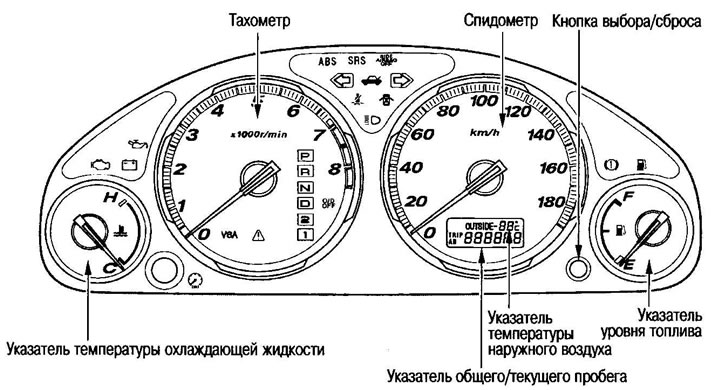
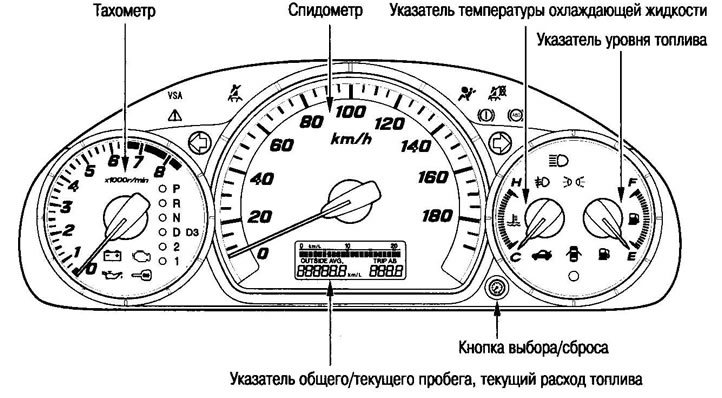
Speedometer
Displays the vehicle's speed
Tachometer
Displays the engine speed.
Caution: Since high engine speeds can cause engine damage, do not exceed the maximum permissible engine speed (6500).
Total/current mileage indicator
If you turn the ignition key to position II, the display will show the total and current mileage of the vehicle (or ambient air temperature).
Switching indication
Briefly pressing the select/reset button switches sequentially between "total mileage, TRIP A, TRIP B".
Total mileage indicator (odometer)
Displays the total mileage of the vehicle (in km).
Current mileage indicator
Displays the current mileage of the vehicle after resetting the counter (in km). It is possible to display two values of the current mileage TRIP A and TRIP B.
Zeroing is performed as follows:
Use the Select/Reset button to select the desired option (TRIP A or TRIP B) press the button and hold until the reading is reset.
Instrument panel of cars produced in 2001-2004 in standard configuration
Instrument cluster of cars produced since 2005 in standard configuration
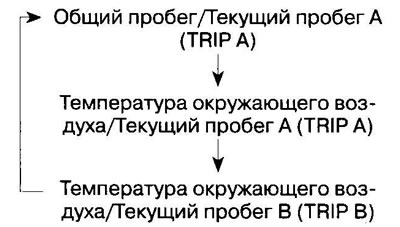
Switching indication
Pressing the select/reset button briefly switches the display sequentially:
Total mileage indicator (odometer)
Displays the total mileage of the vehicle (in km).
Current mileage indicator
Displays the current mileage of the vehicle (in km) after resetting the counter. It is possible to display two values of the current mileage TRIP A and TRIP B.
Zeroing is performed as follows: select the desired indicator (TRIP A or TRIP B), press and hold the select/reset button until the reading is reset to zero.
Note: After 999.9 km, the current mileage display is reset to zero.
Ambient air temperature indicator
Displays the temperature outside the vehicle when driving at speeds over 30 km/h (ignition key in position II). The indicator starts flashing after the temperature drops below 3°C (ignition key in position II).
Note: Since the temperature sensor is located on the front bumper near the engine compartment, the temperature is displayed with an error at driving speeds below 30 km/h.
Fuel consumption indicator
Displays fuel consumption km/l (ignition key in position II).
To turn off the indication:
Press and hold the Select/Reset button (approx. 5 seconds) until the indication disappears.
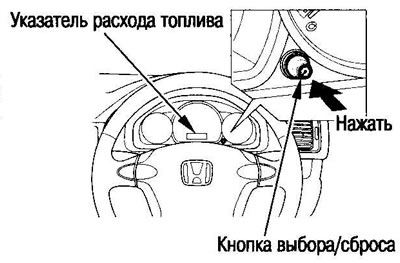
To restore the indication, do the same again.
Note: Before the fuel consumption display disappears, the current mileage indicator is reset.
Fuel level indicator
Displays the fuel level in the tank (ignition key in position II).
Coolant temperature gauge
Displays engine coolant temperature (ignition key in position II).
Backlight control
By turning the select/reset button, you can adjust the brightness of the backlight and indication on the instrument panel.
To increase the backlight brightness, turn the Select/Reset button to the right. When maximum brightness is reached, a sound signal is emitted.
To decrease the backlight brightness, turn the Select/Reset button to the left. When the minimum brightness is reached, a sound signal is emitted.
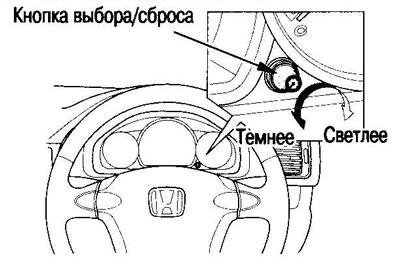
Brightness adjustment indicator (models since 2005)
When you turn the select/reset button, the odometer display shows a brightness change scale.
The minimum value is 1 division; turning the knob to the right increases the number of divisions.
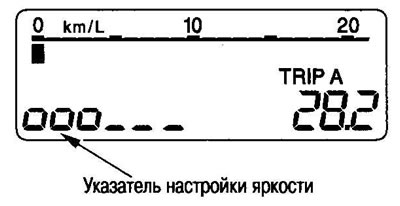
Help: The scale disappears from the display after approx. 5 seconds after finishing the setting or after pressing the select/reset button. The instrument panel light goes out:
- Approx. 3 min after driver's door is opened;
- Approx. 30 sec after driver's door is closed;
- Approx. 10 sec. after the key was inserted into the ignition switch (if there were no other actions);
- Approx. 10 sec. after the ignition key has been turned from position II to position I or 0;
- Immediately after removing the key from the ignition.
[The original is located on the website www.HondaBook.ru]