HondaBook.ru
Auto companies Volkswagen Auto companies Ford Auto companies Lada Auto companies Skoda Auto companies BMW Auto companies Mazda Auto companies Peugeot
English Русский
Български
Беларускі
Український
Српски
Hrvatski
Română
Polski
Slovenský
Magyar
Bookmark Contacts Sitemap   


Accord Civic Fit / Jazz CR-V HR-V Others Articles
HR-V 1 (1998-2006, petrol)

Gearbox — removal (Honda HR-V 1)

  • Main
  • Honda HR-V
  • 1 (1998-2006, petrol)
  • Transmission
  • Automatic gearbox
  • Gearbox — removal
1
Warning!
  • Make sure the lifts, jacks and safety stands are installed correctly and the lift brackets are installed in the correct locations on the engine.
  • Set the parking brake and block the rear wheels so that the vehicle does not roll off the stands and fall on you while you are working underneath it.


Caution: To avoid damage to the paintwork, cover the fenders with protective cloth.


1. Shift into neutral.

2. First disconnect the negative (-) cable, then the positive (+) cable from the battery.

3. Remove the battery retaining bracket, then the battery itself.

4. Remove the battery base.

5. Remove the drain plug and drain the transmission fluid.

6. Screw the plug into the drain hole, installing a new sealing washer.
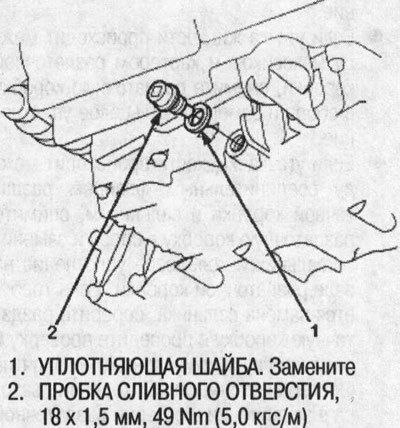
6. Screw the plug into the drain hole, installing…


7. Remove the harness clamp from the clamp bracket, then disconnect the starter cables.
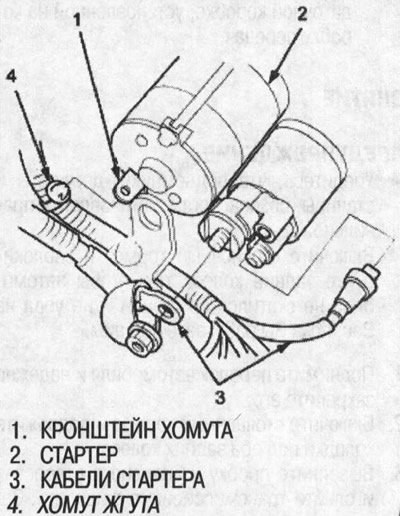
7. Remove the harness clamp from the clamp…


8. Disconnect the transmission ground cable terminals and remove the radiator hose clamp from the transmission hanger bracket, then disconnect the solenoid harness connector and the drive pulley speed sensor connector.
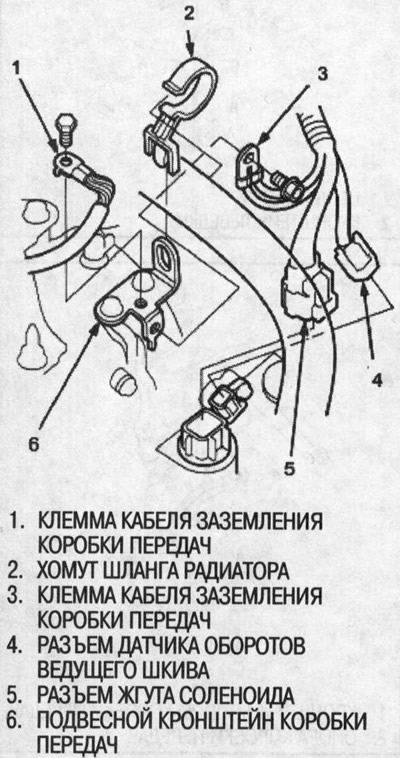


8. Disconnect the transmission ground cable…


9. Remove the clamp from the shift cable end, then separate the cable end from the control lever.

10. Remove the shift cable bracket together with the cable. Do not kink the shift cable.
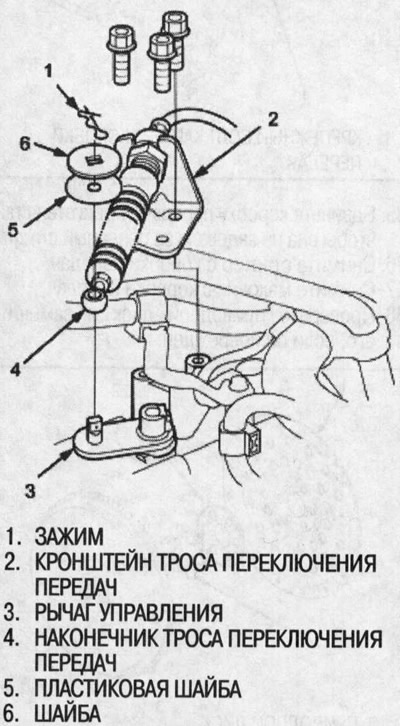
10. Remove the shift cable bracket together with…


11. Remove the harness clamp bracket, then disconnect the connectors for the engine coolant sensor (ECT), secondary shaft speed sensor, driven pulley speed sensor, and vehicle speed sensor (VSS).
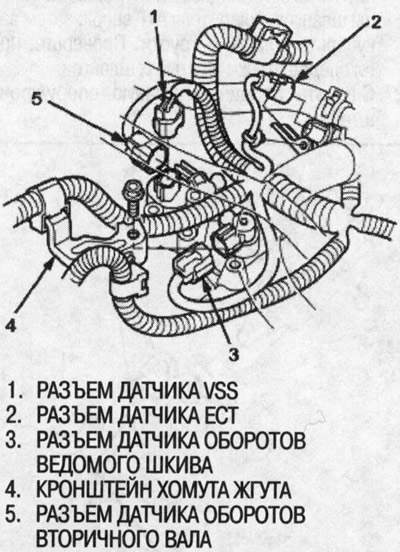
11. Remove the harness clamp bracket, then…


12. Remove the distributor.


13. Unscrew the gearbox housing mounting bolts.
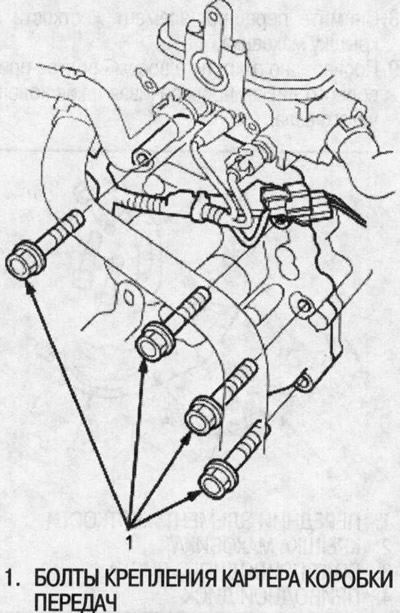
13. Unscrew the gearbox housing mounting bolts.


14. Remove the mudguard.
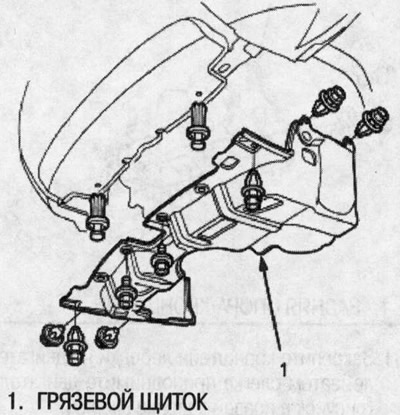
14. Remove the mudguard.


15. Place a 5mm socket wrench on the ball joint pin end, then remove the flange nuts from the ball joint pins on the front stabilizer link. Separate the front stabilizer links from the lower control arms.

16. Remove the cotter pins and unscrew the nuts of the ball joints, then separate the steering knuckles from the lower suspension arms (see Chapter. "Front and rear suspension").
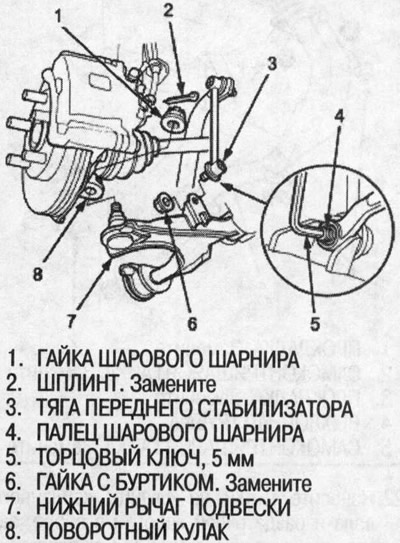
16. Remove the cotter pins and unscrew the nuts…


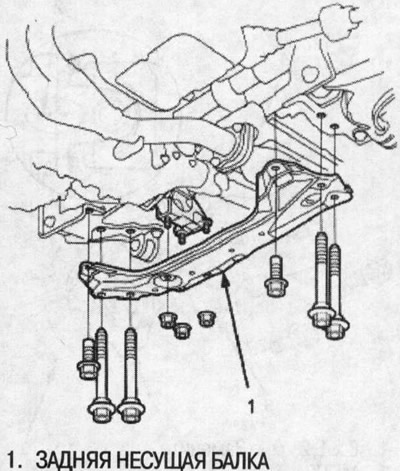
17. Remove the rear support beam.


17. Remove the rear support beam.


18. Pry the drive shaft out of the differential and intermediate shaft, then pull on the inner joints and remove the right drive shaft from the differential and the left drive shaft from the intermediate shaft (see Ch. "Drive shafts"),

19. Move the right drive shaft forward.

20. Apply clean motor oil to all high-cleanliness surfaces, then tie plastic bags to the ends of the drive shafts.
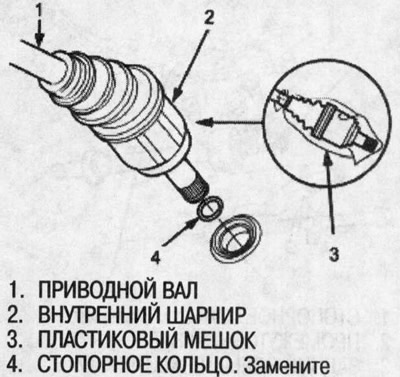
20. Apply clean motor oil to all high-cleanliness…


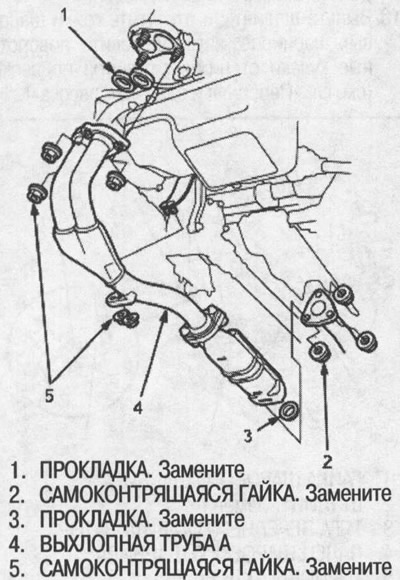
21. Remove the exhaust pipe A.

21. Remove the exhaust pipe A.


22. Mark the flanges of the propeller shaft and transfer case assembly, then separate the propeller shaft from the transfer case assembly on 4WD models.
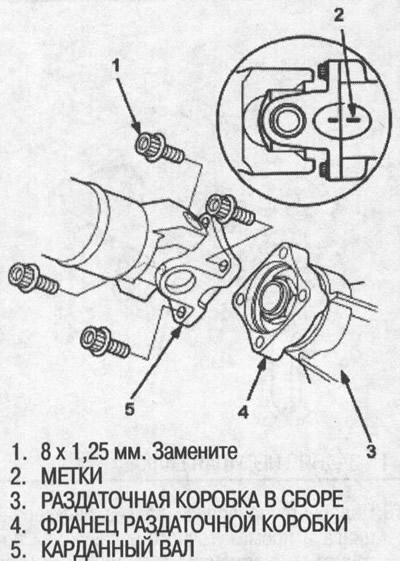


22. Mark the flanges of the propeller shaft and…


23. Remove the intermediate shaft.

24. Apply clean engine oil to all high-cleanliness surfaces, then tie plastic bags to both ends of the intermediate shaft.

25. Remove the rear stiffener.
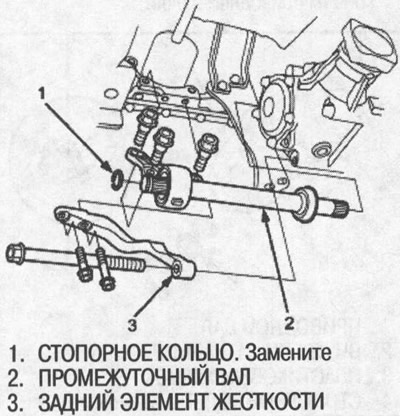
25. Remove the rear stiffener.


26. Disconnect the ATF cooler feed hoses from the ATF cooler tubes. To prevent ATF fluid from leaking, turn the ends of the ATF cooler hoses upward, then plug the hoses and tubes. Check for signs of leakage at the hose joints.

27. Remove the front right support/bracket.
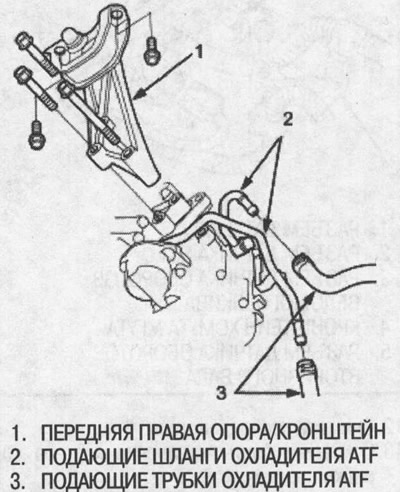
27. Remove the front right support/bracket.


28. Remove the front stiffener and flywheel cover.


29. Loosen the eight drive disk bolts one by one while turning the crankshaft pulley.
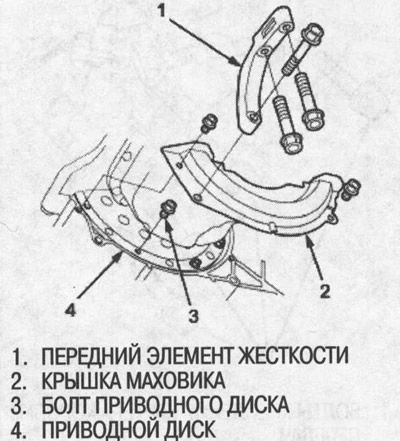
29. Loosen the eight drive disk bolts one by one…


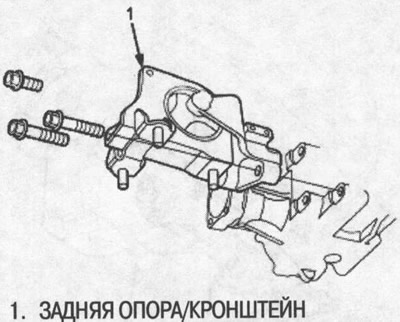
30. Remove the rear support/bracket.

30. Remove the rear support/bracket.

31. Secure the winch bracket to the engine, then lift the engine slightly.
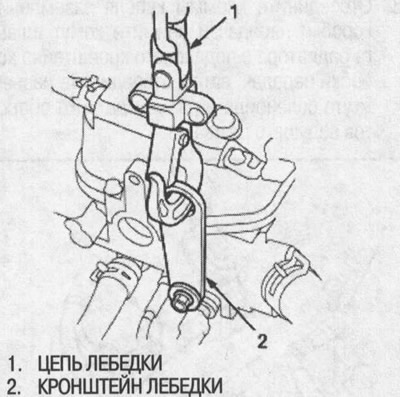
31. Secure the winch bracket to the engine, then…


32. Support the gearbox with a jack and lift it only enough to relieve the load on the supports.

33. Remove the gearbox support bracket.
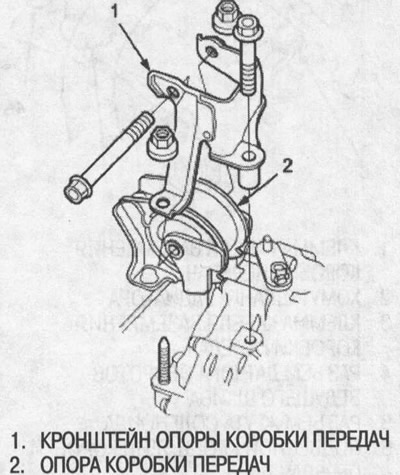
33. Remove the gearbox support bracket.


34. Unscrew the gearbox housing mounting bolt.
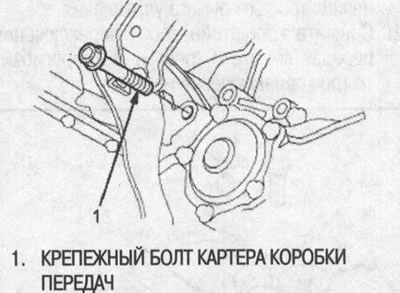
34. Unscrew the gearbox housing mounting bolt.


35. Move the gearbox away from the engine so that it does not touch the reference pin.

36. Remove the starter from the gearbox.

37. Remove the flywheel from the gearbox.

38. Check the drive disk and replace it if it is damaged.
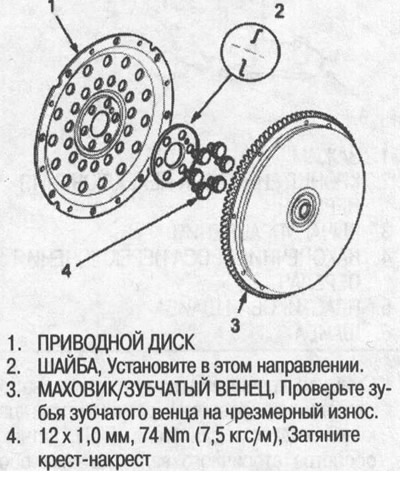
38. Check the drive disk and replace it if it is…


(Publication reprinted from the website: Hondabook.ru)
This article is available at: russian, bulgarian, belarusian, ukrainian, serbian, croatian, romanian, polish, slovak, hungarian
This information has been verified: Emil Safonov
Share with friends:
◀ Previous
HR-V 1: Automatic gearbox
Next ▶

Transfer case — installation
Transfer case — removal
Transfer case — check
ATF fluid filter — removal and installation
Lower valve box — replacement
Gearbox, lower valve box
Gearbox housing, flywheel housing (2WD)
Gearbox housing, flywheel housing (4WD)
Right cover, intermediate crankcase
Removal the gearbox housing, lower valve box
See also other articles from Honda manuals:
Gearbox — Accord 1990-91 Honda Accord 3 (1985-1989)
Gearbox support — inspection and replacement Honda Civic 3 and 4 (1983-1991)
Checking the level and replacing the oil in the rear gearbox Honda Fit 1 (2001-2008)
Rear Axle Gearbox Oil (CR-V 4WD models only) Honda CR-V 1 (1995-2001, petrol)
Link in different formats to this article
Comments and feedback from visitors
Александр (11.05.2021 18:49)
Статья не полная, подскажите как правильно снять АКПП
answer quote


How much will 38 + 18 ?


HR-V 1 (1998-2006, petrol) 
  • General information
  • User manual
  • Maintenance
  • Power unit
  • Engine repair
  • Lubrication system
  • Cooling system
  • Fuel injection and control
  • Power and exhaust system
  • Engine electrical equipment
  • Transmission
  • Clutch
  • Mechanical gearbox
  • Automatic gearbox
  • Rear differential
  • Drive shafts and cardan
  • Chassis and running gear
  • Steering
  • Car suspension
  • Brake system
  • Body and interior
  • Exterior (external elements)
  • Interior (internal elements)
  • Doors, locks and windows
  • Electrical equipment
  • Equipment and devices
  • Lighting system
  • Electrical circuits
HondaBook.ru © 2018–2026 • Mobile version • Sitemap: EN BG BY UA RS HR RO PL SK HU • Feedback • Driver Information • Search system • Bookmark
Accord 3 (1985-1989) • Accord 6 (1997-2002) • Civic 3 and 4 (1983-1991) • Civic 5 and 6 (1991-2000) • Civic 6 (1995-2000) • Civic 7 (2000-2005) • Civic 8 (2005-2011) • Fit 1 (2001-2008) • CR-V 1 (1995-2001) • CR-V 2 (2002-2006) • HR-V 1 (1998-2006) • Avancier 1 (1999-2003) •
 
This website uses cookies to ensure proper functioning. By clicking "OK," you agree.