
Contents: Testing at the control unit input…⇊ Testing at the control unit input…⇊ Testing the Driver's Door Lock Push…⇊ Testing the driver's door lock…⇊ Testing the Passenger Door Lock…⇊ Testing the rear door lock actuator ⇊ Testing the transmitter ⇊ Programming the transmitter ⇊ Testing the ignition switch ⇊
Testing at the control unit input (without remote door locking system)
1. Remove the lower pocket on the driver's side (see Ch. "Body").
2. Disconnect the 6-pin connector from the control unit.
3. Check the connector and socket contacts to ensure they are making good contact.
- If contacts are bent, loose or corroded, repair the defects and retest the system.
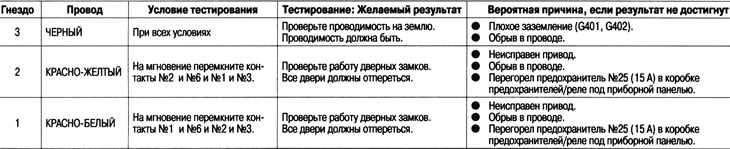
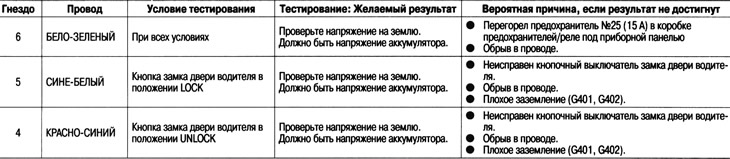
- If the contacts appear to be OK, perform the following tests on the connector.
- If any of the tests indicate a problem, find and correct the cause, then retest the system.
- If the test at the input of the unit shows normal, the control unit must be faulty, replace it.
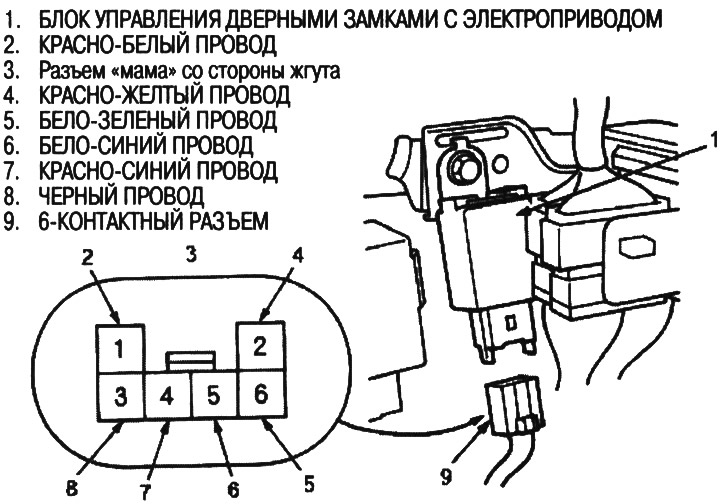
Disconnect the 6-pin connector from the power door lock control unit
Connect the 6-pin connector to the power door lock control unit
Testing at the control unit input (with remote door locking system)
1. Remove the lower pocket on the driver's side (see Ch. "Body"),
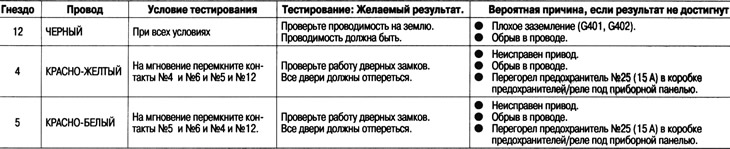
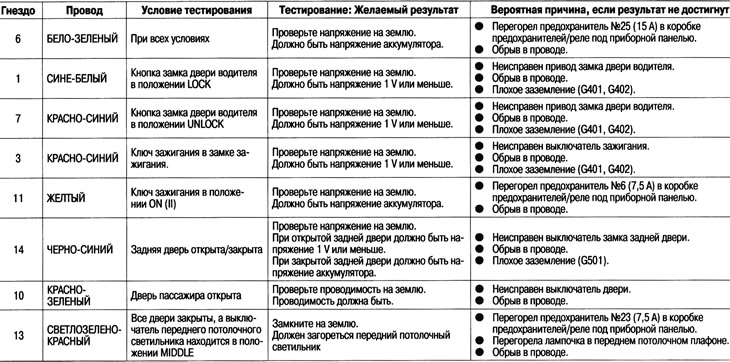
2. Disconnect the 14-pin connector from the control unit.
3. Check the connector and socket contacts to ensure they are making good contact.
- If contacts are bent, loose or corroded, repair the defects and retest the system.
- If the contacts appear to be OK, perform the following tests on the connector.
- If any of the checks indicate that there is no
- serviceability, find and eliminate the cause, then recheck the system.
- If the test at the input of the unit shows normal, the control unit must be faulty, replace it.
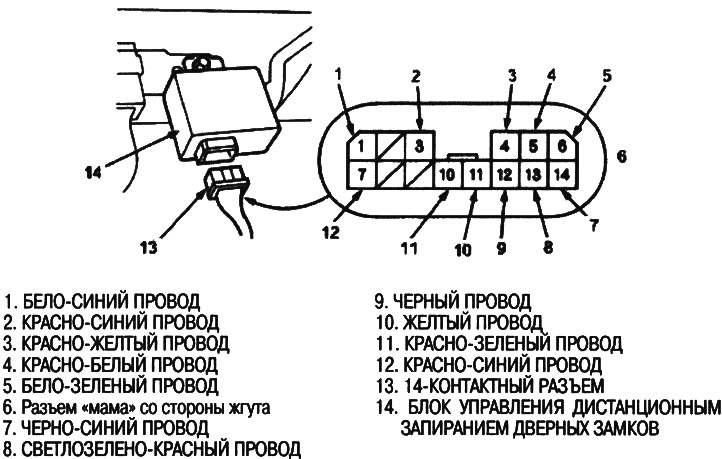
Disconnect the 14-pin connector from the remote door lock control unit
Connect the 14-pin connector to the remote door lock control unit
Testing the Driver's Door Lock Push Button Switch
1. Remove the door panel on the driver's side (see chapter "Body").
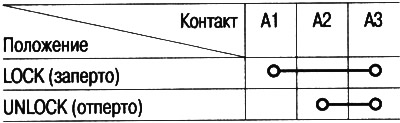
2. Disconnect the 3-pin connector from the pushbutton switch (without remote control door locking system) or actuator (with remote control door locking system).
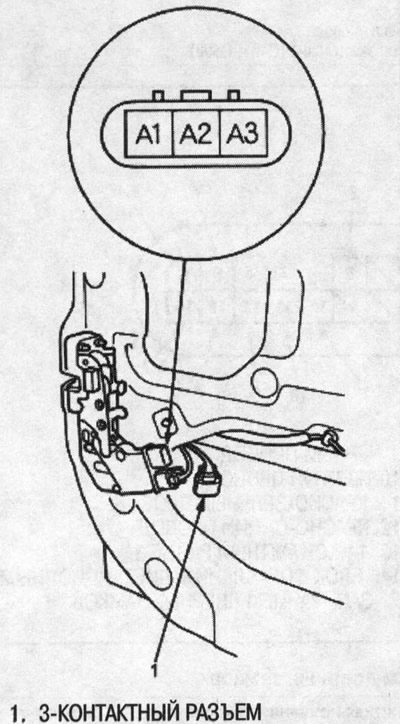
3. Check for conductivity between the contacts in all switch positions in accordance with the table.
Testing the driver's door lock actuator (with remote door locking system)
1. Remove the driver's side door panel.
2. Disconnect the 2-pin connector from the drive.
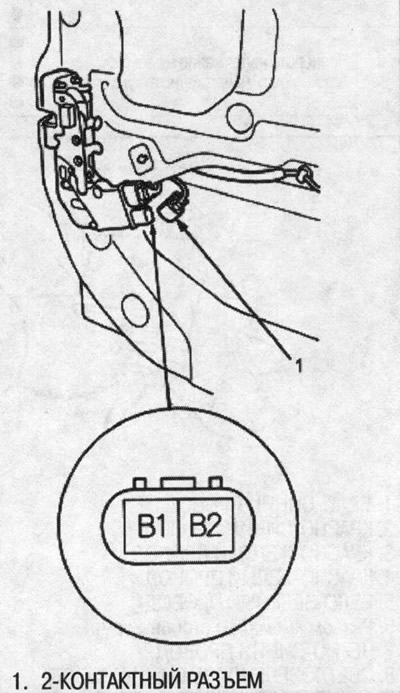
Caution: To avoid damage to the drive, apply battery voltage only briefly.
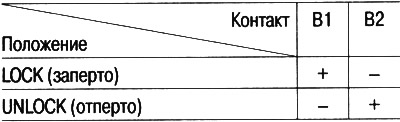
3. Check the operation of the drive by supplying power and grounding according to the table.
Testing the Passenger Door Lock Actuator
1. Remove the door panel on the passenger side.
2. Disconnect the 2-pin connector from the drive.
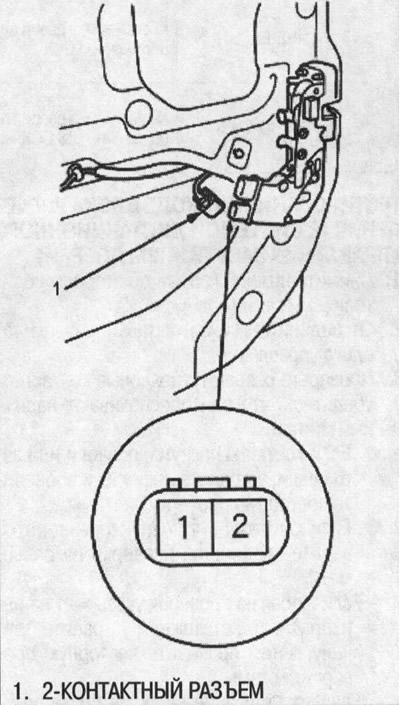
Caution: To avoid damage to the drive, apply battery voltage only briefly.
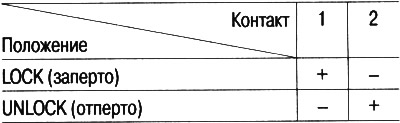
3. Check the operation of the drive by supplying power and grounding according to the table.
Testing the rear door lock actuator
1. Remove the decorative panel from the rear door.
2. Disconnect the 2-pin connector from the drive.
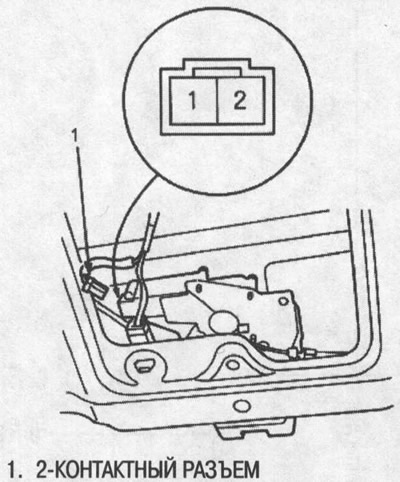
Caution: To avoid damage to the drive, apply battery voltage only briefly.
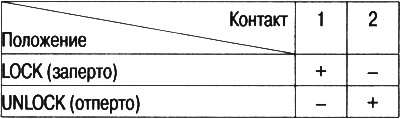
3. Check the operation of the drive by supplying power and grounding according to the table.
Testing the transmitter
Note:
- If the doors are unlocked and locked using the transmitter, but the LED on the transmitter does not light, then the LED is faulty; replace the transmitter.
- If any door is open, the doors cannot be locked or unlocked using the transmitter.
- If you unlock the doors using the transmitter but do not open any doors within 30 seconds, the doors will lock again automatically.
- If the ignition key is inserted into the ignition switch, the doors cannot be locked or unlocked using the transmitter.
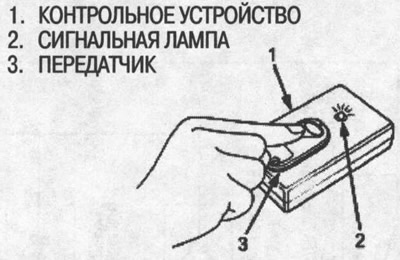
1. Using the remote door lock control unit (07MAJ-SP00300):
Place the transmitter on the control device and press the button on the transmitter.
- If the indicator light does not come on, check:
- Is the battery low?.
- Is the transmitter working properly?.
- If the indicator light comes on, the transmitter is normal.
Note:
- After replacing the battery in the transmitter, point the transmitter at the receiver and press the transmitter button six times.
- On the sixth press, make sure that you can hear the sound of the door lock actuators operating.
Programming the transmitter
Entering transmitter codes into memory:
The remote control receiver can store codes for up to three transmitters. When entering a fourth code, the first code entered is erased.
Note: It is important to observe the time intervals between performing individual operations.
1. Turn the ignition key to the ON (II) position.
2. Within 1-4 seconds, press the lock or unlock button on the transmitter, aiming the transmitter at the receiver (control unit).
3. Within 1-4 seconds, turn the ignition key to the OFF position.
4. Within 1-4 seconds, turn the ignition key to the ON (II) position.
5. Within 1-4 seconds, press the lock or unlock button on the transmitter, aiming the transmitter at the receiver (control unit).
6. Within 1-4 seconds, turn the ignition key to the OFF position.
7. Within 1-4 seconds, turn the ignition key to the ON (II) position.
8. Within 1-4 seconds, press the lock or unlock button on the transmitter, aiming the transmitter at the receiver (control unit).
9. Within 1-4 seconds, turn the ignition key to the OFF position.
10. Within 1-4 seconds, turn the ignition key to the ON (II) position.
11. Within 1-4 seconds, press the lock or unlock button on the transmitter, aiming the transmitter at the receiver (control unit).
12. Make sure that the door lock actuators operate. Within 1-4 seconds, press the lock or unlock button on the transmitter again.
13. Within 15 seconds, point the transmitter (maximum three) whose codes you wish to enter into memory at the receiver and press the lock or unlock buttons.
After entering the code for each transmitter into memory, make sure that you can hear the sound of the door lock actuators operating.
14. Turn the ignition key to the OFF position and remove the key.
15. Check the correct operation with the new codes.
Testing the ignition switch
1. Remove the lower pocket on the driver's side (see chapter "Body").
2. Disconnect the 7-pin connector from the under-dash fuse/relay box.
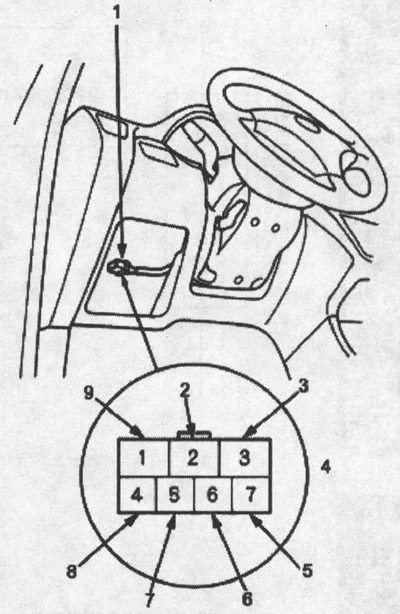
1. 7-pin connector; 2. white and blue wire; 3. white wire; 4. female connector on the harness side; 5. white and blue wire; 6. black and white wire; 7. yellow wire; 8. black and yellow wire; 9. black and white wire
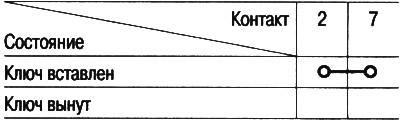
3. Check for conductivity between contacts No.2 and No.7 in each condition according to the table.
The original can be found on the resource www.hondabook.ru