
Caution! When reversing, always use the outside rearview mirrors or look directly behind. This is necessary to reduce the risk of collisions, as the camera has a limited viewing range.
Camera viewing range
The camera's range is limited to 3m.
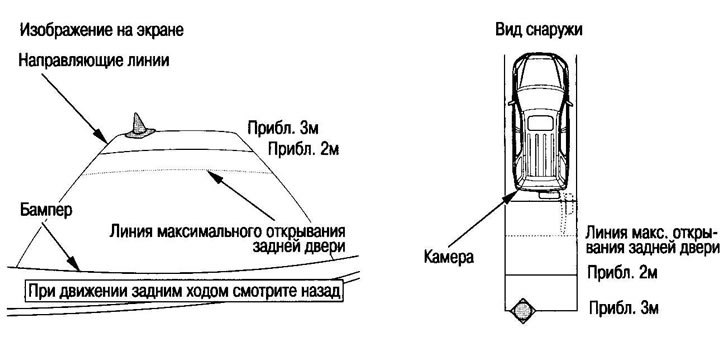
Reference.
- Even when the ignition switch is in the "II" position and the selector lever is in the "R" position, the guide line will not appear unless the navigation system is turned on.
- The camera uses a special type of lens, so the image on the screen is distorted compared to the real one.
- The camera's viewing range is limited; the image from the sides of the bumper and underneath it is not included in the field of view.
- Dirt on the camera lens causes the image on the screen to become blurry.
- To clean the lens, use water and glass cleaning agents. Do not use alcohol, solvents or abrasives as this may damage the lens.
- Image degradation usually occurs in the following cases:
- 1. In the dark or in the shade
- 2. When bright light hits the camera lens
- 3. When the chamber heats up strongly
- 4. If there are water drops on the camera lens
Disabling the indication of guide lines
You can remove the display of guide lines from the screen.
1. Make sure the parking brake is applied.
2. Turn the ignition key to position "II", move the selector lever to position "R".
3. Click the install button.
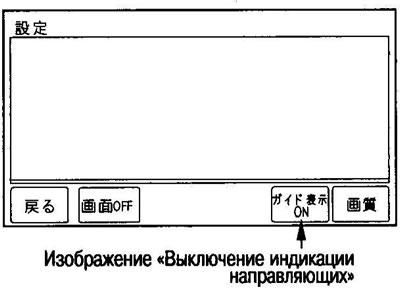
4. Touch the "Turn off guide display" image on the display screen.
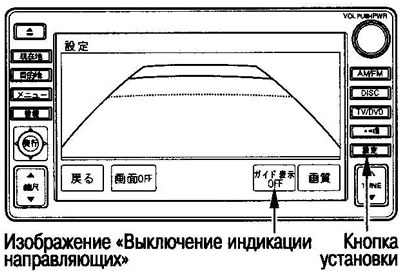
To display the guide lines again, tap the "Turn on guide lines" image on the display screen.
For safety reasons, do not adjust the rear view camera while driving.
(The original can be found on the resource: HONDABOOK.ru)