
HondaBook.ru
Auto companies Volkswagen Auto companies Ford Auto companies Lada Auto companies Skoda Auto companies BMW Auto companies Mazda Auto companies Peugeot
English Русский
Български
Беларускі
Український
Српски
Hrvatski
Română
Polski
Slovenský
Magyar
Bookmark Contacts Sitemap   


Accord Civic Fit / Jazz CR-V HR-V Others Articles
Avancier 1 (1999-2003, petrol)

Control cable — replacement (Honda Avancier 1)

  • Main
  • Honda
  • Avancier 1 (1999-2003, petrol)
  • Transmission
  • Automatic gearbox
  • Control cable — replacement
0
Caution: Install the jack and stands only in designated areas.


1. Remove the lower front console panel.

2. Set the selector lever to position R and unscrew the control cable end nut.
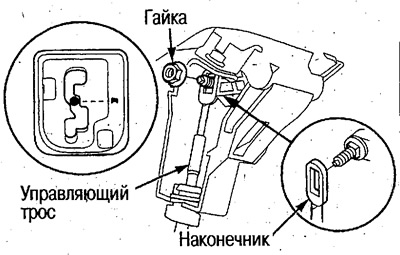
2. Set the selector lever to position R and…


3. Turn the holder 90° counterclockwise, remove the cable from the bracket and disconnect it from the selector lever assembly.
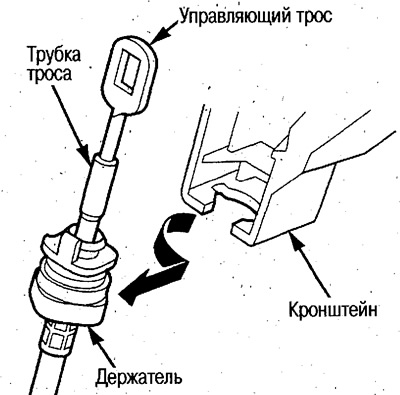
3. Turn the holder 90° counterclockwise, remove…


4. Remove the floor insulation.

5. Remove the control cable bracket and bushing.
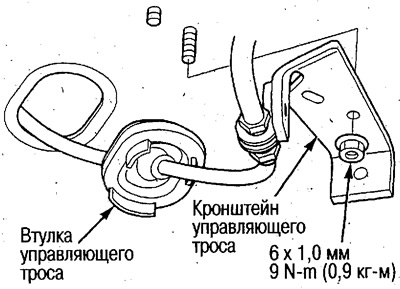
5. Remove the control cable bracket and bushing.


6. Remove the control cable.


2WD models:

(1) Loosen the rack bolts and remove the cable cover.

(2) Remove the control lever from the shaft, remove the cable.
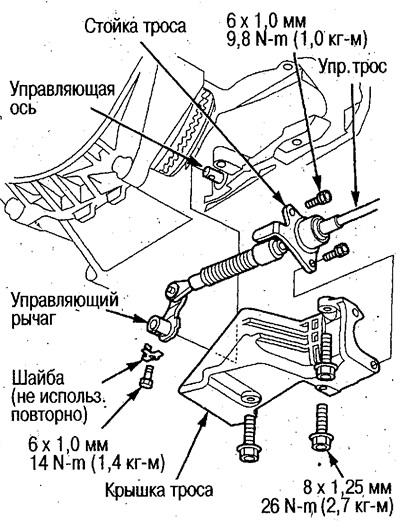
(2) Remove the control lever from the shaft,…


4WD models:

(1) Remove the cable cover and unscrew the rack bolts.

(2) Remove the shift shaft, remove the lever from the control shaft, then remove the cable.
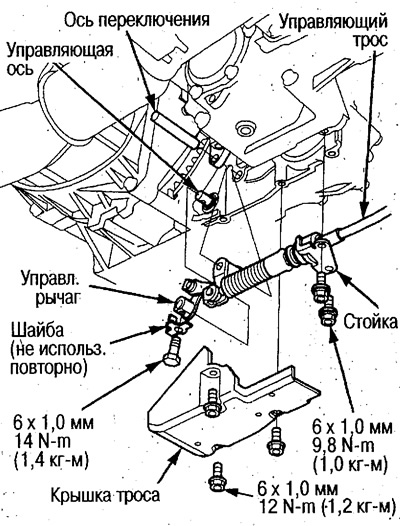
(2) Remove the shift shaft, remove the lever from…


7. Replace the cable. Guide the cable tip into the passenger compartment. Align the bushing with the hole and install it.

Do not bend the cable too much during installation.

8. Install the control cable bracket.

9. Install the lever on the steering axle.

2WD models:

(1) Install the lever on the axle.

(2) Install the cable cover, then install the stand.

After installing the cover, secure the stand firmly to ensure that the cable and lever attachment point are protected.


4WD models:

(1) Install the lever on the control shaft and install the shift shaft.

(2) Install the stand, then the cable cover.

10. Install floor insulation.

11. Turn the holder 90° counterclockwise, insert into the bracket, turn 90° clockwise and secure the holder.

Install the cable by holding the holder, not the tube.

Before turning the cable clockwise, the holder's protrusion should be positioned on the opposite side from the bracket. After installation, the protrusion should be directed towards the front of the vehicle.
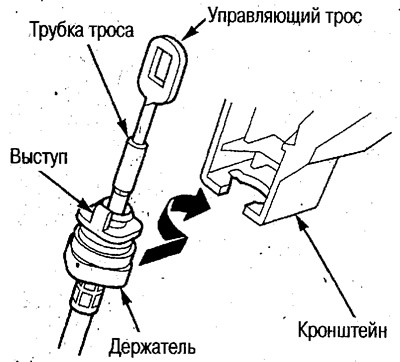
Before turning the cable clockwise, the holder's…


12. Turn the ignition key to the ON (II) position and make sure that the R indicator lights up and the automatic transmission is also in the R position.

If the automatic transmission is not in the R position, press the control cable down until it stops, then pull it up one position and release.
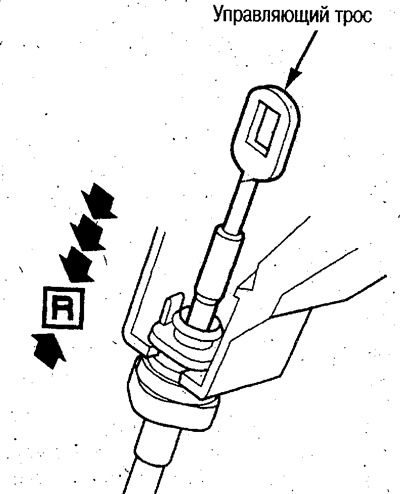
If the automatic transmission is not in the R…


13. Turn the ignition key to the OFF position.


14. Set the selector lever to position R.

15. Secure the selector lever in position R using the 6 mm diameter dowel pin through the holes.
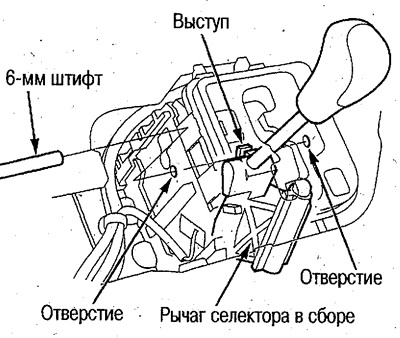
15. Secure the selector lever in position R using…


16. Place the cable end with the square hole onto the corresponding section of the threaded stud, secure the cable and tighten the nut.
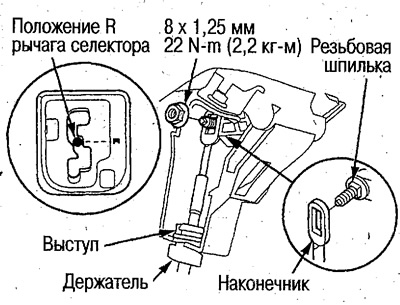
16. Place the cable end with the square hole onto…


17. Remove the locating pin.

18. Move the selector lever to all positions and check that the indication is correct.

19. Start the engine and move the selector lever through all positions again and check that the control cable is adjusted correctly.

20. Using the ignition key, press the shift lock mechanism and make sure that the lock is released. Also check that the lock is engaged when the key is removed.

21. Install the front console lower panel.
This article is available at: russian, bulgarian, belarusian, ukrainian, serbian, croatian, romanian, polish, slovak, hungarian
This information has been verified: Emil Safonov
Share with friends:
◀ Previous
Avancier 1: Automatic gearbox
Next ▶

Control cable — adjustment
Automatic transmission selector lever — installation
Automatic transmission selector lever — disassembly and assembly
Automatic transmission selector lever — removal
Automatic transmission oil cooler hoses — installation
Transfer case (4WD) — checking for play
Transfer Case (4WD) — Check for Oil Leaks
Transfer case (4WD) — replacement
Transfer case (4WD) — installation
Automatic transmission assembly — removal
See also other articles from Honda manuals:
Throttle Control Cable Fastener (Carburetor) Honda Accord 3 (1985-1989)
Throttle Control — Cable Replacement Honda Civic 3 and 4 (1983-1991)
Gearbox control cable — adjustment Honda Fit 1 (2001-2008)
Idle Air Control Valve (IAC valve) Honda CR-V 1 (1995-2001, petrol)
Instruments, control and signal lamps Honda HR-V 1 (1998-2006, petrol)
Link in different formats to this article
Comments and feedback from visitors
No comments yet


How much will 45 + 24 ?


Avancier 1 (1999-2003, petrol) 
  • General information
  • Controls and instruments
  • User manual
  • Power unit
  • Engine maintenance
  • Engine repair
  • Cooling system
  • Engine management
  • Power and exhaust system
  • Transmission
  • Automatic gearbox
  • Drive shafts and differential
  • Chassis and running gear
  • Steering
  • Car suspension
  • Brake system
  • Body and interior
  • Doors, locks and windows
  • Interior (internal elements)
  • Exterior (external elements)
  • Air conditioner
  • Electrical equipment
  • Power devices
  • Equipment and devices
  • Headlights and lighting
  • Electrical circuits
HondaBook.ru © 2018–2026 • Mobile version • Sitemap: EN BG BY UA RS HR RO PL SK HU • Feedback • Driver Information • Search system • Bookmark
Accord 3 (1985-1989) • Accord 6 (1997-2002) • Civic 3 and 4 (1983-1991) • Civic 5 and 6 (1991-2000) • Civic 6 (1995-2000) • Civic 7 (2000-2005) • Civic 8 (2005-2011) • Fit 1 (2001-2008) • CR-V 1 (1995-2001) • CR-V 2 (2002-2006) • HR-V 1 (1998-2006) • Avancier 1 (1999-2003) •
 
This website uses cookies to ensure proper functioning. By clicking "OK," you agree.