
Contents: Radio ⇊ Sound adjustment ⇊ Cassette deck ⇊ Remote control for audio system…⇊ Car radio security system ⇊
As a rule, the audio system is not included in the standard vehicle equipment and is installed as additional equipment.
The proprietary audio system delivers clear sound across all frequency ranges and is distinguished by the ease of switching off your favorite radio stations using the preset keys.
The cassette deck features Dolby noise reduction, automatic chrome dioxide tape detection and an auto-reverse function that allows continuous playback of recordings from both tracks of the tape without reinstalling the audio cassette.
Note: The Dolby system used is manufactured under license from Dolby Laboratories Licensing Corporation. "Dolby" DD, as well as the iconare registered trademarks of DolbyLaboratories Licensing Corporation.
Radio
Turning on
The audio system operates when the ignition key is in the "ACC" (I) or "ON" (II) position. In the first position of the key, the power supply of auxiliary power consumers is switched on, in the second position, the ignition and power supply of all power consumers are switched on. To switch on the audio system, press the "PWR" handle or the radio range switching button. The volume level is adjusted by turning the "PWR" handle.
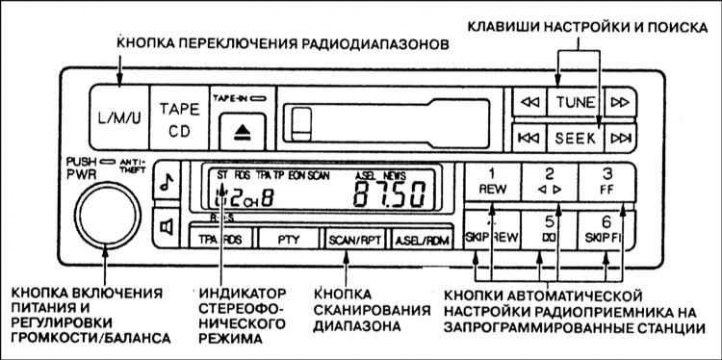
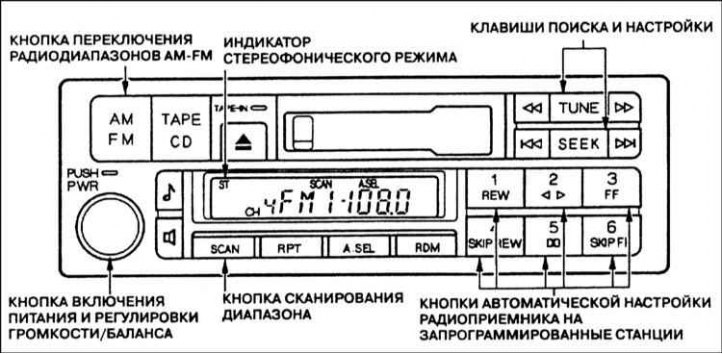
When the audio system is switched on, the display on the radio control panel shows the selected radio range indicator and the radio signal frequency value to which the radio receiver was tuned before powering off. To switch to another radio range, press the range switching button. When the radio receiver is switched to the U/FM range and tuned to a radio station that broadcasts in stereo, the "ST" (Stereo) indicator appears on the display. If the car is in an area with poor stereo signal reception, the "ST" indicator starts flashing.
There is no possibility of stereo reception of radio broadcasts in other ranges.
Setting
In any of the three ranges, the radio receiver allows tuning in four ways: manually (TUNE), semi-automatically (SEEK), automatically by scanning the range and tuning (SCAN) or automatically tuning to pre-selected radio stations whose frequencies are stored in the radio receiver's memory.
Manual tuning (TUNE function) is performed using the TUNE key. Press the right
 or left
  part of the TUNE key to change the radio tuning frequency downwards or upwards, respectively. When you press and hold the key down, the tuning frequency begins to change continuously. The current radio tuning frequency is displayed on the display of the radio control panel. Release the TUNE key as soon as the receiver is tuned to the desired frequency. To change the tuning frequency by one discrete step, briefly press and release the TUNE key.
There is also a semi-automatic tuning mode (SEEK function). When this function is turned on, the radio receiver searches for a radio station with a strong signal in the current range and tunes to it automatically. To turn the radio receiver into search mode, press and hold the right
 or left
  part of the SEEK key. The search for a radio station with a sufficiently strong signal will occur in the lower or upper sub-range relative to the current tuning frequency of the radio receiver, depending on which part of the key is pressed. The search stops as soon as the receiver finds the first radio station with a strong signal.
When the automatic range scanning function is turned on (Scan function), the radio receiver searches for all radio stations with a sufficiently strong radiation signal in the current range. To turn the radio receiver into the range scanning mode, press and release the SCAN button. The search for radio stations with a strong signal will occur in the entire selected range. When a signal of the required intensity is detected, the search is paused, and the radio receiver receives a radio signal on this wave for approximately five seconds. If no buttons are pressed during this time, the radio receiver continues scanning the range and searches for the next radio station with a strong signal, which it will also receive for approximately five seconds. If during the range scanning a signal is detected from a station that you would like to continue listening to, press the SCAN button again.
Tuning the radio to pre-selected stations. Using six buttons, marked with numbers from 1 to 6, you can enter the frequencies of your favorite radio stations into the radio receiver's memory. In a type A stereo radio, each button allows you to program one radio station in each range. The design of a type B stereo radio allows you to use each of the six buttons to fix one frequency in the AM radio range and two frequencies in the FM range (one in each of the FM1 and FM2 subranges). To program the radio receiver's memory, perform the following operations:
- a) Using the appropriate button, select the required radio frequency range;
- b) Use the TUNE, SEEK or SCAN key to tune the radio to the desired station;
- c) Select one of the six memory programming buttons for this radio station, press and hold it until you hear a short beep;
- d) Repeat steps 1 through 3 to store the frequencies of six radio stations in the radio receiver's memory;
- e) Now it is enough to press any of the six buttons of the radio receiver memory programming so that it automatically tunes to the pre-selected station, the signal frequency of which is entered into the corresponding memory cell.
6. The radio receiver's preset frequencies are erased from memory in the event of a failure (severe discharge or disconnection of the battery, as well as when the audio system fuse is removed.
Automatic programming of radio receiver memory
At a significant distance from the location of the transmitting stations, the radio receiver can no longer receive signals on the previously selected frequencies. At the same time, there is the possibility of quickly (in automatic mode) reprogramming the system memory to signals from local stations.
To activate the automatic memory programming function, press the "A.SEL" button - the "A.SEL" indicator will light on the display of the radio control panel. The radio will scan all ranges within a few seconds and store the frequencies of the stations with the strongest signal in memory.
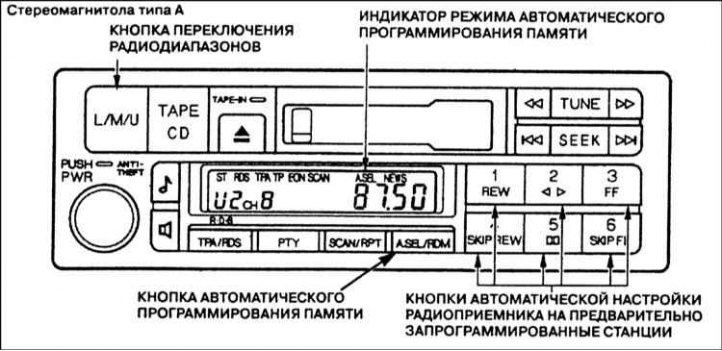
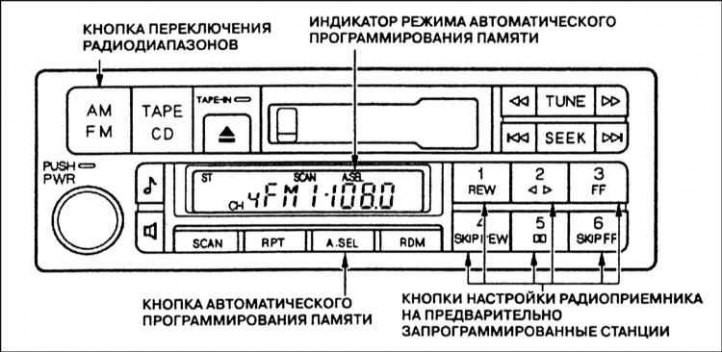
The radio receiver stores up to six stations in the VHF range (type A stereo radio) or six stations in the AM range and twelve stations in the FM range (type B stereo radio). Subsequent tuning of the radio receiver to the programmed stations is carried out in the usual way using buttons with numbers from 1 to 6.
If the vehicle is located at a considerable distance from a developed radio network, the receiver may not detect a sufficient number of local radio stations with a strong signal to fill all available memory cells (12 or 18). In this case, when you press the preset button corresponding to a free memory cell, the indicator "0" will light up on the control panel display
When the automatic programming mode is enabled, you can manually program some memory cells using the setup buttons.
It should be noted that when the automatic programming mode is turned on, the frequencies of previously entered stations are not erased from the radio receiver's memory. After returning home, press the "A.SEL" button again to turn off the automatic memory programming mode. In this case, the preset buttons provide access to the frequencies that were initially programmed.
RDS Radio Data System (only for type A car radios)
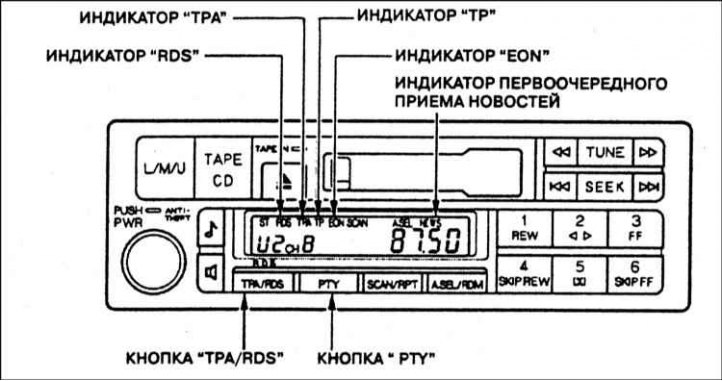
Type A car radios provide the ability to use the advanced service functions of the RDS radio data system.
RDS button. If the radio receiver operates in the U (FM) range, it can automatically re-tune to the frequencies of various regional radio stations broadcasting the same program; on a long journey, this will save you from having to periodically change the receiver settings and ensure good quality reception of the program.
The RDS functions are activated automatically when you turn on the radio. If the radio station to which the radio is tuned is broadcasting in the RDS standard, the name of the received radio station will appear on the display of the radio control panel instead of the signal frequency. If a program is simultaneously transmitted on several frequencies, the radio will automatically select and tune to the frequency that provides the best reception quality (the strongest signal). These RDS functions save you from having to re-tune the radio if you are in a region with a developed network of RDS radio stations.
When the vehicle moves away from the RDS transmitting station to a distance where the signal can no longer be received reliably, the receiver remembers the last tuning frequency and displays its value on the display instead of the radio station name.
To turn off the RDS function of the radio, press and hold the "TPA/RDS" button for at least two seconds. The "RDS" indicator on the control panel display will go out.
"TP" indicator. When the radio receiver is tuned to an RDS station that operates in traffic information mode, the "TP" indicator automatically turns on on the display. Traffic information is transmitted by such stations periodically or as needed in intervals or during the broadcast of other radio programs in the U (FM) range. Therefore, if the "TP" indicator lights up on the display of the radio control panel, you can hear operational traffic information.
TPA function. To find an RDS station that operates in the traffic announcement mode, briefly (no more than two seconds) press the "TPA/RDS" button. The "TPA" indicator will appear on the display of the radio control panel. If the radio is already tuned to a station operating in the traffic announcement mode (the "TP" indicator is lit on the display), it will continue to operate in the previous mode. If the receiver is not tuned to a TP station, or the signal from the TP station is not strong enough, an audible warning signal will sound after 70 seconds. Then, every 30 seconds, the radio will turn on the warning signal until the TPA function is turned off by briefly pressing the "TPA/RDS" button again. The warning buzzer will be turned off when the radio is tuned to another TP station using the "TUNE" knob, "SEEK" buttons or preset buttons.
When playing back recordings on an audio cassette or compact disc, you can also hear operational traffic information. When the TPA function is turned on (the "TPA" indicator lights up on the display) and the radio is tuned to a TR station that is operating in the traffic information mode (the "TR" indicator lights up on the display), playback of recordings from an audio cassette or compact disc is automatically interrupted as soon as the traffic information broadcast begins. When receiving traffic information, the "TRF-INFO" indicator lights up on the display. In addition, the sound volume is automatically set to a preset level regardless of the current position of the volume control knob.
After the traffic information broadcast has finished, the radio automatically resumes playback of the recording from the audio cassette or CD.
PTY function. Pressing the "PTY" button briefly (less than two seconds) activates the PTY function. This function allows you to find out the type or genre of the program that the radio station is broadcasting. For example, if a performance recording is being broadcast, the "DRAMA" indicator will appear on the display of the radio control panel. Broadcasting of discussions of some scientific problem is accompanied by the "SCIENCE" indicator, etc. If the RDS radio station does not transmit data on the genre of the program being broadcast, the "NONE" indicator will appear on the display.
When the radio is tuned to a non-RDS station, the "NO RDS" indicator lights up on the display. The PTY function is automatically switched off and the display returns to its original state (unless other commands are given).
When the PTY function is turned on, you can use the "TUNE" or "SEEK" buttons to quickly find a radio station that broadcasts a program of the genre you need. When you press the "TUNE" or "SEEK" buttons, the display will show messages indicating different genres of radio programs, for example, "NEWS" (News), "AFFAIRS" (Business), "INFO" (Information), "SPORT" (Sports), etc. As soon as the designation of the genre you need appears on the display, briefly (no longer than two seconds) press the "PTY" button. The radio will switch on the automatic search mode for a program of the specified genre. If at the moment the program of the selected genre is not broadcast by any station, the message "NO PTY" will appear on the display. After six seconds, the "NO PTY" indicator goes out, and the automatic search mode for a radio station by the specified genre of the program is turned off.
The automatic search mode for radio stations by a given genre of the broadcast program is also switched off if, after selecting the desired genre of the program (using the "TUNE" knob or the "SEEK" buttons), no button is pressed within five seconds.
News priority indicator. Pressing the PTY button for more than two seconds activates the news priority mode. The display will show "NEWS". In this mode, the radio will receive news bulletins from all radio stations first, regardless of the previously selected program (only traffic news broadcasts are not interrupted).
EON indicator: When a news bulletin is being broadcast by a station other than the one you are tuned to, the display shows EON.
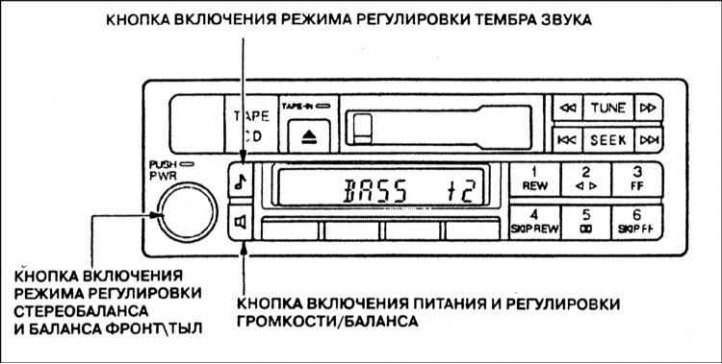
Adjusting the front/rear stereo balance. The design of the car radio control panel allows you to adjust the volume of the left/right and front/rear speakers of the acoustic system separately. In the first case, the stereo balance is adjusted, in the second - the front/rear balance.
Sound adjustment
Stereo balance and front/rear balance are adjusted using the "BAL/'FAD" button. Pressing the button changes the adjustment mode from stereo balance to front/rear balance, then rotating the "PWR" ring adjuster, adjust the volume of the left/right and front/rear speakers of the acoustic system.
Adjusting the sound timbre. The sound timbre is adjusted using the "TREBLE/BAS" button. Pressing the button switches between the low and high frequency adjustment modes. Then, rotating the "PWR" ring control, adjust the sound timbre in the low and high frequency range as desired. Next, rotating the "PWR" ring control, adjust the sound timbre in the low and high frequency range as desired.
Cassette deck
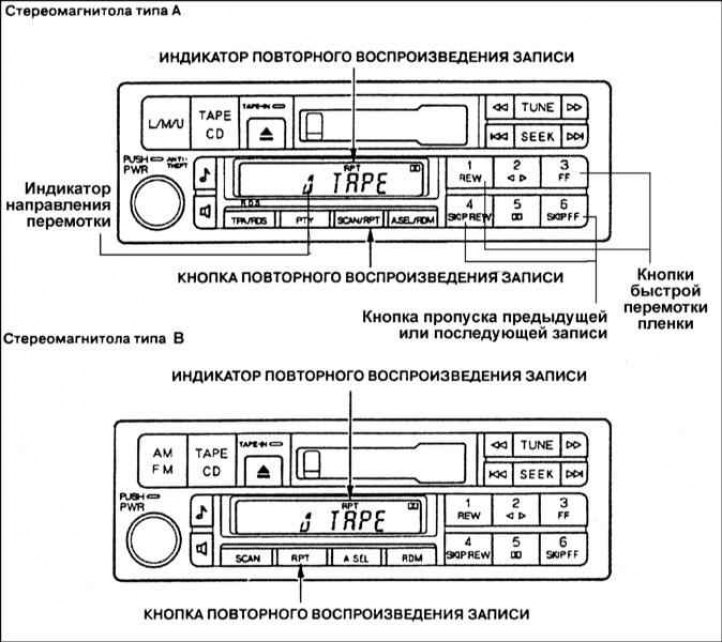
The layout of the controls for playing magnetic tape recordings on the front panel of the radio is shown in the illustrations.
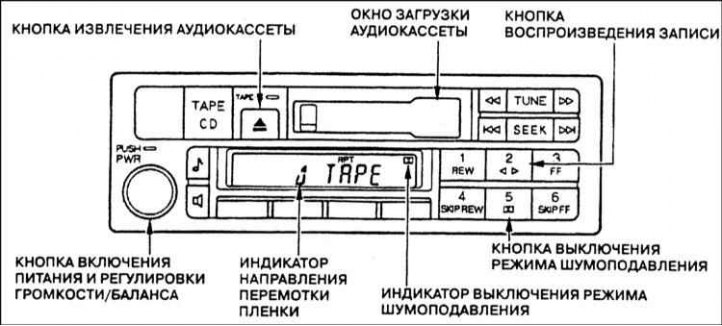
Turn on the tape recorder by pressing the "PWR" button. Turn the audio cassette so that its side with the open section of the magnetic tape is on the right. Then insert the cassette into the receiving window of the deck. The audio cassette should enter the receiving window almost completely, after which the magnetic tape is automatically loaded into the working position and the recording begins to play.
The indicators, made in the form of arrows pointing up and down, and located on the display of the radio control panel, show the direction of movement of the magnetic tape and the number of the track being played. In order to change the track and switch the direction of movement of the tape to the opposite, press the "PLAY" button.
The automatic reverse function enables continuous playback of an audio cassette: when the end of the tape is reached, the cassette deck automatically switches the direction of tape rewinding to the opposite direction. In this case, the recording from the second track of the magnetic tape is played.
The Dolby noise reduction mode is automatically activated immediately after the cassette is inserted into the deck's receiving window. If the cassette was recorded without using the noise reduction mode, turn off this mode on the player by pressing the button with the icon
 .
.
The cassette is removed from the deck using the "EJECT" button.
Music fragment search function
The deck's design provides the ability to search for the desired record during playback of the magnetic recording. The search is performed using the tape fast rewind buttons "FF2, "REW", "RPT" or "SKIP".
Fast forward and reverse rewinding of the tape. Two buttons "FF" and "REW" are designed to activate the fast forward and reverse rewind modes of the magnetic tape. In order to quickly rewind the tape, press the "REW" button. Fast forward is carried out using the "FF" button. In this case, the indicator on the display of the car radio will light up, depicting the corresponding letters. To stop fast forward or reverse rewinding of the tape, press the "PLAY" button. If in the fast rewind mode the end of the magnetic tape is reached, the direction of rotation of the cassette automatically changes to the opposite and playback of the recording from another track of the tape begins.
Skip mode (SKIP). Skip mode allows you to skip a song or a section of a recording on an audio cassette tape. To activate the skip mode, press the "SKIP FF" or "SKIPREW" button, depending on which section of the recording you want to skip: the one preceding or following the current playback moment. If you want to return to the beginning of the song or section of a recording that is currently being played, press the "SKIP" and "REW" buttons simultaneously. The letters "REW" will appear on the display while the tape is rewinding. If you want to go to the beginning of the next song or section of a recording, press the "SKIP" and "FF" buttons simultaneously. The letters "FF" will appear on the display while the tape is rewinding. When the system detects the beginning of the next recording on the tape, the playback mode will automatically turn on.
Repeat playback of a recording. This function allows automatic multiple repeat playback of the same recording. The function is activated by pressing the "RPT" button. At the same time, the display on the control panel of the radio will show the inscription "RPT". When the end of the current recording is reached, fast rewinding of the tape to the beginning of this recording is automatically activated. The player will continuously play the same recording until the "RPT" button is pressed again.
The implementation of the above-described service functions of skipping and repeating a record is based on the use of free gaps between individual fragments of a record on a magnetic tape. These service functions may not work correctly if the duration of pauses between individual records is too short, or the level of background noise in the pauses is too high. In addition, if there are pauses within a fragment, they will be perceived by the player as gaps separating individual records on a magnetic tape.
Caring for your radio
During operation of the car radio, the magnetic head of the cassette deck gradually becomes contaminated with dust deposits and particles of the magnetic layer that have fallen off the film. If the magnetic head is significantly contaminated, the sound quality during playback of recordings deteriorates. In view of the above, it is necessary to regularly, every 30 hours of operation of the deck, clean the magnetic head.
Careless care of the radio and failure to follow the agreed schedule for cleaning the magnetic head can lead to a situation where it will be impossible to remove accumulated deposits using a regular cleaning cassette.
The deck design provides for the possibility of automatic unloading of an audio cassette that for some reason cannot be played back normally. If the cassette is ejected before playback begins, this indicates possible damage to it; do not attempt to reload such a cassette. Sometimes the playback of the audio recording may stop, the deck reverse mechanism may be turned on once or twice, or the cassette may be unloaded. Usually, such phenomena occur due to jamming of the mechanism, or as a result of uneven resistance to rewinding the magnetic tape on the cassette reels. In this case, it is necessary to remove the audio cassette and manually rewind the tape several turns of the reel.
The car radio cassette deck is designed to use audio cassettes with a recording time of up to 100 minutes. Using larger-capacity cassettes with thin magnetic film may result in deck failure or film deformation.
Carefully inspect the audio cassette before inserting it into the deck's slot. If the magnetic tape is significantly loose, tighten it by rotating the reel hub in the appropriate direction with a pencil or your fingers.
If the label peels off, glue it back or remove it completely. Otherwise, the peeled label may cause the cassette to jam when you try to remove it from the deck. Do not insert a bent or broken audio cassette into the deck's input window.
Do not leave audio cassettes in places where they are exposed to high temperatures or high humidity, such as on the top shelf of the dashboard or in the cassette deck itself, and do not insert an overheated or overcooled cassette into the radio until its temperature has returned to normal.
Do not insert foreign objects into the cassette deck's input window.
Remote control for audio system operation
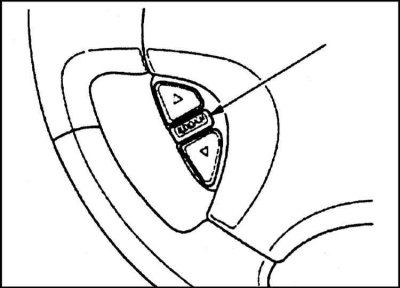
The remote control consists of three buttons and allows you to control the operation of the radio without taking your hands off the steering wheel. The upper and lower buttons of the remote control allow you to adjust the sound volume, increasing it - button (tt), or decreasing it - button (uu). Press the corresponding button and hold until the sound volume reaches the desired level.
The "AUDIO/CH" button (Switching audio modes) performs three functions depending on what is being listened to at the moment: radio, magnetic recording, or recording from a compact disc.
When listening to the radio, the "AUDIO/CH" button allows you to switch to other radio stations. Each time you press the button, the radio switches to the next station in the selected frequency range stored in the receiver's memory. At the same time, the display on the front panel of the radio shows the number of the selected radio station. To switch to another frequency range, press the radio range switching button located on the front panel of the radio.
When playing a magnetic recording, pressing the "AUDIO/CH" button will move to the next recording on the tape. When the button is pressed, the flashing inscription "FF" will appear on the display of the front panel of the radio. The pause on the magnetic tape will be skipped, and the system will move on to playing the next recording.
When listening to a compact disc, the "AUDIO/CH" button allows you to switch to playback of the recording from the next track. In this case, the display of the stereo radio shows the number of the disc and the track from which the recording is being played.
Car radio security system
On models equipped with such a system, disconnecting the audio system from the power source for any reason results in its blocking. In order to unlock the system, it is necessary to enter a five-digit code using the radio tuning buttons to pre-selected stations. Since there are hundreds of thousands of such combinations, it is practically impossible to unlock the system without knowing the correct code.
When installing an audio system in a vehicle, the owner receives a special card with the code and serial number of the stereo system. The authors of this Manual strongly recommend that you keep the card in a safe and secure place. Enter the serial number of the audio system in a notebook and keep it with other documents outside the vehicle. A new card to replace the lost one can be obtained at authorized Honda service stations upon presentation of the serial number.
If the battery is discharged or disconnected, the audio system will inevitably be blocked. In this case, when the system is turned on, the display on the front panel of the radio will show "Code". Using the setup buttons, enter the required five-digit code. If the code is entered correctly and identified by the audio system, it will begin to function in normal mode.
If you make a mistake when entering the code, do not try to correct it by pressing the buttons again - first finish entering the erroneous combination, and only then enter the correct code. You have ten attempts to enter the code. If you fail to enter the correct code after ten attempts, repeated attempts can be made no earlier than in an hour.
After unlocking the system, you will need to reprogram the radio's memory to receive your favorite radio stations, as disconnecting from the power supply clears the audio system's memory.