Contents: 2WD models ⇊ 4WD models ⇊
Caution: When connecting, do not mix up the tubes and electrical wiring. Do not touch the components and wiring in the installation area.
1. Install a new O-ring onto the torque converter and install it onto the secondary shaft.
2. Install the pins (14 mm) into the torque converter. Install the starter onto the automatic transmission housing.
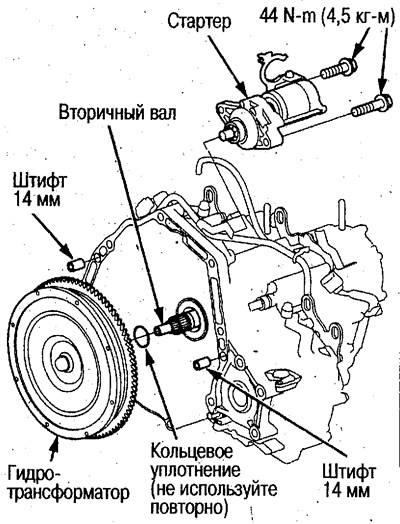
3. Support the automatic transmission with a jack and install it on the cylinder block.
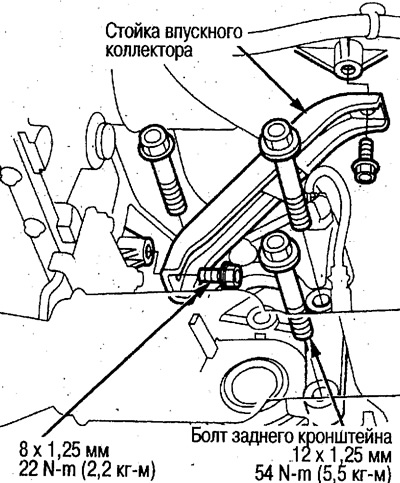
4. Tighten the rear bracket bolts. Then bolt the intake manifold stand.
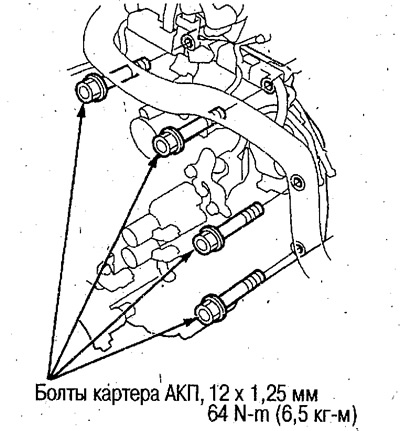
5. Tighten the automatic transmission housing bolts.
 |
 |
6. Position the breather hose with the mark facing up.
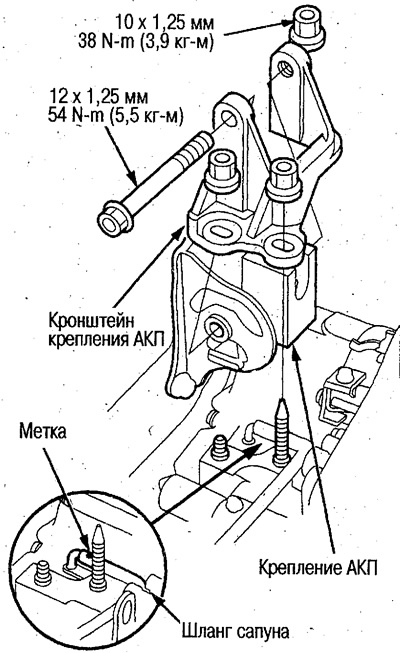
7. Install the automatic transmission mounting bracket, tighten the bolt by hand. Then tighten the nut, then tighten the bolt to the required force.
8. Remove the jack and lift hooks.
9. Tighten the drive disk bolts, install the control lever and the torque converter cover.
2WD models
(1) Turn the crankshaft pulley and tighten the drive plate bolts. Connect the drive plate and torque converter.
(2) Tighten the crankshaft pulley bolts, see chapter Engine Mechanical Part.
(3) Install the lever onto the steering shaft and secure the washer.
Do not bend the cable too much during installation.
(4) Install the torque converter cover.
(5) Install the cable cover, then install the stand into it.
After installing the cover, secure the stand firmly to ensure the cable and lever mount is protected.
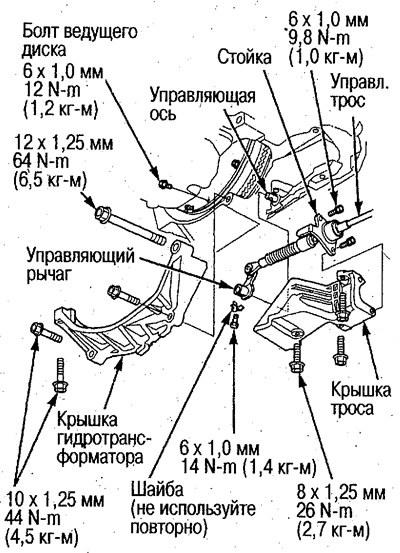
4WD models
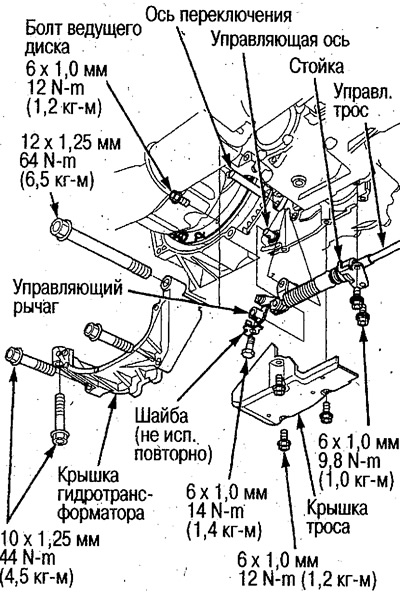
(1) Turn the crankshaft pulley and tighten the drive plate bolts. Connect the drive plate and torque converter.
(2) Tighten the crankshaft pulley bolts, see chapter Mechanical part of the engine.
(3) Install the lever onto the control shaft, install the shift shaft and secure the washer.
Do not bend the cable too much during installation.
(4) Install the torque converter cover.
(5) Install the cable stand, then install the cable cover.
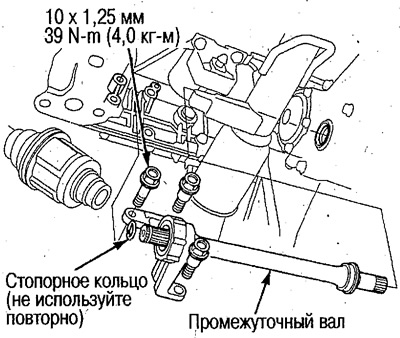
10. 4WD models: Secure a new snap ring to the intermediate shaft and install it.
Prevent foreign particles from entering.
Clean the contact areas of the intermediate shaft and differential with cleaning oil, then dry with compressed air, make sure there are no foreign particles, lubricate with automatic transmission oil and install the shaft.
11. Install new snap rings onto the drive shafts and install them into the differential and intermediate shaft (4WD models).
Prevent foreign particles from entering.
Clean the contact areas of the drive shaft and differential with cleaning oil, dry with compressed air, make sure there are no foreign particles, lubricate with automatic transmission oil and install the shaft.
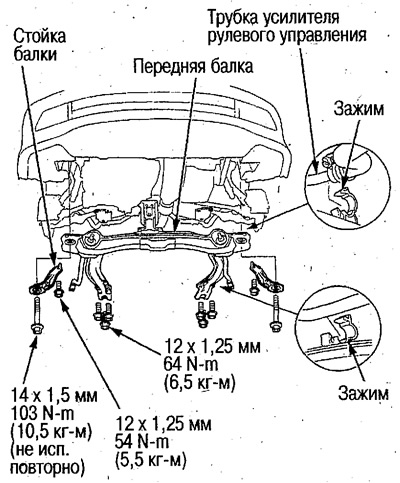
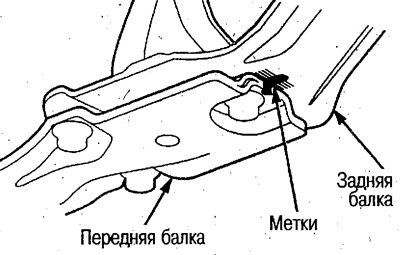
12. Install the front beam and its struts, aligning the marks made before removal.
Secure the power steering tubes to the clamps.
 |
 |
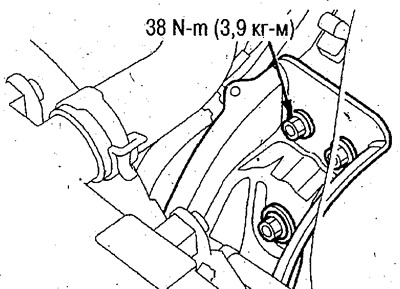
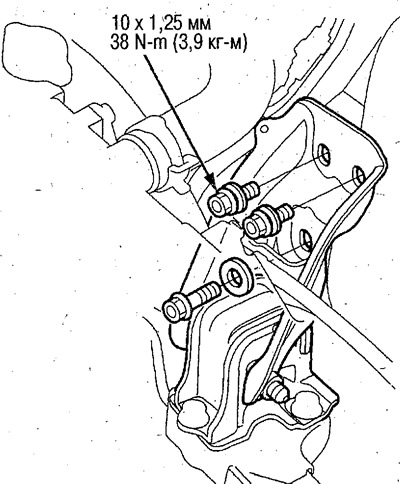
13. Tighten the front bracket bolts.
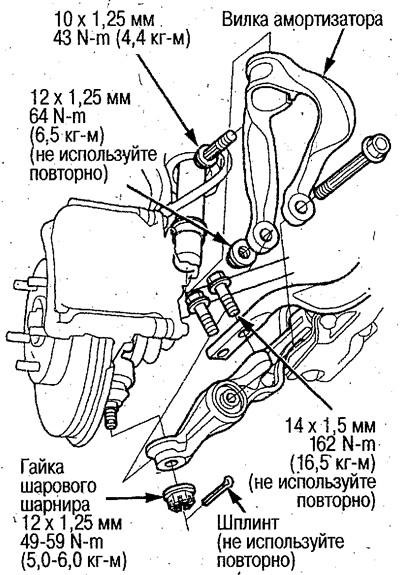
14. Install the shock absorber fork and tighten its bolt.
15. Tighten the ball joint nut and secure it with a new cotter pin, see chapter Front and rear suspension.
16. Install the shock absorber fork and longitudinal rod on the lower arm.
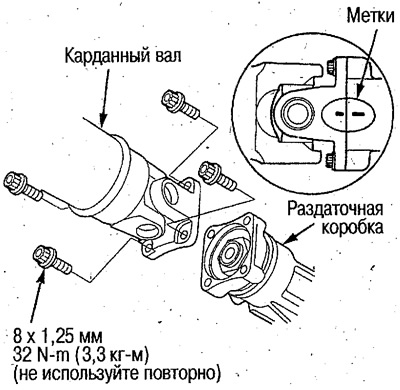
17. 4WD models: Install the propeller shaft into the transfer case.
Align the marks made before removal.
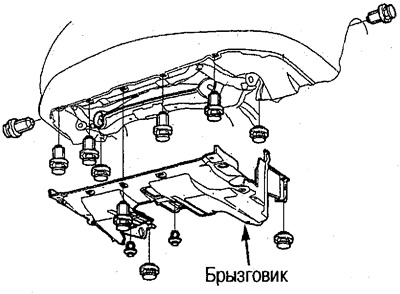
18. Install the mudguard.
19. Connect the 2nd gear clutch pressure switch connector and install the stand.
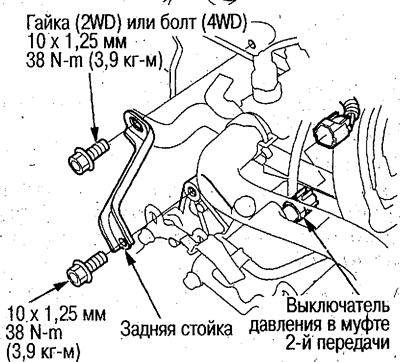
Do not allow water, oil, etc. to enter the connector. Secure the connector tightly.
20. Connect the B and C shift solenoid valve connector and install the wiring clamp into the clamp stand.
21. Secure the automatic transmission oil cooler hoses to the tubes, see the relevant section above.
22. Connect the connectors of the torque converter lock-up solenoid valve and the shift solenoid valve A.
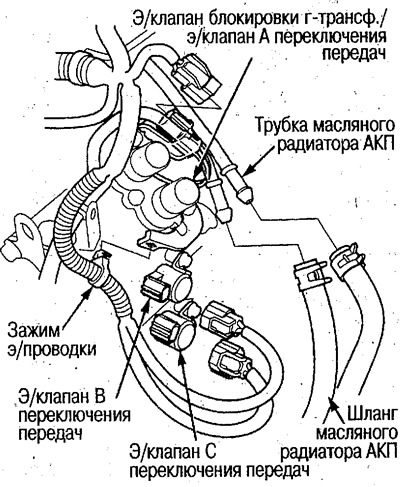
23. Connect the connectors of the intermediate shaft speed sensor and the selector lever switch. Install the selector lever switch connector on the rack. Secure the electrical wiring clamp to it.
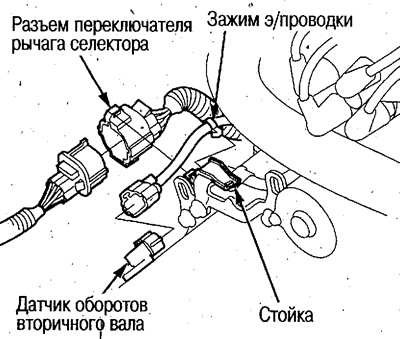
24. Secure the ground wire.
25. Connect the connectors of the secondary shaft speed sensor, the A and B clutch pressure solenoid valves and the 3rd gear clutch pressure switch. Secure the electrical wiring clamps to the stand.
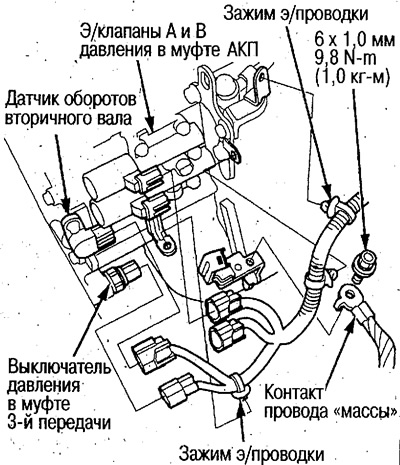
Do not allow water, oil, etc. to enter the connectors.
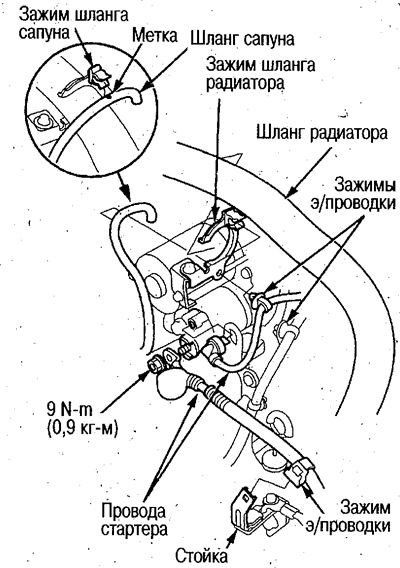
26. Install the starter wires and secure the electrical wiring clamp to the stand.
Place the terminal with the protrusion towards the nut.
27. Secure the radiator and breather hoses in the clamps.
Position the breather hose with the mark facing up.
28. Install the base under the tray and battery, secure the mounting strip.
29. Secure the battery cable clamps to the base and secure the ground.
30. Install the air duct and air cleaner housing.
31. Fill the automatic transmission oil, see the relevant section above.
32. Connect the battery contacts.
Clean the battery terminals with sandpaper and apply grease after installation.
33. Apply the parking brake and start the engine. Move the selector lever to all positions and make sure the control cable is adjusted correctly.
34. Check the front wheel alignment angles, see chapter Front and rear suspension.
35. Warm up the engine, turn it off and check the automatic transmission oil level.
36. Perform a road test and a final check of the automatic transmission operation on the vehicle (see above).
37. After checking, loosen the front bracket bolts and retighten them to the required torque.