
HondaBook.ru
Auto companies Volkswagen Auto companies Ford Auto companies Lada Auto companies Skoda Auto companies BMW Auto companies Mazda Auto companies Peugeot
English Русский
Български
Беларускі
Український
Српски
Hrvatski
Română
Polski
Slovenský
Magyar
Bookmark Contacts Sitemap   


Accord Civic Fit / Jazz CR-V HR-V Others Articles
HR-V 1 (1998-2006, petrol)

Release bearing — removal and inspection (Honda HR-V 1)

  • Main
  • Honda HR-V
  • 1 (1998-2006, petrol)
  • Transmission
  • Clutch
  • Release bearing — removal and inspection
0
1. Remove the release fork boot from the clutch housing.

2. Remove the release fork and release bearing from the clutch housing.
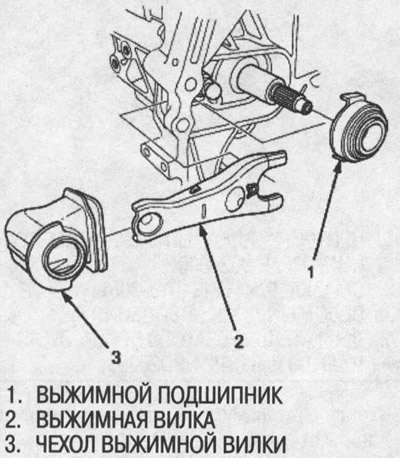
2. Remove the release fork and release bearing…


3. Check the release bearing play by turning it by hand. If the play is excessive, replace the bearing with a new one.

Note: The release bearing is packed with grease. Do not wash it in solvent.
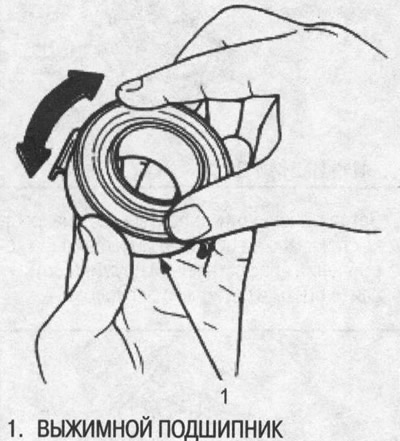

Note: The release bearing is packed with grease.…


Installation


Note: Use only HONDA Genuine Urea Grease UM264 (P/N41211-PY5-305).


1. With the release fork inserted between the release bearing latches, install the release bearing onto the secondary shaft by inserting the release fork through the hole in the clutch housing.
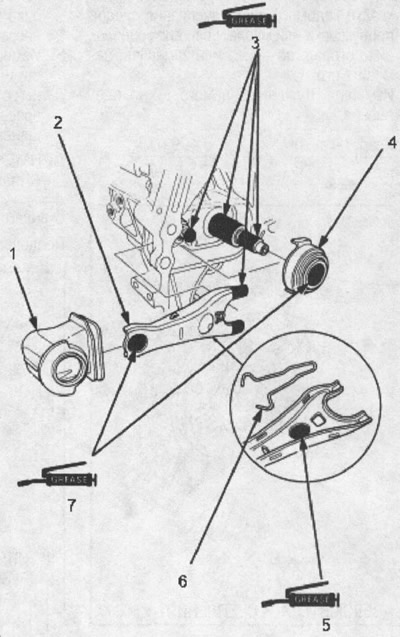
1. CASE for release fork

1. CASE for release fork
2. RELEASE FORK
3. LUBRICANT (P/N41211-PY5-305)
4. RELEASE BEARING
5. LUBRICANT (P/N41211-PY5-305), 1.0-1.6 g
6. RELEASE FORK SPRING
7. LUBRICANT (P/N41211-PY5-305), 0.4-1.0 g


2. Align the release fork retainer with the release fork axle, then place the release fork onto the release fork axle without tilting.

3. Move the release fork right and left and make sure that it fits tightly against the release bearing and that the release bearing rotates smoothly).
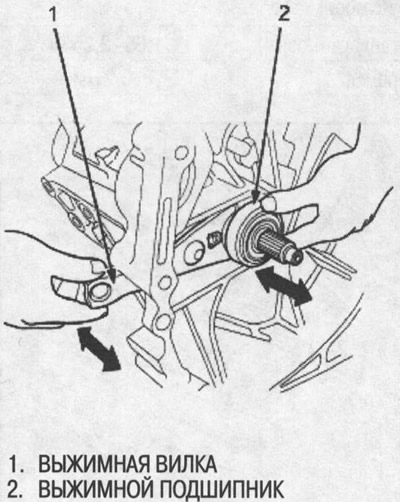
3. Move the release fork right and left and make…


4. Place the cover on the release fork; make sure the boot seals the release fork and clutch housing.
This article is available at: russian, bulgarian, belarusian, ukrainian, serbian, croatian, romanian, polish, slovak, hungarian
This information has been verified: Emil Safonov
Share with friends:
◀ Previous
HR-V 1: Clutch
Next ▶

Clutch slave disc and pressure plate — installation
Clutch flywheel — check and replacement
Clutch slave disc — removal and inspection
Pressure plate — removal and inspection
Clutch slave cylinder — replacement
Clutch specifications
See also other articles from Honda manuals:
Removal, checking and installation the release bearing and clutch… Honda Accord 6 (1997-2002)
Release bearing and fork — removal, inspection and installation Honda Civic 3 and 4 (1983-1991)
Bleeding the clutch release hydraulic drive Honda Fit 1 (2001-2008)
Replacing the release bearing Honda CR-V 2 (2002-2006, petrol)
Emergency release of the rear door Honda Avancier 1 (1999-2003, petrol)
Link in different formats to this article
Comments and feedback from visitors
No comments yet


How much will 27 + 30 ?


HR-V 1 (1998-2006, petrol) 
  • General information
  • User manual
  • Maintenance
  • Power unit
  • Engine repair
  • Lubrication system
  • Cooling system
  • Fuel injection and control
  • Power and exhaust system
  • Engine electrical equipment
  • Transmission
  • Clutch
  • Mechanical gearbox
  • Automatic gearbox
  • Rear differential
  • Drive shafts and cardan
  • Chassis and running gear
  • Steering
  • Car suspension
  • Brake system
  • Body and interior
  • Exterior (external elements)
  • Interior (internal elements)
  • Doors, locks and windows
  • Electrical equipment
  • Equipment and devices
  • Lighting system
  • Electrical circuits
HondaBook.ru © 2018–2026 • Mobile version • Sitemap: EN BG BY UA RS HR RO PL SK HU • Feedback • Driver Information • Search system • Bookmark
Accord 3 (1985-1989) • Accord 6 (1997-2002) • Civic 3 and 4 (1983-1991) • Civic 5 and 6 (1991-2000) • Civic 6 (1995-2000) • Civic 7 (2000-2005) • Civic 8 (2005-2011) • Fit 1 (2001-2008) • CR-V 1 (1995-2001) • CR-V 2 (2002-2006) • HR-V 1 (1998-2006) • Avancier 1 (1999-2003) •
 
This website uses cookies to ensure proper functioning. By clicking "OK," you agree.