
HondaBook.ru
Auto companies Volkswagen Auto companies Ford Auto companies Lada Auto companies Skoda Auto companies BMW Auto companies Mazda Auto companies Peugeot
English Русский
Български
Беларускі
Український
Српски
Hrvatski
Română
Polski
Slovenský
Magyar
Bookmark Contacts Sitemap   


Accord Civic Fit / Jazz CR-V HR-V Others Articles
HR-V 1 (1998-2006, petrol)

Integrated control unit (Honda HR-V 1)

  • Main
  • Honda HR-V
  • 1 (1998-2006, petrol)
  • Electrical equipment
  • Equipment and devices
  • Integrated control unit
0
Contents: Entry testing ⇊ Intermittent wiper relay system ⇊ Light on reminder system ⇊ Ignition Key Reminder System ⇊
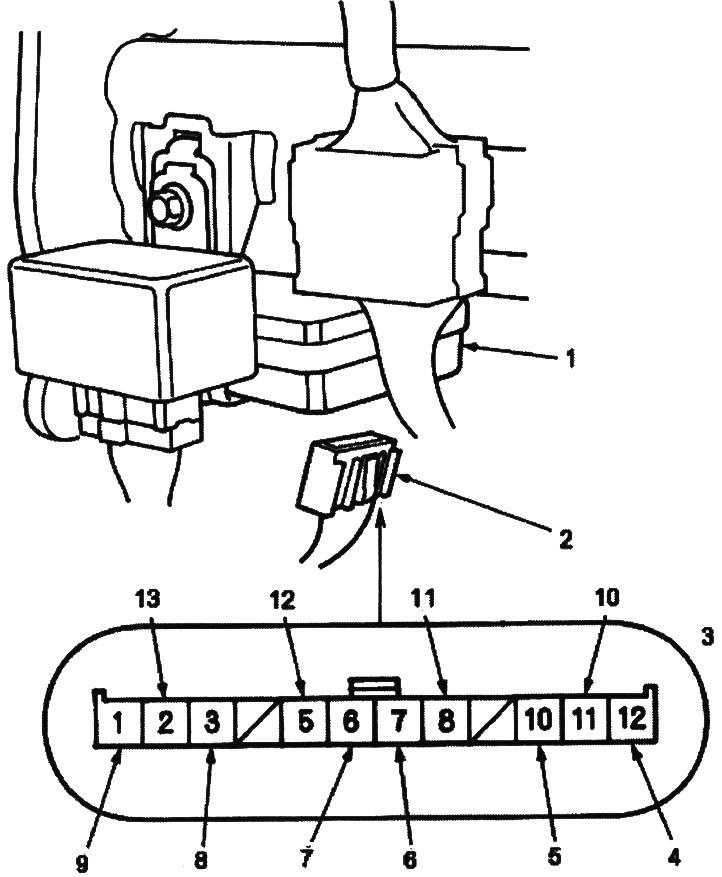
1. INTEGRATED CONTROL UNIT

1. INTEGRATED CONTROL UNIT
2. 12-PIN CONNECTOR
3. Female connector on the harness side
4. RED-BLUE WIRE
5. BLACK AND RED WIRE
6. RED-GREEN WIRE [LIGHT GREEN-RED WIRE]
7. GREEN WIRE
8. WHITE-BLUE WIRE
9. BLACK WIRE
10. WHITE-GREEN WIRE
11. BLUE-YELLOW WIRE
12. WHITE-BLUE WIRE
13. BLACK AND BLUE WIRE
[]: Without remote control door locking system


Entry testing


1. Remove the lower pocket on the driver's side (see Ch. "Body"),

2. Disconnect the 12-pin connector from the integrated control unit.

3. Check the connector and socket contacts to ensure they are making good contact.
  • If contacts are bent, loose or corroded, repair the defects and retest the system.
  • If the contacts appear to be OK, perform the following tests on the connector.
    • If any of the tests indicate a problem, find and correct the cause, then retest the system.
    • If the test at the input of the unit shows normal, the control unit must be faulty, replace it.

Intermittent wiper relay system
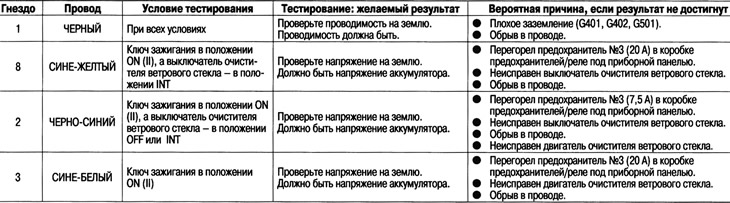


Intermittent wiper relay system


Light on reminder system
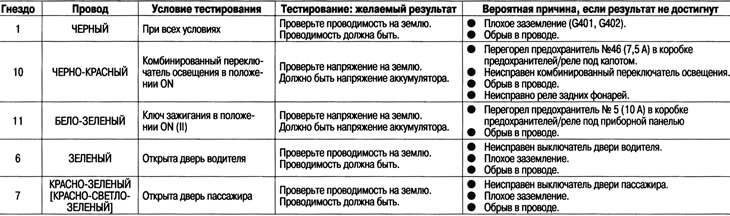


Light on reminder system

[]: Without remote control door locking system

Ignition Key Reminder System
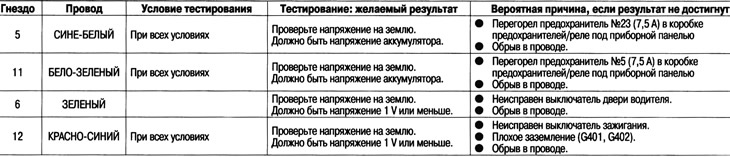


Ignition Key Reminder System
This article is available at: russian, bulgarian, belarusian, ukrainian, serbian, croatian, romanian, polish, slovak, hungarian
This information has been verified: Emil Safonov
Share with friends:
◀ Previous
HR-V 1: Equipment and devices
Next ▶

Vehicle Speed Alarm System (KY Model)
Vehicle Speed Sensor — Replacement
Instrument cluster — replacement
Instrument cluster — description
Fuses
Electric windows — general description
Electric windows — troubleshooting
Resetting the electric window control unit
Testing the main switch of the electric windows
Testing the main power window switch input
See also other articles from Honda manuals:
Electronic Control Unit (ECU) Honda Accord 3 (1985-1989)
Integrated control unit Honda Civic 5 and 6 (1991-2000)
Electronic control unit Honda Fit 1 (2001-2008)
ABS control unit — removal and installation Honda CR-V 1 (1995-2001, petrol)
Location of contacts of the PGM-FI system control unit Honda Avancier 1 (1999-2003, petrol)
Link in different formats to this article
Comments and feedback from visitors
No comments yet


How much will 20 + 43 ?


HR-V 1 (1998-2006, petrol) 
  • General information
  • User manual
  • Maintenance
  • Power unit
  • Engine repair
  • Lubrication system
  • Cooling system
  • Fuel injection and control
  • Power and exhaust system
  • Engine electrical equipment
  • Transmission
  • Clutch
  • Mechanical gearbox
  • Automatic gearbox
  • Rear differential
  • Drive shafts and cardan
  • Chassis and running gear
  • Steering
  • Car suspension
  • Brake system
  • Body and interior
  • Exterior (external elements)
  • Interior (internal elements)
  • Doors, locks and windows
  • Electrical equipment
  • Equipment and devices
  • Lighting system
  • Electrical circuits
HondaBook.ru © 2018–2026 • Mobile version • Sitemap: EN BG BY UA RS HR RO PL SK HU • Feedback • Driver Information • Search system • Bookmark
Accord 3 (1985-1989) • Accord 6 (1997-2002) • Civic 3 and 4 (1983-1991) • Civic 5 and 6 (1991-2000) • Civic 6 (1995-2000) • Civic 7 (2000-2005) • Civic 8 (2005-2011) • Fit 1 (2001-2008) • CR-V 1 (1995-2001) • CR-V 2 (2002-2006) • HR-V 1 (1998-2006) • Avancier 1 (1999-2003) •
 
This website uses cookies to ensure proper functioning. By clicking "OK," you agree.