
Note:
- Installation is carried out in the reverse order of removal.
- When installing a new evaporator, pour a small amount of compressor oil into it.
- When installing, make sure the evaporator plate is installed in the correct direction.
- When installing, make sure that no dirt or dust gets into the evaporator tubes.
- Replace the O-rings with new ones when installing. Use O-rings suitable for HFG-134a (R-134a) refrigerant.
- When installing, apply SP-10 compressor oil to the O-rings.
- Do not allow compressor oil to come into contact with vehicle parts. If it does, remove it immediately with a detergent and wipe dry.
- After installing the metal lunches, carefully insert the tubes until they are fully secured.
- After installation, charge the system with refrigerant.
1. Remove the refrigerant from the system.
2. Cut off the plastic clips from the evaporator tubes. Remove dirt with compressed air or detergents. Remove the metal rims, disconnect the inlet and outlet tubes. Remove the sealing rings from the tubes. Wipe the inner walls of the tubes with a brush and SP-10 compressor oil (after disconnecting the tubes, do not use compressed air or detergents). Immediately after disconnecting the tubes, they must be tightly closed to prevent dirt from entering the system.
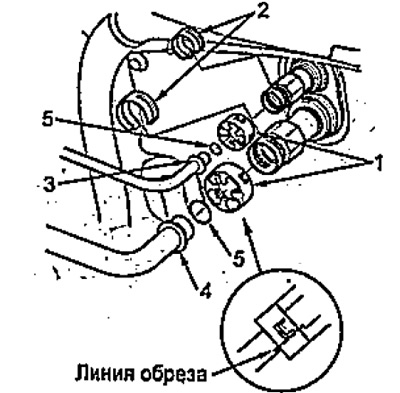
1 - plastic retainer,
2 - metal rim,
3 - inlet pipe,
4 - outlet pipe,
5 - sealing ring.
3. Remove the heater fan assembly.
4. Loosen the screws and remove the evaporator tube cover. Loosen the two bolts and remove the refrigerant supply and return tubes, remove the expansion valve and sealing rings.
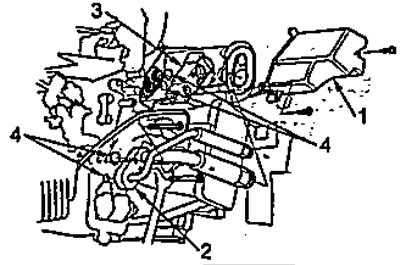
1 - evaporator tube cover,
2 - refrigerant supply and intake pipes,
3 - expansion valve,
4 - sealing rings.
5. Disconnect the temperature sensor connector behind the evaporator, remove the connector holder. Loosen the screws and remove the air duct.
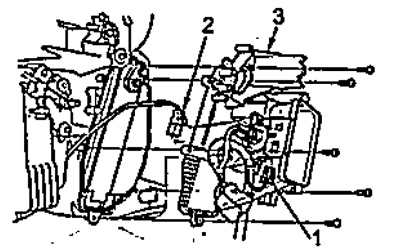
1 - temperature sensor connector behind the evaporator,
2 - detachable retainer,
3 - air duct.
6. Remove the evaporator assembly with the plate.
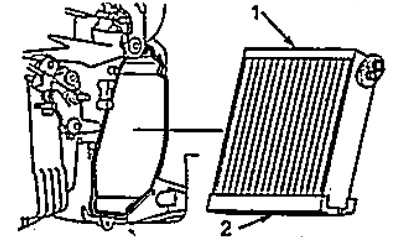
1 - evaporator,
2 - evaporator plate.