HondaBook.ru
Auto companies Volkswagen Auto companies Ford Auto companies Lada Auto companies Skoda Auto companies BMW Auto companies Mazda Auto companies Peugeot
English Русский
Български
Беларускі
Український
Српски
Hrvatski
Română
Polski
Slovenský
Magyar
Bookmark Contacts Sitemap   


Accord Civic Fit / Jazz CR-V HR-V Others Articles
Avancier 1 (1999-2003, petrol)

Checking idle speed. (Honda Avancier 1)

  • Main
  • Honda
  • Avancier 1 (1999-2003, petrol)
  • Power unit
  • Engine management
  • Checking idle speed.
0
Start the engine and warm it up until the radiator fan runs twice. Then warm it up for more than 2 minutes without load at 3000 rpm.

Check the condition of the air cleaner filter element, ignition timing, condition of the spark plug electrodes, and proper functioning of the crankcase ventilation system.

Make sure the PGM Fi indicator light is not on.

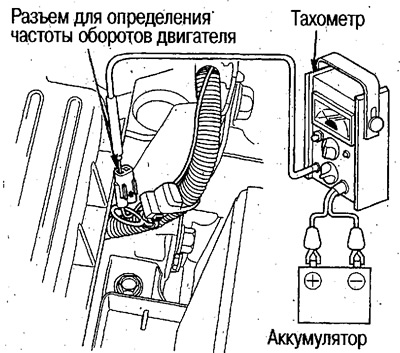
1. In case of using a tachometer, remove the rubber cover of the engine speed detection connector located on the right side of the engine and connect the tachometer.

If using the Honda PGM tester or an external diagnostic tool:

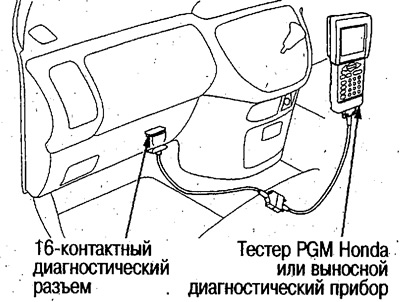
Connect the Honda PGM Tester or other diagnostic tool to the 16-pin diagnostic connector located on the left side of the center console.
Connect the Honda PGM Tester or other diagnostic…

2. Measure the idle speed after more than 1 minute of engine operation without load (headlights, fan, rear window heater, radiator fan, air conditioner, etc. are turned off).


  • Idle speed (no load): 700±50/min. (position N or P)

3. Turn on the air conditioner and measure the idle speed after more than 1 minute of engine operation with the air conditioner compressor running.
  • Idle speed (under load): 770±50/min. (position N or P)

If the idle speed is not within the norm, check the idle speed control system (see above).

(Original material on the website «hondabook.ru»)
This article is available at: russian, bulgarian, belarusian, ukrainian, serbian, croatian, romanian, polish, slovak, hungarian
This information has been verified: Emil Safonov
Share with friends:
◀ Previous
Avancier 1: Engine management
Next ▶

Checking idle speed on a cold engine
Location of contacts of the PGM-FI system control unit
Diagnostics of engine management system faults
Electrical diagram of the engine management system
Vacuum tubes and hoses
 
See also other articles from Honda manuals:
Checking the functionality of the air conditioning idle speed… Honda Accord 3 (1985-1989)
Checking and adjusting idle speed (every 48,000 km or every 24 months) Honda Civic 6 (1995-2000)
Checking the idle speed on a cold engine Honda Fit 1 (2001-2008)
Adjusting idle speed and mixture quality Honda CR-V 1 (1995-2001, petrol)
Idle Speed Control System — Description Honda HR-V 1 (1998-2006, petrol)
Link in different formats to this article
Comments and feedback from visitors
No comments yet


How much will 27 + 50 ?


Avancier 1 (1999-2003, petrol) 
  • General information
  • Controls and instruments
  • User manual
  • Power unit
  • Engine maintenance
  • Engine repair
  • Cooling system
  • Engine management
  • Power and exhaust system
  • Transmission
  • Automatic gearbox
  • Drive shafts and differential
  • Chassis and running gear
  • Steering
  • Car suspension
  • Brake system
  • Body and interior
  • Doors, locks and windows
  • Interior (internal elements)
  • Exterior (external elements)
  • Air conditioner
  • Electrical equipment
  • Power devices
  • Equipment and devices
  • Headlights and lighting
  • Electrical circuits
HondaBook.ru © 2018–2026 • Mobile version • Sitemap: EN BG BY UA RS HR RO PL SK HU • Feedback • Driver Information • Search system • Bookmark
Accord 3 (1985-1989) • Accord 6 (1997-2002) • Civic 3 and 4 (1983-1991) • Civic 5 and 6 (1991-2000) • Civic 6 (1995-2000) • Civic 7 (2000-2005) • Civic 8 (2005-2011) • Fit 1 (2001-2008) • CR-V 1 (1995-2001) • CR-V 2 (2002-2006) • HR-V 1 (1998-2006) • Avancier 1 (1999-2003) •
 
This website uses cookies to ensure proper functioning. By clicking "OK," you agree.