HondaBook.ru
Auto companies Volkswagen Auto companies Ford Auto companies Lada Auto companies Skoda Auto companies BMW Auto companies Mazda Auto companies Peugeot
English Русский
Български
Беларускі
Український
Српски
Hrvatski
Română
Polski
Slovenský
Magyar
Bookmark Contacts Sitemap   


Accord Civic Fit / Jazz CR-V HR-V Others Articles
Avancier 1 (1999-2003, petrol)

Setting the desired speed and moving at a constant speed (Honda Avancier 1)

  • Main
  • Honda
  • Avancier 1 (1999-2003, petrol)
  • General information
  • User manual
  • Setting the desired speed and moving at a constant speed
0
Contents: Increase the set speed (while the…⇊ Decrease the set speed (while the…⇊
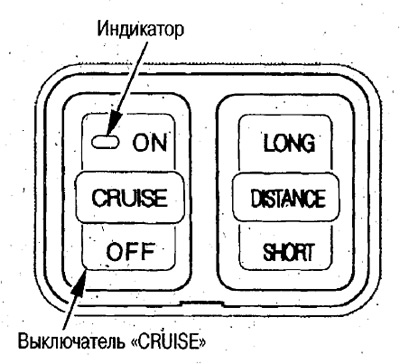
1. Turn on the IHCC system by pressing the "CRUISE" switch to the ON side (the indicator on the button will light).

1. Turn on the IHCC system by pressing the…


If you press the switch from the OFF side, the system will turn off.

If the ignition key is set to position "I" or "0", the system will turn off automatically.

To turn the system back on, press the "CRUISE" switch on the ON side.

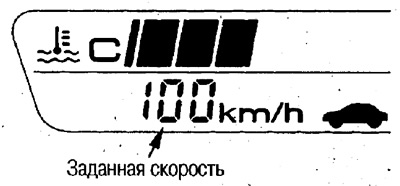
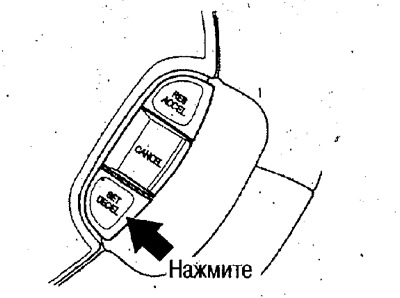
2. Using the accelerator pedal, reach the desired speed within 65-100 km/h. If you briefly press the "SET/DESEL" button at this time, the current speed will be set (the green indicator on the instrument cluster will light up).

The set speed will be displayed on the display.
The set speed will be displayed on the display.

If you are not using the IHCC system, for safety reasons, turn off the system by pressing the "CRUI.SE" switch to the OFF side.


Increase the set speed (while the system is running)


The set speed is increased by the "RES/ACCEL" switch.
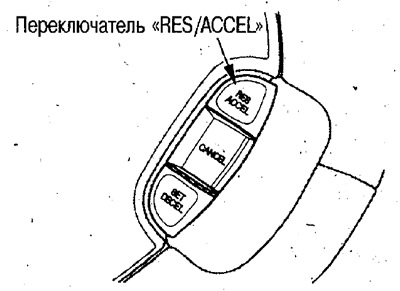
The set speed is increased by the «RES/ACCEL»…


Each time you press the switch, the speed increases by 2 km/h.

If you hold the switch down, the set speed will increase and the car will accelerate. After releasing the switch, the current speed will be set.

Note:
  • If there is a vehicle ahead, the system controls the distance, so pressing the switch further will not increase the speed.
  • While the set speed is being changed, the speed display on the screen flashes.


Increasing the set speed using the gas pedal


If you accelerate the car by pressing the gas pedal and after reaching the desired speed, briefly press the "SET/DESEL" switch, the current speed will be set (the set speed will be displayed).
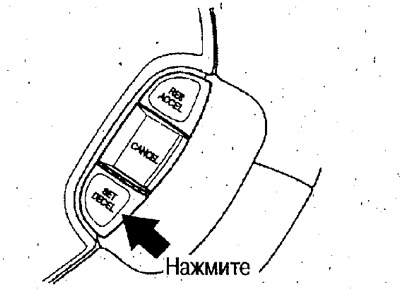
If you accelerate the car by pressing the gas…


Decrease the set speed (while the system is running)


Decreasing this speed with the "SET/DESEL" switch
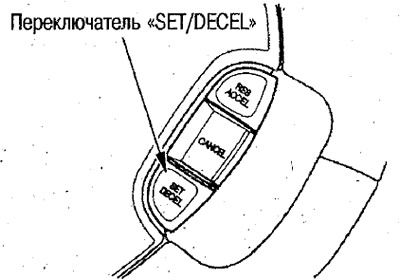


Decreasing this speed with the «SET/DESEL» switch


Each time you press the switch, the speed decreases by 2 km/h.

If you hold the switch down, the vehicle will slow down using engine braking. Releasing the switch will restore the current speed.

Reducing the set speed using the brake pedal
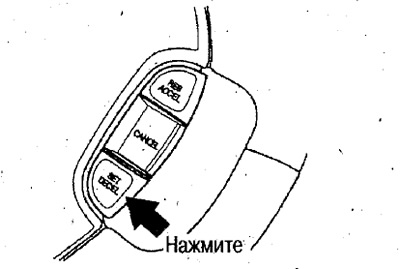


Reducing the set speed using the brake pedal


Press the brake pedal and slow down to the desired speed. Release the brake pedal and briefly press the "SET/DESEL" switch. This will set the current speed (the display will show the set speed).

Temporary acceleration (while the system is running)


To accelerate, press the gas pedal.

If you release the accelerator pedal, the car will move at the previously set constant speed. If the temporary speed exceeds 100 km/h, the system will turn off.
This article is available at: russian, bulgarian, belarusian, ukrainian, serbian, croatian, romanian, polish, slovak, hungarian
This information has been verified: Emil Safonov
Share with friends:
◀ Previous
Avancier 1: User manual
Next ▶

About brake lights
Driving with the IHCC system operating
Adaptive Cruise Control (IHCC) System — Device
Car parking
Stopping the car
Changing the set distance between cars
Disabling the IHCC system
IHCC indicator and warning light
Warning buzzer
Automatic system shutdown
See also other articles from Honda manuals:
Idle speed control Honda Accord 3 (1985-1989)
Adjusting the idle speed Honda Civic 3 and 4 (1983-1991)
Checking the idle speed on a cold engine Honda Fit 1 (2001-2008)
Adjusting idle speed and mixture quality Honda CR-V 1 (1995-2001, petrol)
Idle Speed Control System — Description Honda HR-V 1 (1998-2006, petrol)
Link in different formats to this article
Comments and feedback from visitors
No comments yet


How much will 47 + 25 ?


Avancier 1 (1999-2003, petrol) 
  • General information
  • Controls and instruments
  • User manual
  • Power unit
  • Engine maintenance
  • Engine repair
  • Cooling system
  • Engine management
  • Power and exhaust system
  • Transmission
  • Automatic gearbox
  • Drive shafts and differential
  • Chassis and running gear
  • Steering
  • Car suspension
  • Brake system
  • Body and interior
  • Doors, locks and windows
  • Interior (internal elements)
  • Exterior (external elements)
  • Air conditioner
  • Electrical equipment
  • Power devices
  • Equipment and devices
  • Headlights and lighting
  • Electrical circuits
HondaBook.ru © 2018–2026 • Mobile version • Sitemap: EN BG BY UA RS HR RO PL SK HU • Feedback • Driver Information • Search system • Bookmark
Accord 3 (1985-1989) • Accord 6 (1997-2002) • Civic 3 and 4 (1983-1991) • Civic 5 and 6 (1991-2000) • Civic 6 (1995-2000) • Civic 7 (2000-2005) • Civic 8 (2005-2011) • Fit 1 (2001-2008) • CR-V 1 (1995-2001) • CR-V 2 (2002-2006) • HR-V 1 (1998-2006) • Avancier 1 (1999-2003) •
 
This website uses cookies to ensure proper functioning. By clicking "OK," you agree.