HondaBook.ru
Auto companies Volkswagen Auto companies Ford Auto companies Lada Auto companies Skoda Auto companies BMW Auto companies Mazda Auto companies Peugeot
English Русский
Български
Беларускі
Український
Српски
Hrvatski
Română
Polski
Slovenský
Magyar
Bookmark Contacts Sitemap   


Accord Civic Fit / Jazz CR-V HR-V Others Articles
Avancier 1 (1999-2003, petrol)

Automatic air conditioner (Honda Avancier 1)

  • Main
  • Honda
  • Avancier 1 (1999-2003, petrol)
  • General information
  • User manual
  • Automatic air conditioner
0
Contents: Using the air conditioner ⇊ Common use ⇊ Using Manual Control Mode ⇊ Air conditioner power button ⇊ Removal fog from windshield and rear…⇊ If the air conditioner is not used…⇊ Sensors ⇊

Using the air conditioner


Use the air conditioner while the engine is running.

Common use


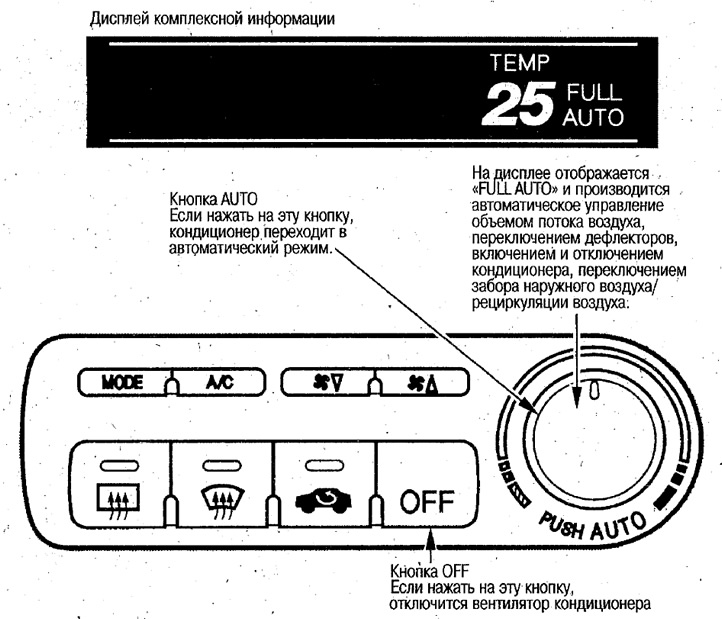
1. Press the AUTO button.

2. Set the desired temperature in the cabin.

To turn off the air conditioner, press the OFF button.

Depending on the outside temperature, the fan may run for a while after the air conditioner is turned off. This is done to prevent cold air from entering the cabin.

After setting the desired temperature, do not rotate the temperature control knob randomly, as it may take longer to reach the desired temperature in the cabin.

Avoid directing cold air at yourself for long periods of time, as hypothermia can be harmful to your health.

After parking in the scorching sun, open the windows, air out the interior, and then turn on the air conditioner.
After parking in the scorching sun, open the…


Using Manual Control Mode


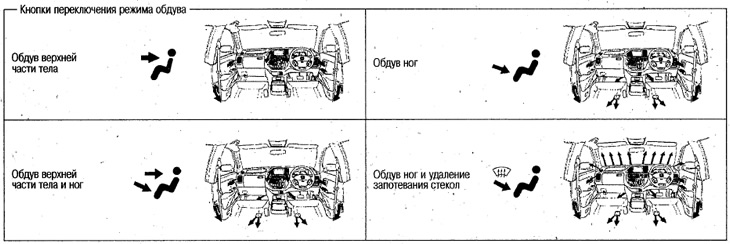
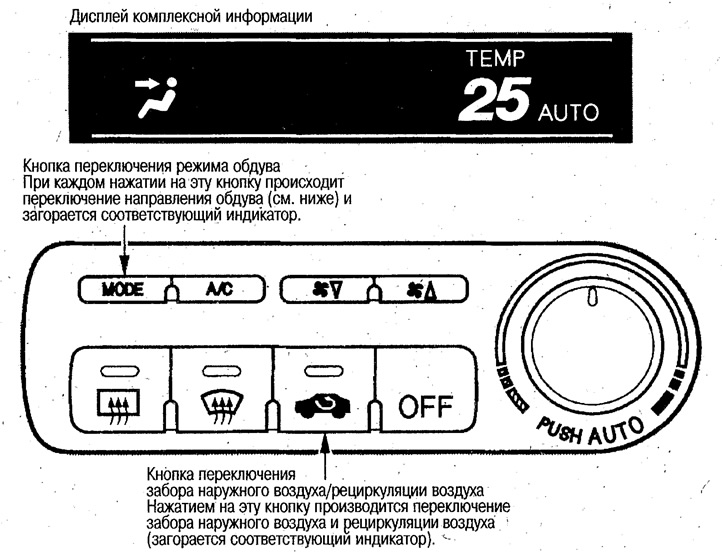
The air conditioner is controlled by pressing the buttons for switching the blowing mode, switching the outside air intake/air recirculation, turning on the air conditioner and switching the fan speed.


If any parameter is manually changed in the "FULL AUTO" mode, the "FULL" display goes out, but all other parameters except those set manually are controlled automatically.

To return to the "FULL AUTO" mode, press the "AUTO" button.
To return to the «FULL AUTO» mode, press the…


To return to the «FULL AUTO» mode, press the…

Air conditioner power button


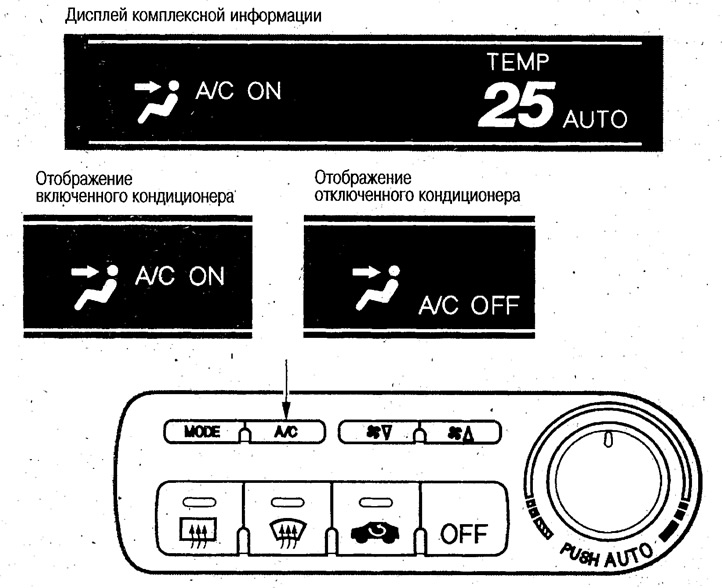
Each time you press the button, it switches between "ON" and "OFF". The display will show "A/C ON" or "A/C OFF".

To cool the interior or remove fog from the windows, turn the air conditioner on ("ON").

Use the air conditioner by operating the buttons for switching the blowing mode, switching the outside air intake/air recirculation, turning on the air conditioner, and switching the fan speed.

If any parameter is manually changed in the "FULL AUTO" mode, the "FULL" display goes out, but all other parameters except those set manually are controlled automatically.


If any parameter is manually changed in the «FULL…


Removal fog from windshield and rear window
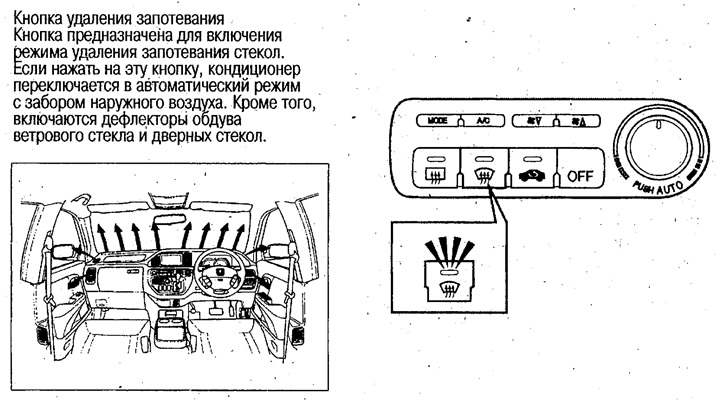


Removal fog from windshield and rear window


Press the defogging button.

Note: Do not set the temperature to low during defogging. When cold air hits the glass, the edges of the glass may fog up, which will limit your vision.


Quick removal of fog
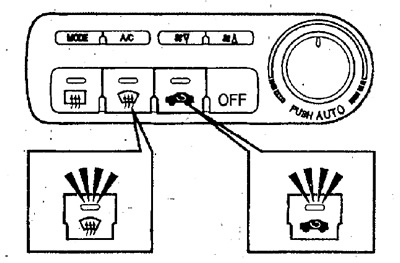


Quick removal of fog


If the air conditioner is not used for a long time


Run it periodically for a few minutes at low engine speed to lubricate the system components.


Note: When the temperature in the cabin is low, the air conditioner may not work. First, warm up the air in the cabin, and then turn on the air conditioner.


Note:
  • If you leave the air recirculation mode on for a long time, the windows may fog up, which will limit your visibility.
  • After removing fog, use the outside air intake mode.


Sensors


The automatic air conditioner is equipped with a cabin temperature sensor and a sun intensity sensor. Do not place foreign objects on the sensor locations or splash water on the sensors, otherwise it will be impossible to maintain the set cabin temperature.
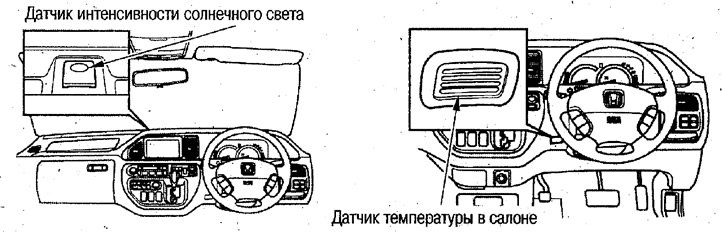
The automatic air conditioner is equipped with a…
This article is available at: russian, bulgarian, belarusian, ukrainian, serbian, croatian, romanian, polish, slovak, hungarian
This information has been verified: Emil Safonov
Share with friends:
◀ Previous
Avancier 1: User manual
Next ▶

Adjusting the air conditioner deflectors
Comprehensive information display
Other safety devices
4WD Model Capabilities (L-4, V-4 Models)
ABS (Anti-lock Braking System)
Antenna — General Information
Audio system with AM/FM radio
Audio system — listening to a tape recorder
Audio system — CD changer (if available)
Steering wheel audio controls
See also other articles from Honda manuals:
Automatic transmission Honda Accord 3 (1985-1989)
Checking the oil level in an automatic transmission Honda Civic 3 and 4 (1983-1991)
Diagnostics of air conditioner with automatic control Honda Fit 1 (2001-2008)
Air Conditioner — Maintenance Honda CR-V 1 (1995-2001, petrol)
Selector lever (models with automatic transmission) Honda HR-V 1 (1998-2006, petrol)
Link in different formats to this article
Comments and feedback from visitors
No comments yet


How much will 13 + 19 ?


Avancier 1 (1999-2003, petrol) 
  • General information
  • Controls and instruments
  • User manual
  • Power unit
  • Engine maintenance
  • Engine repair
  • Cooling system
  • Engine management
  • Power and exhaust system
  • Transmission
  • Automatic gearbox
  • Drive shafts and differential
  • Chassis and running gear
  • Steering
  • Car suspension
  • Brake system
  • Body and interior
  • Doors, locks and windows
  • Interior (internal elements)
  • Exterior (external elements)
  • Air conditioner
  • Electrical equipment
  • Power devices
  • Equipment and devices
  • Headlights and lighting
  • Electrical circuits
HondaBook.ru © 2018–2026 • Mobile version • Sitemap: EN BG BY UA RS HR RO PL SK HU • Feedback • Driver Information • Search system • Bookmark
Accord 3 (1985-1989) • Accord 6 (1997-2002) • Civic 3 and 4 (1983-1991) • Civic 5 and 6 (1991-2000) • Civic 6 (1995-2000) • Civic 7 (2000-2005) • Civic 8 (2005-2011) • Fit 1 (2001-2008) • CR-V 1 (1995-2001) • CR-V 2 (2002-2006) • HR-V 1 (1998-2006) • Avancier 1 (1999-2003) •
 
This website uses cookies to ensure proper functioning. By clicking "OK," you agree.