
HondaBook.ru
Auto companies Volkswagen Auto companies Ford Auto companies Lada Auto companies Skoda Auto companies BMW Auto companies Mazda Auto companies Peugeot
English Русский
Български
Беларускі
Український
Српски
Hrvatski
Română
Polski
Slovenský
Magyar
Bookmark Contacts Sitemap   


Accord Civic Fit / Jazz CR-V HR-V Others Articles
Avancier 1 (1999-2003, petrol)

Cooling unit (Honda Avancier 1)

  • Main
  • Honda
  • Avancier 1 (1999-2003, petrol)
  • Body and interior
  • Air conditioner
  • Cooling unit
0
Contents: Removal and installation ⇊ Disassembly ⇊

Removal and installation


1. Discharge the refrigerant.

2. Remove the relay box.

Do not disconnect the connector.

3. Disconnect the inlet hose and outlet pipe.
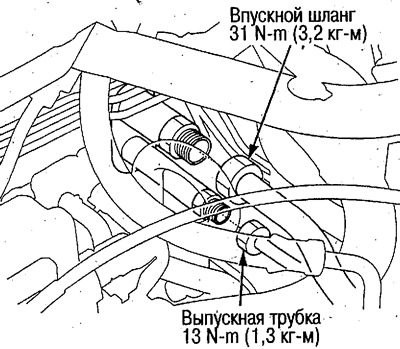
3. Disconnect the inlet hose and outlet pipe.


4. Remove the instrument panel lower cover, center lower cover and glove box, see chapter Body.

5. Disconnect the connector and remove the electrical wiring clamp, unscrew the bolts and screws, remove the glove box frame. Unscrew the bolts, remove the electrical wiring clamp and remove the bracket.
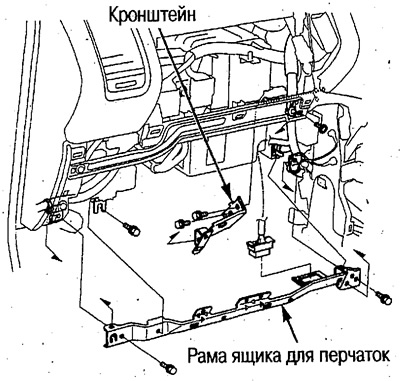
5. Disconnect the connector and remove the…


6. Remove the electrical wiring clamp and disconnect the connector from the evaporator sensor. Unscrew the screws, nuts and bolts and remove the cooling unit.
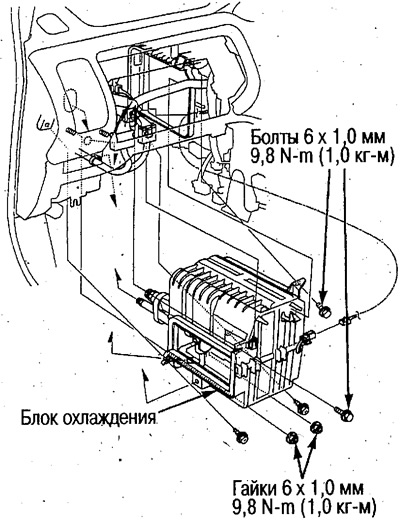
6. Remove the electrical wiring clamp and…


7. Installation is carried out in the reverse order of removal, taking into account the following.


Check for air leaks in the cooling unit area.

Replace the tube O-rings with new ones and lubricate them with compressor oil (ND-OIL8) before installation.

After installation, check the operation of the air conditioner.

Disassembly
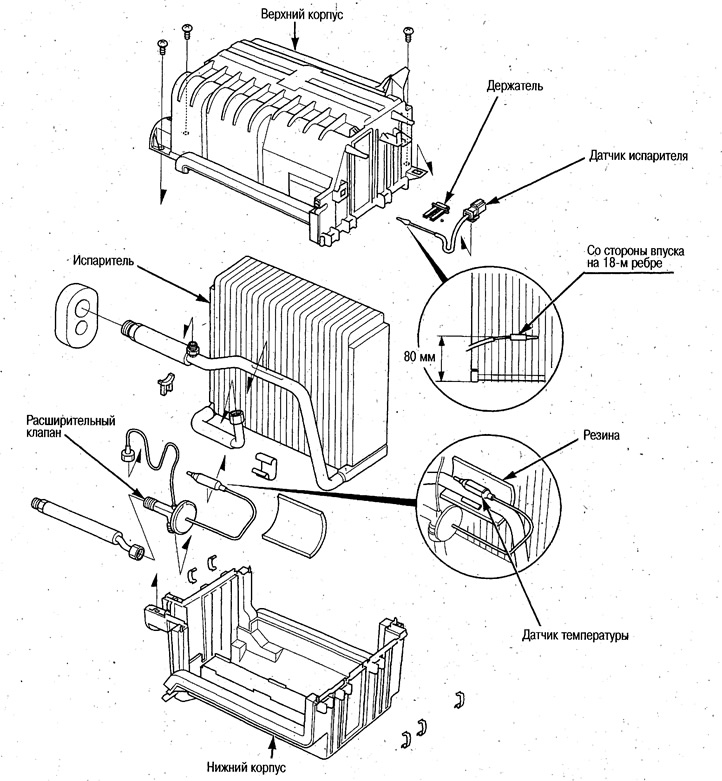


Disassembly


Using the holder, secure the evaporator sensor to the appropriate area.

Install the expansion valve temperature sensor on the outlet pipe and wrap it with rubber.

After assembly, check and ensure that there are no gaps between the housings.

(The article is based on information from the website: www.hondabook.ru)
This article is available at: russian, bulgarian, belarusian, ukrainian, serbian, croatian, romanian, polish, slovak, hungarian
This information has been verified: Emil Safonov
Share with friends:
◀ Previous
Avancier 1: Air conditioner
Next ▶

Automatic air conditioning control unit
Power transistor
Evaporator sensor
Sunlight intensity sensor
Outside air temperature sensor
Supercharger unit
Heater unit
Water valve cable — adjustment
Air Conditioner Fault Diagnosis by Refrigerant Pressure
Tightening forces of fasteners
See also other articles from Honda manuals:
Cooling system Honda Accord 3 (1985-1989)
Cooling system control Honda Civic 3 and 4 (1983-1991)
Electric fan of the cooling system Honda Fit 1 (2001-2008)
Heating and Cooling Hoses — Checking Honda CR-V 1 (1995-2001, petrol)
Engine cooling system — design description Honda HR-V 1 (1998-2006, petrol)
Link in different formats to this article
Comments and feedback from visitors
No comments yet


How much will 44 + 18 ?


Avancier 1 (1999-2003, petrol) 
  • General information
  • Controls and instruments
  • User manual
  • Power unit
  • Engine maintenance
  • Engine repair
  • Cooling system
  • Engine management
  • Power and exhaust system
  • Transmission
  • Automatic gearbox
  • Drive shafts and differential
  • Chassis and running gear
  • Steering
  • Car suspension
  • Brake system
  • Body and interior
  • Doors, locks and windows
  • Interior (internal elements)
  • Exterior (external elements)
  • Air conditioner
  • Electrical equipment
  • Power devices
  • Equipment and devices
  • Headlights and lighting
  • Electrical circuits
HondaBook.ru © 2018–2026 • Mobile version • Sitemap: EN BG BY UA RS HR RO PL SK HU • Feedback • Driver Information • Search system • Bookmark
Accord 3 (1985-1989) • Accord 6 (1997-2002) • Civic 3 and 4 (1983-1991) • Civic 5 and 6 (1991-2000) • Civic 6 (1995-2000) • Civic 7 (2000-2005) • Civic 8 (2005-2011) • Fit 1 (2001-2008) • CR-V 1 (1995-2001) • CR-V 2 (2002-2006) • HR-V 1 (1998-2006) • Avancier 1 (1999-2003) •
 
This website uses cookies to ensure proper functioning. By clicking "OK," you agree.